


If you are looking for a way to dominate social media without spending hours editing, you need to know how to create free video by Crayo AI. Whether you want to grow a TikTok account, start a YouTube Shorts channel, or boost your Instagram Reels, this tool is a game-changer.
The best part? You don’t need to be a prompt engineer or a video editor. You can even create long-form videos using this exact same method, and yes—this content is fully monetizable.
Why Crayo AI is a Viral Powerhouse
Most AI tools require complex prompts, but Crayo AI is built for speed. Here is why it ranks as a top choice for creators:
- Zero Prompting Required: Just copy and paste any news article or blog post.
- Multi-Platform Ready: Perfect for TikTok, YouTube, and Instagram.
- Monetization Friendly: High-quality AI voices and unique visuals help you pass monetization reviews.
- All-in-One Export: Get voiceovers, subtitles, and background footage in one click.
Step 1: Loging and Head to the Dashboard
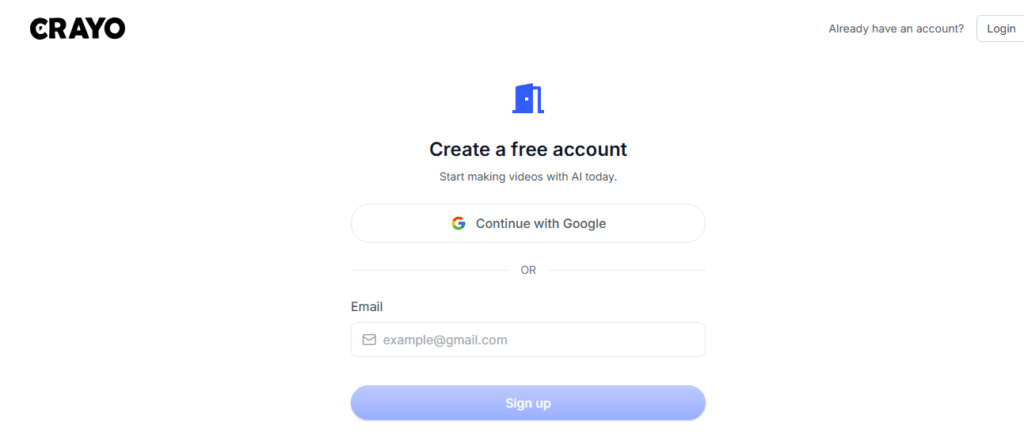
First, open Crayo.ai. and connect with google account.
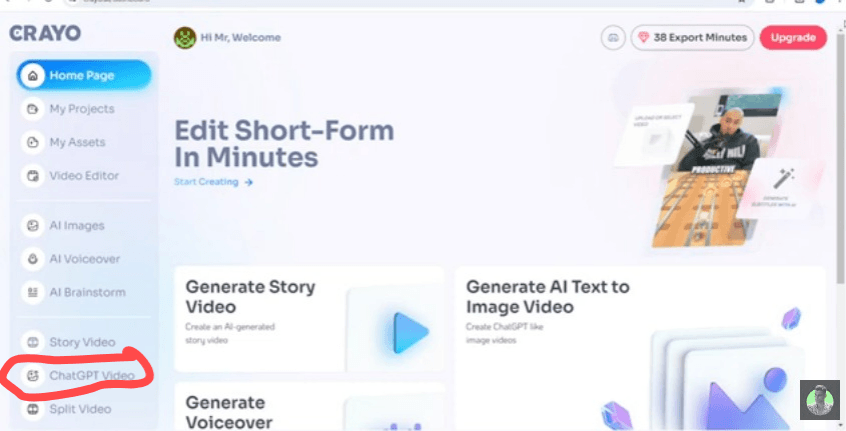
Once you’re on the dashboard, look at the sidebar menu and select “Chat GPT Video or select plateform like titok or reddit”. This mode is specifically designed to create free video by Crayo AI that mimics the viral text-story style everyone is watching right now.
Step 2: Grab a Trending Topic
Instead of typing everything yourself, go to a news site and find a trending article (like the latest iOS updates or celebrity news).
- Copy the Title: This will be your video’s “Hook.”
- Copy the Content: Grab the first few paragraphs.
- Paste it: Go back to Crayo and paste this into the Prompt Box. The AI will use this text for both the visual images and the voiceover.
Step 3: Generate and Polish Your Images
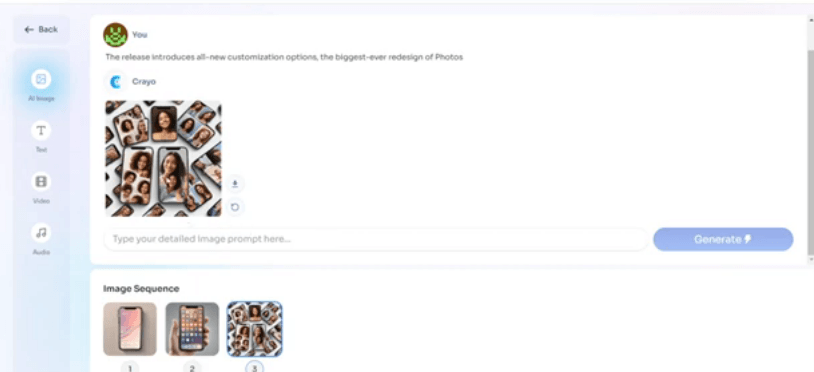
When you hit “Generate,” the AI creates the first image for your sequence. If you don’t like it, just click Regenerate. You can do this as many times as you want to ensure your visuals are perfect.
Pro Tip: To create free video by Crayo AI that actually goes viral, make sure your images have a bit of “emotion” or humor that matches your script.
Step 4: Add the Viral “Background”
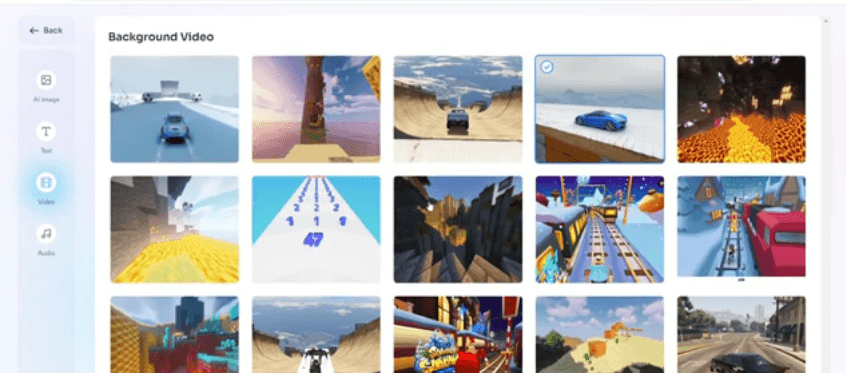
Now, choose a background video. Crayo offers “Viral Backgrounds” like GTA drifting or Minecraft parkour. These are proven to keep viewers’ eyes busy while they listen to the story. After choosing your background, you can also toggle between Light and Dark mode for your text overlays.
Step 5: Choose a Famous AI Voice
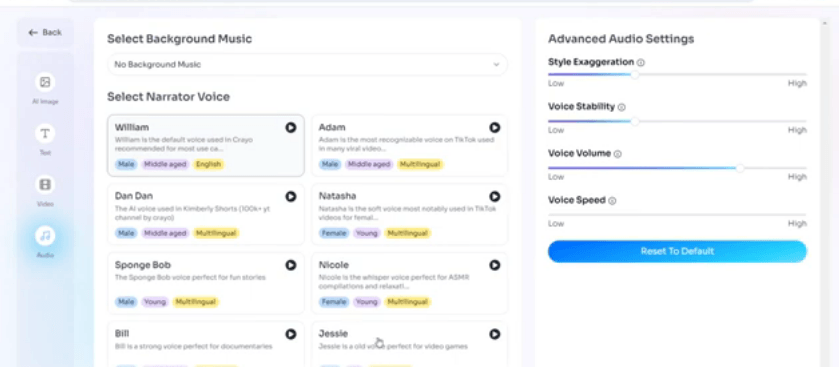
Next is the narration. To create free video by Crayo AI that sounds professional, pick a voice from the library.
- Dandan: A very popular choice used by creators with millions of views.
- Settings: Keep the Voice Volume at 75%. This leaves room for you to add trending music later on TikTok without drowning out the narrator.
Step 6: Final Edit and Export
Crayo will open a timeline editor where you can drag and drop layers.
- Check Length: If you want to hit that 1-minute mark for monetization, simply paste more paragraphs from your article.
- Naming: Rename your file using the article’s title. This helps with SEO when you upload it.
- Export: Hit export, and your high-quality video is ready to download!
Why Use This Method?
| Feature | Benefit |
| No Manual Writing | Just copy-paste trending news. |
| Auto-Captions | No need to time subtitles manually. |
| Multi-Platform | Works for TikTok, Reels, and YouTube Shorts. |
Everything You Need to Know to Create Free Video by Crayo AI
Is the content generated by Crayo AI copyright-free?
Yes. When you create free video by Crayo AI, the images, AI voices, and generated scripts are typically copyright-free. However, if you use “Viral Backgrounds” (like GTA or Minecraft footage) provided by the platform, these are generally safe for social media use under fair use/transformative content, but you should always check the latest platform-specific monetization policies.
Can I monetize videos made with Crayo AI on YouTube and TikTok?
Absolutely. To monetize, focus on the “originality” of your script. Google and TikTok’s algorithms favor “Transformative Content.” By using Crayo AI to turn a text-based article into a narrated video with subtitles and unique AI-generated images, you are creating an original piece of media that qualifies for programs like the YouTube Partner Program and TikTok Creativity Program.
Do I need an account to start using Crayo AI?
No, you can actually create free video by Crayo AI without even signing up for an account. By clicking the “Try Now” button on their homepage, you can test the workflow, paste a script, and see the results instantly. This is the fastest way to see if the tool fits your content style before committing.
How do I remove the watermark from my Crayo AI videos?
To download a clean, high-definition video without a watermark, you usually need to use a workflow credit or have a basic subscription. However, during certain promotional periods, you can create free video by Crayo AI with limited exports. Professional creators often use the “Clipper” or “Hobby” plans to ensure their brand looks polished and watermark-free.
What is the best video length for going viral with Crayo AI?
For TikTok and Reels, aim for 30–60 seconds to maximize your “completion rate.” If you are targeting the TikTok Creativity Program, your video must be over 1 minute long. Crayo AI makes this easy; just paste a longer article or multiple paragraphs into the prompt box to automatically extend your timeline.
