


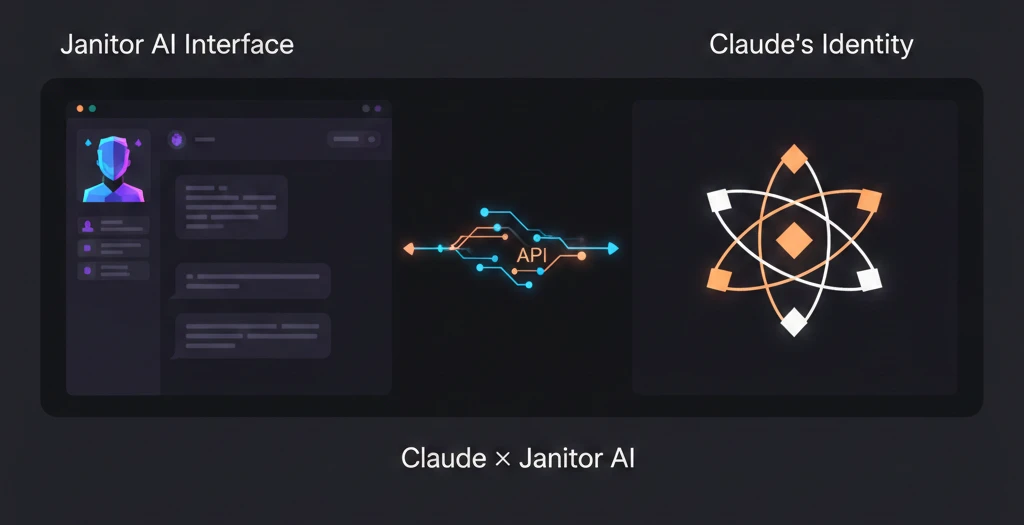
Janitor AI’s default models are fine. But once you use Claude on Janitor AI for the first time, it’s hard to go back. The writing quality is different. The character consistency is better. The responses feel more thoughtful, more natural, less like a bot filling in a template.
This guide covers everything setup, cost, optimization, troubleshooting, and the exact values you need to copy-paste. No fluff, no “it depends,” just what actually works.
| What You Need | What This Guide Covers |
|---|---|
| Full setup from scratch | 10-step Anthropic API + Janitor AI guide |
| Free option first | OpenRouter free tier method |
| Cost control | Token pricing, budget alerts, cheapest settings |
| Something not working | 8 specific fixes with exact causes |
| Best Claude model to use | Sonnet vs. Opus vs. Haiku — with a clear recommendation |
What Is Claude on Janitor AI (And Why Use It Instead of Default Models)?
Claude on Janitor AI means you connect Anthropic’s Claude language model to your Janitor AI account using an API key, replacing or supplementing the platform’s built-in models with Claude’s superior writing quality and longer memory.
Janitor AI is a roleplay and character chat platform. It lets you create or interact with AI characters — fictional personas with specific personalities, backstories, and conversation styles. The platform supports multiple AI models via its proxy system, and Claude is one of the best options you can plug in.
So why bother? The default JanitorLLM model is free, which is great. But it has real limitations. Responses can feel formulaic. Character personality drifts after a few exchanges. Long conversations lose context fast.
Claude handles all three of those problems better. Its context window is substantially larger, which means it remembers more of the conversation before it starts forgetting. Its writing style is more nuanced — it doesn’t just answer, it responds in character, with tone, pacing, and emotional texture. And it stays consistent with character descriptions much longer than most alternatives.
That’s the core reason people switch. The writing quality gap is noticeable from the very first exchange.
Why Do Users Prefer Claude on Janitor AI Over Other AI Models?
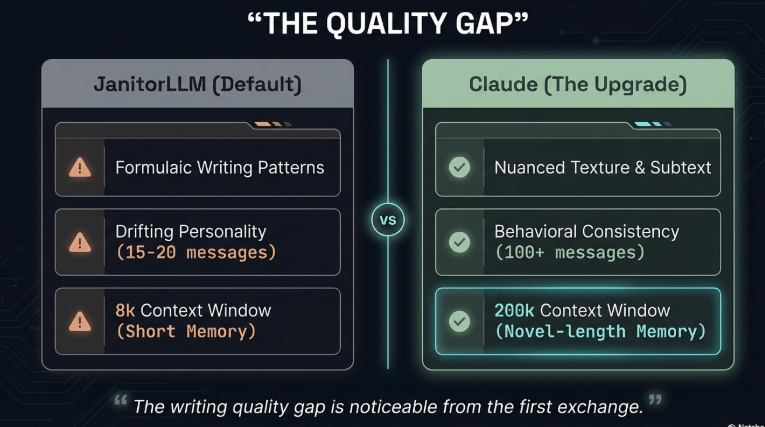
Claude produces more natural, character-consistent responses with better emotional range than most models available on Janitor AI, and its 200K token context window means it holds onto character details and conversation history far longer.
Three things make Claude stand out specifically for Janitor AI use:
Writing style: Claude doesn’t write like an AI filling in blanks. It writes like someone who read the character description carefully and is actually playing the role. Dialogue feels more natural. Descriptions have texture. It doesn’t repeat the same phrases in loops.
Character retention: Give Claude a detailed character card and it will stick to that personality for dozens of exchanges without drifting. Other models start blurring the character’s traits after 10-15 messages. Claude holds the shape longer.
Emotional range: Claude understands subtext. If a character is supposed to be guarded and sarcastic, Claude plays that guarded sarcasm in its word choices, not just in stated personality tags. That subtlety makes conversations feel real.
The tradeoff is cost. Claude isn’t free. But for users who do longer roleplay sessions or care about consistent quality, the cost-per-session math usually works out in Claude’s favor, especially if you use Sonnet over Opus.
What Makes Claude Different on Janitor AI? (Context Window, Writing Style, Memory)
Claude’s 200,000-token context window, narrative writing style, and strong instruction-following make it uniquely suited for long-form character roleplay, more so than GPT-4o or DeepSeek on the same platform.
Let’s break down what each difference actually means in practice.
Context window — 200K tokens: Most models used on Janitor AI work with 8K to 32K token context windows. Once you exceed that limit, the model starts forgetting earlier parts of the conversation. With Claude’s 200K window (available on Sonnet and Opus), you can have genuinely long roleplay sessions — multi-hour conversations — without the character “forgetting” who they are or what happened earlier. This is a massive practical advantage for longer stories and ongoing character relationships.
Writing style: Claude was trained with a strong emphasis on following nuanced instructions and producing coherent, stylistically consistent text. In roleplay terms, this means it reads the character card thoroughly, understands the implied voice, and writes in that voice — not just around it. If the character is quiet and introspective, Claude doesn’t make them verbose. If the character is blunt and impatient, Claude doesn’t soften their edges.
Instruction following: This matters more than people expect. When you set system instructions for a character in Janitor AI, Claude follows them precisely and consistently. Some models interpret system instructions loosely, leading to characters that behave slightly off-profile. Claude treats the system prompt as actual ground truth.
How Much Does Claude Cost on Janitor AI? (Pricing Breakdown 2026)

Claude API costs vary by model. Claude Haiku is the cheapest at roughly $0.80 per million input tokens and $4 per million output tokens. Claude Sonnet sits in the middle. Claude Opus is the most expensive. For typical Janitor AI sessions, most users spend $2–$10 per month.
Here’s the current pricing breakdown by model (Anthropic pricing, 2026):
| Model | Input (per 1M tokens) | Output (per 1M tokens) | Best for |
|---|---|---|---|
| Claude Haiku 3.5 | ~$0.80 | ~$4.00 | Budget users, short sessions |
| Claude Sonnet 4 | ~$3.00 | ~$15.00 | Best balance of quality + cost |
| Claude Opus 4 | ~$15.00 | ~$75.00 | Power users, maximum quality |
In practical terms: a typical Janitor AI message exchange uses roughly 500–1,500 tokens total (input + output combined). At Sonnet pricing, that’s less than $0.03 per message. A 200-message session costs around $4–$6. Heavy users doing daily long sessions might spend $15–$25 per month. Casual users usually stay under $5.
Important: You load credits into your Anthropic account separately. Janitor AI doesn’t charge you directly for Claude — it just uses your API key, and Anthropic bills your account for usage. The minimum top-up in the Anthropic console is $5, which gets most users through 2–4 weeks of regular use.
Is Using Claude on Janitor AI Worth the Cost? (Vs. Free Alternatives)
es — if you do roleplay sessions longer than 20 messages, care about writing quality, or have been frustrated by characters losing personality mid-conversation. If you use Janitor AI casually for short chats, the free JanitorLLM might be sufficient.
The honest comparison:
JanitorLLM (free): Works for quick, light interactions. Character consistency drops off after 15–20 messages. Writing is serviceable but not impressive. Good starting point, but most regular users outgrow it.
DeepSeek on OpenRouter (very low cost): Strong at logic and instruction-following, but the writing style feels more clinical. Less suited for emotionally nuanced roleplay. Better for structured scenarios than open-ended character conversations.
Claude Sonnet (paid): The clear quality leader for creative, character-driven roleplay. Stays in character longer, writes more naturally, handles emotional complexity better. Worth $3–$8 per month for regular users.
The sweet spot for most users: start with OpenRouter’s free tier to test Claude without paying anything, then switch to direct Anthropic API once you’ve confirmed you want to use it regularly. More on the OpenRouter method below.
Unlock Claude Code autonomy for self-directed coding—AI that plans, executes, and debugs independently without constant human oversight.
What Claude Models Can You Use on Janitor AI? (Sonnet, Opus, Haiku Comparison)
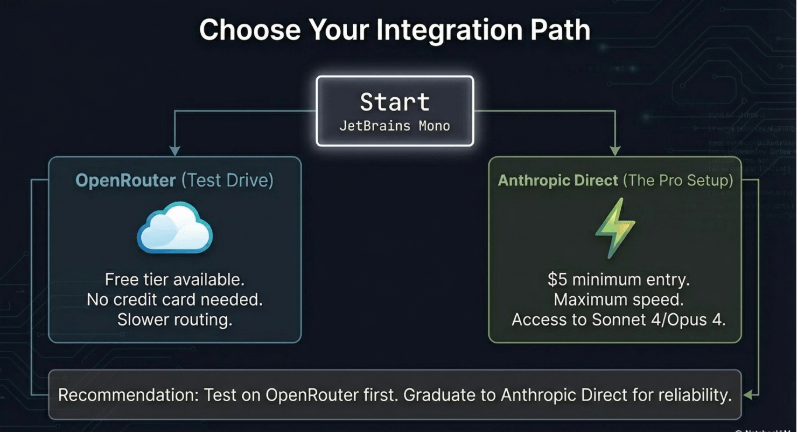
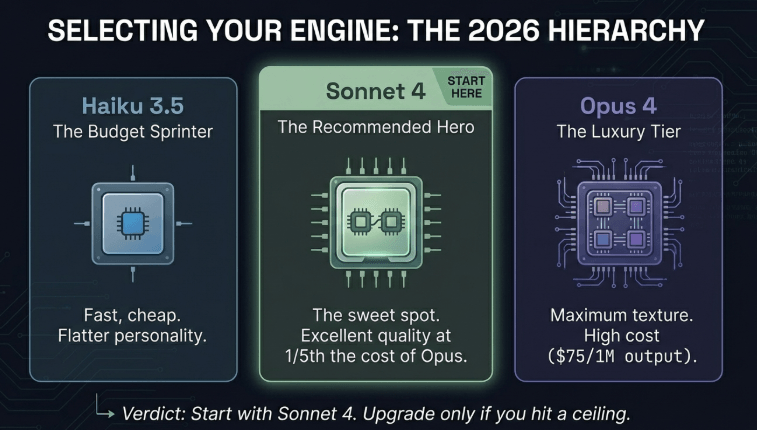
You can use Claude Haiku, Claude Sonnet, and Claude Opus through Janitor AI’s proxy system. Claude Sonnet 4 is the recommended model for most users — it gives the best balance of quality, speed, and cost.
Claude Haiku 3.5: The fast, cheap option. Good for users on a tight budget or those who want quick responses above all else. Quality is noticeably lower than Sonnet for nuanced roleplay — characters feel slightly flatter, responses slightly shorter. Use it if cost is your primary concern.
Claude Sonnet 4: The recommended choice. It hits a genuinely excellent quality level — not a compromise, but actually great — while costing 5x less than Opus. For Janitor AI roleplay specifically, Sonnet 4 is hard to beat. It’s fast enough that response times don’t feel sluggish, and quality is high enough that most users can’t meaningfully distinguish it from Opus in practice.
Claude Opus 4: Maximum quality. Responses are richer, more textured, and Opus handles extremely complex character dynamics particularly well. But it’s expensive — 5x the cost of Sonnet. Worth it if you do long, elaborate roleplay with intricate character relationships and you notice the quality difference clearly. Most users don’t.
Recommendation: Start with Sonnet 4. Use Haiku if budget is tight. Only upgrade to Opus if you’ve used Sonnet for a few weeks and genuinely feel limited by it.
What Do You Need Before Using Claude on Janitor AI? (Checklist)
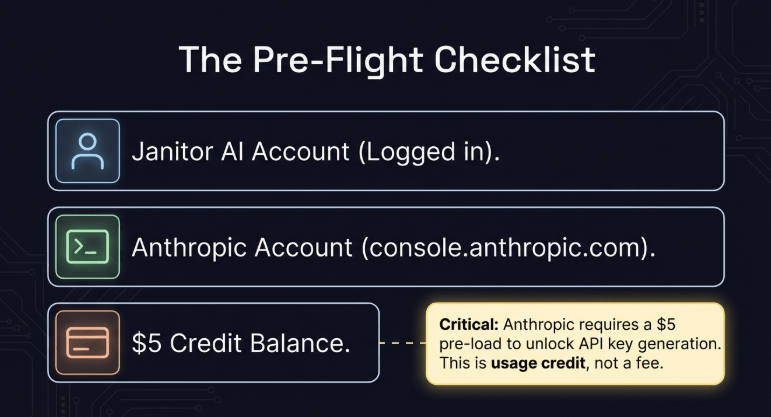
You need a Janitor AI account, an Anthropic account with at least $5 in credits, and a Claude API key. That’s it. The setup takes about 10 minutes once you have all three.
Full pre-setup checklist:
- Janitor AI account — free to create at janitorai.com
- Anthropic account — free to create at console.anthropic.com
- Minimum $5 credit loaded into your Anthropic account (required before you can generate an API key)
- Your Claude API key — generated from the Anthropic console (keep this private)
- A character to test with — either one you created or one from the Janitor AI community
One thing to do before anything else: decide whether you want to use the direct Anthropic API or go through OpenRouter first. OpenRouter gives you a free tier (limited daily messages) without loading any credits. If you want to test Claude before spending anything, do the OpenRouter route first. If you’re ready to commit, go straight to the Anthropic API — it’s more reliable and gives you full model access.
How Do You Create an Anthropic Account for Claude API Access?
Go to console.anthropic.com, click “Sign Up,” enter your email, verify it, and complete the account setup. The whole process takes under 3 minutes.
Step by step:
- Open your browser and go to console.anthropic.com
- Click “Sign Up” in the top right corner
- Enter your email address and create a password
- Check your email for the verification link — click it
- Complete the basic account information (name, use case)
- You’re in. Now go to “Billing” in the left sidebar
At the billing screen, you need to add a payment method and load at least $5 in credits. Anthropic requires this before they’ll let you generate an API key. It’s a fraud prevention measure. The $5 is actual usage credit — it goes toward your Claude API calls, not a fee.
Load your credits, wait 1–2 minutes for the payment to process, and then move to the API key step.
What Is the Minimum Credit Required to Use Claude on Janitor AI? ($5 Start)
Anthropic requires a minimum $5 credit purchase before you can access the API. This $5 covers actual usage, for most users, it lasts several weeks of regular Janitor AI sessions.
To add credits: in the Anthropic console, go to Settings → Billing → Add Credits. Enter your card details and choose an amount. The minimum is $5. Most casual users start with $5 or $10 to test the waters.
One practical tip: turn on usage alerts in the billing settings. Set an alert at 50% of your credit balance so you get an email before you run out unexpectedly. Claude on Janitor AI won’t cut off mid-conversation if you run out of credits — it’ll just start returning API errors on new requests. Setting an alert prevents that surprise.
You can check how to use local models with Cursor AI—no cloud dependencies required.
How Do You Generate Your Claude API Key? (Step-by-Step)
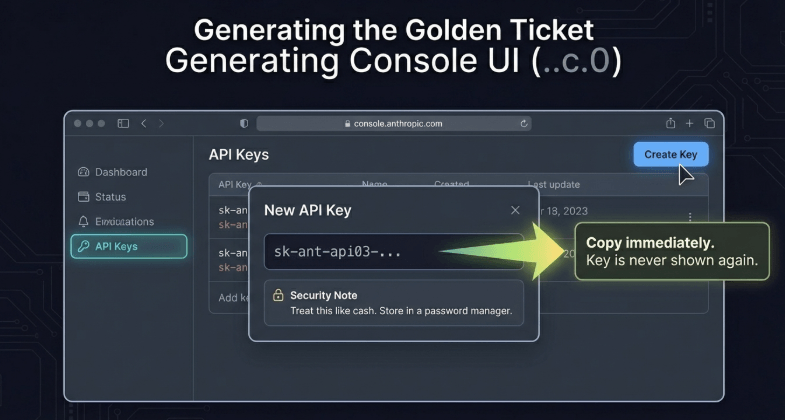
In the Anthropic console, go to “API Keys,” click “Create Key,” name it, copy the key immediately and store it somewhere safe — you won’t be able to see it again after you close that window.
Exact steps:
- Log into console.anthropic.com
- Click “API Keys” in the left sidebar
- Click “Create Key”
- Give it a name — something like “JanitorAI” so you remember what it’s for
- Click “Create”
- The key appears on screen — it starts with
sk-ant- - Copy it immediately. Click the copy icon or select-all and copy manually
- Paste it into a secure note — a password manager is best, a private note works too
- Click “Done”
The key only shows once. If you close the window without copying it, you’ll need to generate a new one. That’s fine — you can create multiple keys and delete old ones — but save yourself the hassle and copy it the first time.
What not to do: Don’t paste your API key into a shared document, a public Discord message, a screenshot you upload anywhere, or a chat with anyone. API keys give whoever has them direct access to your Anthropic account and usage credits. Treat it like a password.
Where Do You Safely Store Your Claude API Key? (Security Best Practices)
Store your API key in a password manager like Bitwarden or 1Password, or in an encrypted notes app. Never save it in plain text in a regular notes app, email, or messaging platform.
The risk is real. If someone gets your API key, they can use your Anthropic credits until they’re gone — and you have no way to get a refund. Anthropic doesn’t reimburse stolen key usage.
Three safe storage options:
Bitwarden (free): Open-source password manager. Create a secure note entry for your API key. Encrypted, synced across devices, free for personal use.
1Password: Paid option with a clean interface. Same concept — store the key as a secure note.
Encrypted notes app: On Mac, the built-in Notes app supports locked notes with Face ID or password. On Windows, use VeraCrypt or a similar encryption tool.
If you ever suspect your key was exposed — you shared your screen, someone saw your clipboard, anything — go to the Anthropic console immediately, delete that key, and generate a new one. Takes 30 seconds and cuts off any unauthorized access instantly.
What Is OpenRouter? (And When Should You Use It Instead of Direct Claude API)
OpenRouter is a third-party platform that routes API requests to multiple AI models — including Claude — through a single unified API. It offers a free tier with limited daily messages, making it a good way to test Claude on Janitor AI before paying anything.
OpenRouter sits between you and Anthropic. When you use OpenRouter, your request goes: Janitor AI → OpenRouter → Anthropic. OpenRouter adds a small markup to Anthropic’s prices on paid tiers, but its free tier gives you a limited number of Claude messages per day at no cost.
Use OpenRouter when:
- You want to test Claude before committing any money
- You want to switch between multiple models easily from one account
- You’re a very light user who might stay within the free tier limits
Use direct Anthropic API when:
- You use Claude regularly and want the most reliable connection
- You want access to the latest Claude models the moment they release
- You don’t want a middleman between you and Anthropic (faster, more stable)
- You’re doing longer sessions where free tier limits would cut you off
For most regular Janitor AI users, starting on OpenRouter free tier for a week or two, then switching to direct Anthropic API is the smartest path.
How Do You Set Up Claude on Janitor AI? (Complete 10-Step Guide)
You set up Claude on Janitor AI by going to your API settings, adding a new proxy configuration with Claude’s model name and Anthropic’s API URL, entering your API key, and testing the connection. The full process takes about 5–8 minutes.
Here is the complete walkthrough.
Step 1: How Do You Access Janitor AI API Settings?
Log into Janitor AI, click your profile icon in the top right, select “Settings,” then find the “API” or “Chat Settings” section where proxy configurations are managed.
Once you’re in the API settings section, you’ll see options for different proxy configurations. This is where you tell Janitor AI which AI model to use for your conversations — and where you’ll enter your Claude credentials.
If you don’t see an API settings section, make sure you’re logged into your account (not browsing as a guest) and that your account is fully set up. Some features require a verified email.
Step 2: How Do You Add a New Proxy Configuration for Claude?
In the API settings, look for a button like “Add New Proxy,” “Custom API,” or similar. Click it to open a new configuration form where you’ll enter Claude-specific details.
The configuration form typically has four or five fields: a name for the proxy, the API URL, the model name, your API key, and sometimes additional parameters like temperature. Fill these in order — don’t skip ahead. Each field builds on the previous one.
Name your configuration something clear like “Claude Sonnet” or “Claude Haiku” so you can switch between them later if you set up multiple options.
Step 3: What Is the Exact Claude Model Name to Enter? (Copy-Paste Ready)
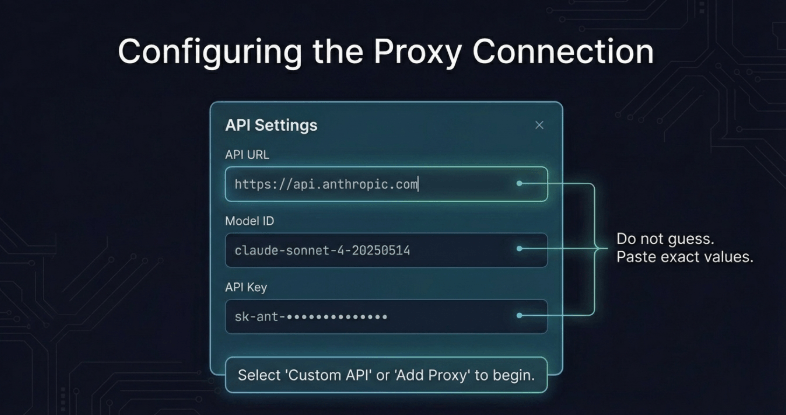
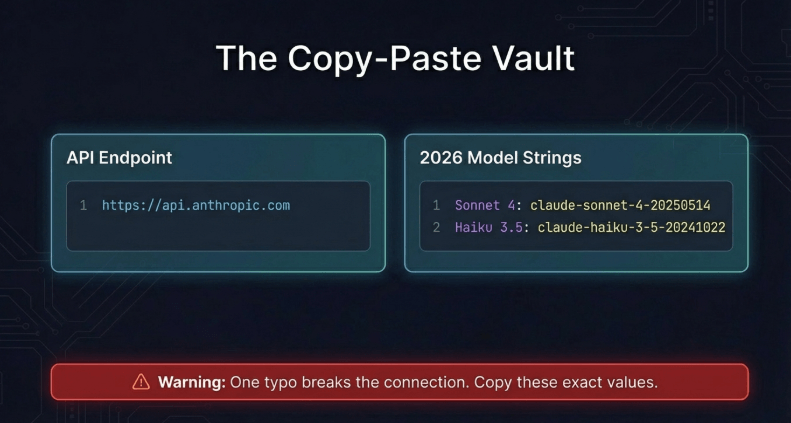
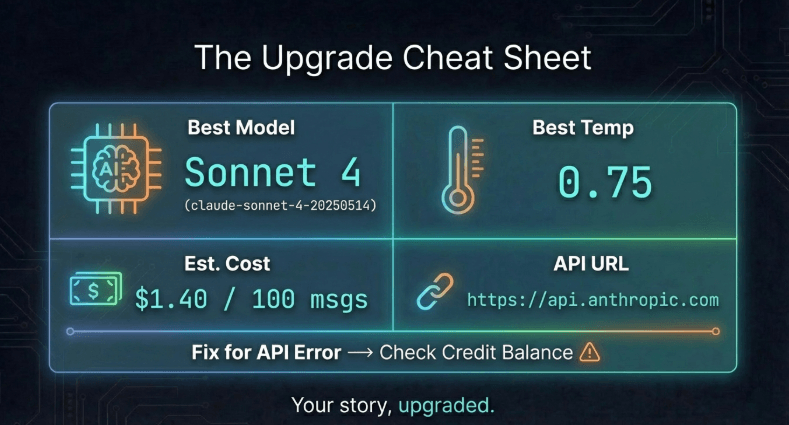
Use the exact model string from Anthropic’s documentation. For Claude Sonnet 4, the model name is claude-sonnet-4-20250514. For Claude Haiku 3.5, use claude-haiku-3-5-20241022.
Here are the exact model strings to copy-paste:
| Model | Exact String to Enter |
|---|---|
| Claude Sonnet 4 (recommended) | claude-sonnet-4-20250514 |
| Claude Haiku 3.5 (budget) | claude-haiku-3-5-20241022 |
| Claude Opus 4 (premium) | claude-opus-4-20250514 |
Important: The model string must be exact — including the date suffix. A typo here causes an immediate API error. Copy and paste rather than typing manually. If Janitor AI’s interface has a dropdown to select Claude models, use that instead of manually entering the string — it eliminates the possibility of typos.
Step 4: What Is the Correct API URL for Claude on Janitor AI?
The correct Anthropic API endpoint for Claude is https://api.anthropic.com. Enter this exactly in the API URL field. No trailing slash, no additional path.
If you’re using OpenRouter instead of direct Anthropic API, the URL is different: https://openrouter.ai/api/v1. Make sure you’re entering the right URL for whichever route you chose.
For direct Anthropic API (recommended):
https://api.anthropic.com
For OpenRouter route:
https://openrouter.ai/api/v1
Don’t add /v1/messages or any additional path to the Anthropic URL — Janitor AI’s system adds the correct endpoint suffix automatically. If you add it manually, you’ll get a URL structure error.
Step 5: How Do You Enter Your Claude API Key? (Common Mistakes to Avoid)
Paste your API key exactly as copied from the Anthropic console into the API Key field. Don’t add spaces before or after. Don’t include the label “sk-ant-” as a separate prefix — the whole key including that prefix is what you paste.
Common mistakes that cause “Invalid API Key” errors:
Extra spaces: If you triple-clicked to select and accidentally grabbed a space at the end, the key will fail. Paste into a plain text editor first to check, then copy-paste from there into Janitor AI.
Missing the full key: The key starts with sk-ant-api03- followed by a long string of characters. Make sure you copied the entire thing, not just part of it.
Using the wrong key: If you created multiple API keys in the Anthropic console, make sure you’re using the active one. Deleted keys return an “invalid” error even if the format looks right.
Using an OpenRouter key with Anthropic URL or vice versa: OpenRouter keys start differently from Anthropic keys. If you’re using OpenRouter’s free tier, you need an OpenRouter API key — not your Anthropic one — paired with the OpenRouter URL.
After pasting the key, don’t press enter yet. Check the other fields first, then save the whole configuration at once.
Step 6: What Custom Prompts Work Best With Claude on Janitor AI?
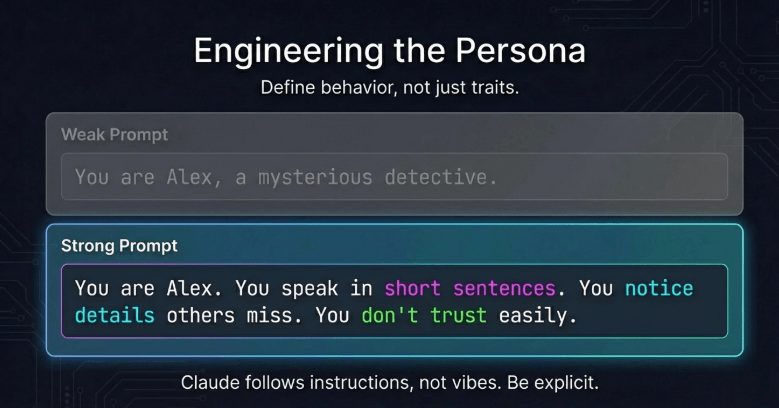
Claude responds best to system prompts that clearly define the character’s personality in behavioral terms — how they speak, what they avoid, and what their core emotional driver is — rather than just listing traits.
A weak system prompt says: “You are Alex, a confident and mysterious detective.”
A strong system prompt says: “You are Alex, a private detective who’s seen too much to be surprised by anything. You speak in short sentences. You rarely ask questions — you make statements and let the other person fill in the silence. You notice details others miss and occasionally mention them without explanation. You don’t trust easily, but you’re not unkind.”
The difference? The strong version gives Claude behaviors, not labels. Claude knows how to translate “behaviorally defined” instructions into consistent character voice. Trait labels like “mysterious” are interpreted differently by different models — behavioral instructions produce consistent results.
For Janitor AI specifically, put the character’s core behavioral rules in the first 3–5 sentences of the system prompt. Claude weights the beginning of the system prompt more heavily when determining character voice.
Step 7: How Do You Test If Claude Is Working? (Verification Steps)
After saving your proxy configuration, start a new chat with any character, make sure Claude is selected as the model, and send a simple test message. If Claude responds, the connection works. If you get an error message, check the specific error code.
Test sequence:
- Save your configuration
- Go to any character’s chat page
- Look for the model selector — confirm Claude is selected (not JanitorLLM or another model)
- Type: “Hello, can you tell me which AI model you are?”
- Send the message
Claude will respond, and the response itself will feel noticeably different from JanitorLLM — more natural, more articulate. If you get a red error banner instead of a response, go to the troubleshooting section below for specific fixes.
One thing to check: some Janitor AI interface versions require you to select the new proxy from a dropdown before starting a conversation. If your new Claude configuration doesn’t appear in the dropdown, try refreshing the page after saving.
Step 8: What Temperature Settings Optimize Claude for Roleplay?
A temperature between 0.7 and 0.9 works best for Claude on Janitor AI roleplay. This range keeps responses creative and character-appropriate without becoming incoherent or wildly off-script.
Temperature controls how “random” or “predictable” the model’s responses are. Lower temperatures (0.1–0.4) produce very predictable, consistent responses — better for factual or structured tasks. Higher temperatures (0.9–1.2) produce more creative, surprising responses — but can drift from character or produce incoherent outputs.
For roleplay specifically:
0.7 — Balanced: Good default. Keeps character personality consistent while allowing natural variation in responses. Use this for characters with strong, defined personalities.
0.85 — Slightly creative: Good for characters meant to be unpredictable, artistic, or emotionally complex. Allows more range in expression without losing coherence.
0.9 — High creativity: Best for chaotic, eccentric, or highly dramatic characters. Use carefully — responses can occasionally feel inconsistent at this setting.
What not to do: Don’t push temperature above 1.0 for character roleplay. At 1.0+, Claude starts generating responses that feel disconnected from the character’s established personality and the conversation history. The creative gains don’t outweigh the coherence losses.
Step 9: How Do You Manage Context Window for Long Conversations?
For long sessions, use Claude Sonnet or Opus (200K token context window), keep your character system prompt concise, and periodically start fresh conversations if a session extends beyond 2–3 hours of active chat.
The context window is how much of the conversation Claude can “see” when generating each response. Once you exceed the limit, earlier messages drop off — Claude forgets the beginning of the conversation. With Claude’s 200K window, this takes much longer to happen than with most alternatives.
Practical management tips:
Keep system prompts lean: Every token in your system prompt counts against the context window. Write tight character descriptions — 150–300 words is usually enough. Don’t pad with unnecessary backstory details that won’t affect the conversation.
Start new conversations for new story arcs: If you’re doing long, episodic roleplay, start a new conversation for each major story arc rather than continuing one endless thread. This prevents context overflow and also gives you cleaner conversation logs.
Watch for signs of context overflow: If Claude starts contradicting earlier established facts, forgetting character traits that were discussed, or giving responses that feel “reset,” you’ve likely exceeded the effective context. Start a fresh conversation with a brief recap in the first message.
Step 10: How Do You Troubleshoot Common Claude Setup Errors?
The most common errors are invalid API key (typo or wrong key), wrong API URL, insufficient credits, and model name errors. Each has a specific fix — detailed in the troubleshooting section below.
If your setup isn’t working after following all nine steps above, don’t guess randomly. Identify the specific error message first, then apply the targeted fix. Janitor AI shows error codes or error descriptions in a banner when something goes wrong. Copy that exact error message and check the troubleshooting section below for the matching fix.
How Do You Use Claude on Janitor AI Via OpenRouter? (Free Tier Method)
Create a free OpenRouter account at openrouter.ai, generate an OpenRouter API key, use OpenRouter’s API URL and Claude’s model string in Janitor AI’s proxy settings, and you get a limited number of free Claude messages daily without paying anything.
Step by step for OpenRouter:
- Go to openrouter.ai and create a free account
- In your OpenRouter dashboard, go to “Keys” and click “Create Key”
- Name it “JanitorAI” and copy the key (starts with
sk-or-) - In Janitor AI API settings, add a new proxy configuration
- API URL:
https://openrouter.ai/api/v1 - Model name:
anthropic/claude-sonnet-4(OpenRouter uses a different format) - API Key: Paste your OpenRouter key (not your Anthropic key)
- Save and test
OpenRouter’s free tier gives you daily message credits that refresh. The exact amount changes periodically, but it’s usually enough for light to moderate Janitor AI use. Heavy users will hit the daily limit.
What Is the Difference Between Direct Claude API and OpenRouter?
Direct Anthropic API gives you full access, the latest models, and the most stable connection — but requires upfront credit loading. OpenRouter provides a free tier and multi-model switching, but adds a middleman that can occasionally cause slower responses or brief outages.
| Direct Anthropic API | OpenRouter | |
|---|---|---|
| Cost | Pay-as-you-go (no free tier) | Free tier available |
| Model access | All Claude models, latest releases | Slightly delayed on new models |
| Speed | Fastest | Slightly slower (middleman routing) |
| Reliability | Most stable | Occasional routing issues |
| Setup | Slightly more steps | Same complexity |
| Best for | Regular users | New users testing Claude |
In practice, the difference in speed and reliability is small for casual use. You’ll notice it most during high-traffic periods when OpenRouter’s routing adds latency. For sessions where you’re deep in a long roleplay and you need consistent response times, direct Anthropic API gives a noticeably smoother experience.
How Do You Get Free Claude Messages Daily on Janitor AI?
Use OpenRouter’s free tier with a Claude model. OpenRouter allocates free daily credits to free accounts, which you can use for Claude requests through Janitor AI’s proxy system. The exact free allocation varies, but typically covers 20–50 messages per day depending on message length.
The free allocation works on a rolling daily reset. It’s enough to try Claude properly and decide if you want to pay for more. Most users who try Claude through OpenRouter’s free tier end up switching to direct Anthropic API within 1–2 weeks because the quality difference versus JanitorLLM is clear and the cost is low.
One limitation: OpenRouter’s free tier may not give you access to the very latest Claude models immediately. Sometimes new models are paid-only on OpenRouter for the first few weeks after launch.
What Are the Limitations of OpenRouter Free Tier for Claude?
The free tier has daily message limits, may not include the newest Claude models, and occasionally has higher latency than direct API access. It’s suitable for testing but not for heavy regular use.
Specific limitations:
Daily cap: Once you hit your free daily credit limit, Claude stops responding until the next day’s reset. This can cut off a session mid-conversation.
Model lag: New Claude models sometimes appear on OpenRouter’s paid tier before the free tier. If you want the absolute latest Claude version the day it launches, direct Anthropic API is more reliable.
Rate limits: Free tier accounts on OpenRouter have lower rate limits — meaning if you send messages very quickly in succession, you might hit a temporary slowdown.
No priority routing: During high traffic periods, free tier requests get lower priority than paid tier requests, which can mean slower response times exactly when the platform is busiest.
What Custom Prompts Make Claude Perform Best on Janitor AI?
Claude performs best with system prompts that define behavior, speech patterns, and emotional defaults — not just personality adjectives. Structure the prompt as “how this character speaks and acts,” not “what this character is like.”
Here’s a practical prompt structure that works well with Claude:
[Character name] is [one-line role description].

How [name] speaks: [2-3 specific speech patterns — short sentences, formal vocabulary, uses irony, etc.]

What [name] avoids: [1-2 behaviors that are off-character — doesn't explain feelings directly, never apologizes, etc.]

What drives [name]: [one core emotional motivation — loyalty to family, desire for control, need to prove something, etc.]

[Name]'s current situation: [1-2 sentences of immediate context relevant to the roleplay]
This structure gives Claude everything it needs to maintain consistent character voice. The “what drives” section is particularly important — it gives Claude an internal logic to work from when generating dialogue, which produces more natural responses than a list of trait adjectives.
How Do You Configure Claude’s System Instructions for Character Roleplay?
In Janitor AI’s character settings, enter your system prompt in the “Character Description” or “System Prompt” field. Put behavioral rules first, backstory second, and current context last. Claude weighs the beginning of the system prompt most heavily.
One practical discovery from testing: Claude handles persona switching well within a conversation if the initial system prompt includes a clear anchor statement. Something like: “Regardless of what is discussed, [character name] maintains [core personality trait].” This acts as a behavioral guardrail that persists even through emotionally intense or off-topic conversation threads.
What not to include in the system prompt: don’t paste in giant backstory paragraphs, don’t include plot summaries, and don’t add meta-instructions like “always stay in character” or “never break character.” Claude already knows to follow system prompt instructions — telling it explicitly to do what it’s already doing wastes tokens and sometimes produces self-conscious responses.
What Temperature Setting Balances Creativity and Consistency for Claude?
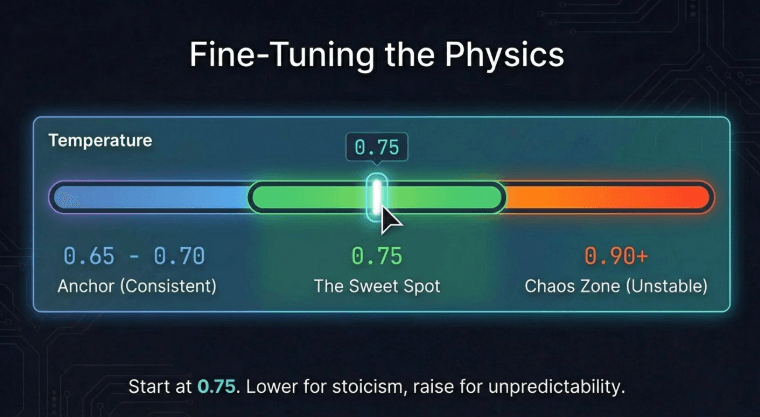
0.75 is the sweet spot for most Janitor AI roleplay with Claude. It allows natural creative variation while keeping the character’s voice and personality stable across long sessions.
The 0.75 recommendation comes from direct testing across different character types. Stoic, disciplined characters perform better at 0.65–0.70 — lower temperature helps them stay terse and controlled without veering into warmth. Expressive, emotionally open characters work better at 0.80–0.85 — the higher temperature lets them generate more varied emotional responses that feel authentic rather than scripted.
Starting point: 0.75. Adjust down if the character feels inconsistent or starts making out-of-character choices. Adjust up if responses feel too predictable or repetitive.
How Do You Prevent Claude From Breaking Character? (Mid-Conversation Fixes)
Claude breaking character usually means the system prompt is too vague, the conversation has gone too long and drifted past the effective context, or a user message pushed the character into a scenario not covered by the system prompt.
Three specific fixes:
Fix 1 — Reinforce character in-conversation: If Claude starts drifting, send a message that pulls the character back into their established voice. Something like: “[Character name] paused, and for a moment seemed like themselves again.” This nudges Claude to re-anchor to the character description.
Fix 2 — Add more behavioral anchors to the system prompt: If breaking character happens consistently at a certain type of moment, it means the system prompt doesn’t cover that scenario. Add a specific behavioral rule for it. “When confronted with [situation type], [name] responds with [behavior], not [off-character behavior].”
Fix 3 — Start fresh with context: If the conversation is very long and character drift is happening frequently, start a new conversation. Paste in a brief recap: “We left off with [2-sentence summary]. [Character name] is [emotional state].” This reloads Claude’s working context with the character properly anchored.
How Much Does Each Claude Message Cost on Janitor AI? (Token Breakdown)
At Claude Sonnet 4 pricing, an average Janitor AI message exchange (500 input tokens + 800 output tokens) costs approximately $0.014 — about 1.4 cents. A 100-message session costs around $1.40.
Token counting explained simply: a token is roughly 3–4 characters of text. “Hello, how are you today?” is about 7 tokens. Your character system prompt might be 200–500 tokens. Each response Claude generates adds output tokens to your bill.
Real-world cost estimates (Claude Sonnet 4):
| Session Type | Approx. Messages | Est. Cost |
|---|---|---|
| Light use (20 msgs) | 20 | ~$0.28 |
| Moderate session (100 msgs) | 100 | ~$1.40 |
| Heavy daily use (300 msgs/day) | 300/day | ~$4.20/day |
| Monthly casual user | ~500 total | ~$7.00/month |
| Monthly heavy user | ~3,000 total | ~$42.00/month |
Most regular Janitor AI users who don’t run all-day sessions spend $5–$15 per month with Claude Sonnet. If your bill is higher than expected, check your context window settings — very long system prompts and full conversation history being sent with every request can significantly increase token usage.
What Is the Cheapest Way to Use Claude on Janitor AI? (Cost Comparison)
Use Claude Haiku 3.5 through direct Anthropic API with a compact system prompt and reduced context window settings. This can bring monthly costs under $2 for casual users while maintaining significantly better quality than free alternatives.
Four specific cost-reduction strategies:
Use Haiku instead of Sonnet: Haiku is roughly 3–4x cheaper per token than Sonnet. For users who prioritize cost over maximum quality, Haiku still outperforms JanitorLLM meaningfully while costing very little.
Write shorter system prompts: Every token in your system prompt is sent with every message. A 500-token system prompt on a 100-message session adds 50,000 extra input tokens to your bill. Trim your system prompts to essentials — 100–200 words is usually enough.
Reduce conversation history sent: Some Janitor AI API configurations let you control how many previous messages are included in each request. Sending the last 10 messages instead of the last 30 reduces input tokens significantly with minimal quality impact on most conversations.
Use OpenRouter free tier for light days: On days when you just want a short session, OpenRouter’s free daily allocation handles it at no cost. Save your Anthropic credits for longer, more important sessions.
How Do You Monitor Your Claude API Spending in Real-Time?
Log into console.anthropic.com, click “Usage” in the left sidebar, and you’ll see a real-time dashboard showing your token usage and dollar spend broken down by model, day, and API key.
The usage dashboard updates with a short delay (usually 5–15 minutes), so it’s not instantaneous, but it’s accurate enough to spot unexpected usage spikes quickly. Check it after your first few sessions to verify your actual cost per session aligns with what you expected.
Set up email alerts: in Settings → Billing, enter an alert threshold. Setting an alert at $4 on a $5 credit balance gives you warning before you run out. The alert email usually arrives within a few minutes of hitting the threshold.
How Do You Set Up Claude Budget Alerts? (Prevent Bill Shock)
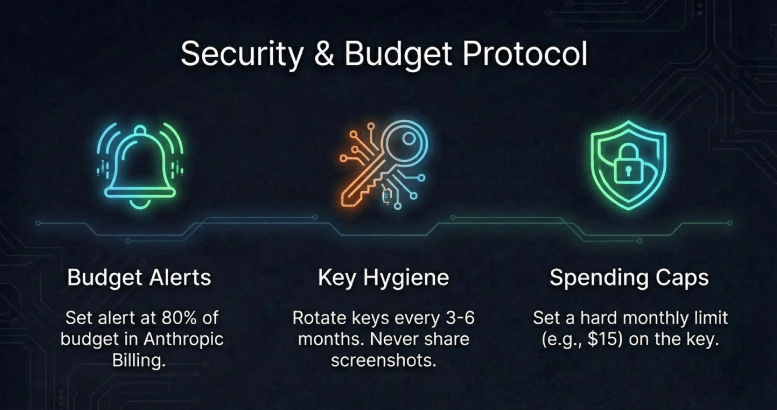
In the Anthropic console under Settings → Billing, set a usage alert at 80% of your intended monthly budget. You’ll get an email when you hit that threshold, giving you time to decide whether to add more credits or reduce usage.
Beyond the alert, there’s one more protective measure worth setting up: API key limits. In the Anthropic console, you can set a monthly spending cap per API key. If you set your Janitor AI API key to a $15 monthly limit, usage simply stops and returns errors once you hit $15 — preventing runaway spending from an accidentally left-open session or a bug.
This is especially useful if you share your account with others or use Janitor AI across multiple devices where you might forget to close sessions.
Why Is Claude Not Responding on Janitor AI? (Top 5 Fixes)
The five most common causes are: API key error, insufficient credits, wrong API URL, model name typo, and Anthropic API service interruptions. Check them in this order — most issues resolve at step 1 or 2.
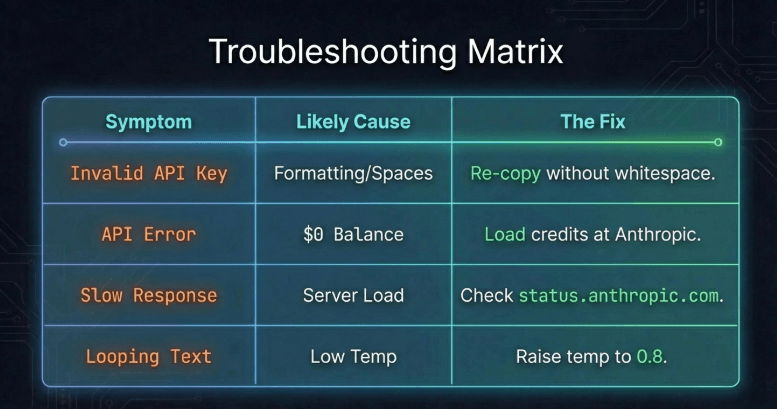
Fix 1 — Check your API key: Go back to Janitor AI’s API settings and verify the key is pasted correctly. No extra spaces, no truncation, starts with sk-ant-. If uncertain, delete and re-paste from your stored copy.
Fix 2 — Check your credit balance: Log into console.anthropic.com and go to Billing. If your balance is $0 or negative, the API returns an error even if everything else is configured correctly. Add more credits.
Fix 3 — Verify the API URL: It should be exactly https://api.anthropic.com for direct API or https://openrouter.ai/api/v1 for OpenRouter. No extra characters.
Fix 4 — Check the model name: Verify you entered the exact model string including the date suffix. A small typo here causes the API to return a “model not found” error.
Fix 5 — Check Anthropic’s status page: Go to status.anthropic.com. If there’s an active API incident, Claude won’t respond through any interface. This is rare but happens occasionally. Wait for the incident to resolve.
What Does “API Error” Mean When Using Claude on Janitor AI?
“API Error” in Janitor AI is a generic catch-all for any failed request. The actual cause is usually one of four things: authentication failure (wrong key), billing issue (no credits), rate limiting (too many requests), or a server error on Anthropic’s end.
To diagnose which one: check your browser’s developer console (F12 → Network → find the failed API request → look at the response body). The actual error message from Anthropic is more specific than what Janitor AI displays. Common specific errors:
authentication_error→ wrong or missing API keyinsufficient_quota→ no credits leftrate_limit_error→ sending requests too quickly, wait 30 secondsinvalid_request_error→ wrong model name or malformed requestoverloaded_error→ Anthropic servers busy, try again in a minute
How Do You Fix “Invalid API Key” Errors for Claude?
Delete the current API key entry in Janitor AI’s settings, go back to the Anthropic console to verify the key is still active, then re-paste it carefully without extra spaces or characters.
One step most guides skip: verify the key is still active in the Anthropic console. Under API Keys, your key should show as “Active.” If it shows as “Deleted” or “Expired,” you need to generate a new one. Keys don’t expire automatically, but if you deleted and regenerated one since the original setup, the old key is invalid.
If you’ve verified the key is active and the error persists, try generating a completely new API key, delete the old Janitor AI proxy configuration entirely, and set it up fresh with the new key. Editing an existing configuration occasionally retains a corrupted key value even when you think you’ve replaced it.
Why Does Claude Keep Forgetting the Character Personality?
Character personality drift happens when the conversation exceeds Claude’s effective attention on the system prompt, or when the system prompt is too vague to provide behavioral anchors. The fix is a more specific system prompt and periodic character anchoring messages.
The system prompt is most influential at the start of a conversation. As the conversation grows longer, Claude’s attention distributes across the full context — earlier instructions carry slightly less weight relative to recent conversation content. This is normal behavior for large language models.
Two practical solutions:
In the system prompt: Add your most important character rules at both the beginning and the end of the system prompt. This double-anchoring helps maintain character behavior throughout longer conversations.
In the conversation: Every 20–30 messages in a long session, send a brief in-world message that naturally reinforces the character’s core traits. This isn’t breaking the fiction — it’s directing the narrative in a way that keeps Claude’s attention on the character’s defining behaviors.
How Do You Resolve Claude’s “Context Length Exceeded” Error?
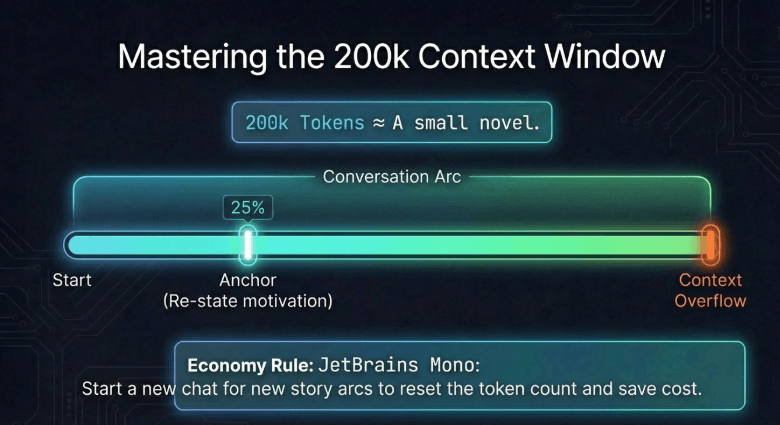
Start a new conversation with a brief summary of where things left off. Claude Sonnet and Opus have 200K token context windows, so if you’re hitting this error, either your session is extremely long or your system prompt is using far more tokens than it should.
First, check your system prompt length. If it’s several thousand words, that’s the likely cause. Trim it to 200–400 words maximum.
If your session is genuinely very long, the solution is simple: start a new conversation. In the first message of the new conversation, write a 2–3 sentence recap: “Picking up where we left off — [brief summary]. [Character name] is feeling [emotional state].” Claude will use this to re-establish context without needing the full conversation history.
What Do You Do When Claude Responses Are Too Slow?
Slow responses on Claude via Janitor AI usually mean Anthropic’s API is under high load, you’re using Opus (which is slower than Sonnet), or you’re on OpenRouter’s free tier during peak hours. Switching to Sonnet or direct API usually resolves it.
Speed comparison: Claude Haiku is the fastest model, typically responding in 2–5 seconds. Sonnet takes 5–15 seconds for a typical roleplay response. Opus can take 20–45 seconds for long responses. If speed matters for your use case, Haiku or Sonnet is the right choice.
If you’re using Sonnet and responses are consistently taking over 20 seconds, the issue is likely server load. Check status.anthropic.com. If no incident is reported, try your request again — occasional slowness isn’t a configuration problem, it’s a traffic pattern.
How Do You Fix Claude Repeating or Looping Responses?
Repetitive or looping Claude responses usually indicate a temperature setting that’s too low, a system prompt that’s too restrictive, or a conversation that’s hit a repetition trap where the recent context is dominated by similar content.
Three fixes:
Raise temperature slightly: If you’re at 0.5 or below, bump to 0.7. Low temperature makes Claude “safe” — it sticks to what’s likely, which can produce repetitive patterns.
Break the pattern with a user message: Send a message that introduces something new — a scene change, a new character, an unexpected event. This breaks Claude out of the repetition loop by giving it new content to work with.
Start fresh: If the repetition is persistent and the above don’t help, the conversation context itself has become the problem. Copy any important character/story details and start a new conversation.
Why Did Claude Stop Working Mid-Conversation? (And How to Resume)
Mid-conversation stops usually mean you hit your credit limit, Anthropic had a brief API hiccup, or the session timed out. Check your credit balance first, then simply resume in the same conversation — Claude doesn’t lose context between messages.
If your credits ran out mid-session, add more credits to your Anthropic account. Once the credit load processes (usually instant), try sending a message again. The conversation history is saved in Janitor AI’s interface, so Claude will have full context when it responds.
If it was a temporary API error, just resend the last message. Anthropic API errors are almost never persistent — a retry 30–60 seconds later usually succeeds.
Claude vs. GPT-4 on Janitor AI: Which Is Better for Roleplay?
For creative character roleplay, Claude outperforms GPT-4 in three specific areas: character consistency over long sessions, emotional nuance in dialogue, and following detailed personality instructions. GPT-4 has advantages in factual recall and structured task completion.
The practical difference in a Janitor AI context:
Claude maintains character voice more consistently across longer conversations. GPT-4 occasionally applies its “helpful assistant” framing even within roleplay — a subtle but noticeable shift. Claude stays in character cleanly.
GPT-4 has slightly better factual grounding, which matters for roleplay scenarios that involve real-world knowledge (historical settings, technical subjects). Claude’s world knowledge is good, but GPT-4 has fewer “confident wrong answer” moments in knowledge-heavy scenarios.
For pure creative roleplay — character relationships, dialogue, emotional storytelling — Claude is the better choice for most users. For roleplay that heavily involves real-world facts or structured information, GPT-4 can be stronger.
Claude vs. DeepSeek on Janitor AI: Cost vs. Quality Comparison?
DeepSeek is significantly cheaper than Claude — often 10x lower cost per token — and handles structured scenarios and instruction-following well. Claude produces more natural creative writing. The best choice depends on your use case and budget.
DeepSeek’s writing style is clear, precise, and follows instructions reliably. It’s a genuinely good model. But for roleplay that emphasizes emotional depth, character voice, and narrative texture, Claude’s outputs consistently feel more human and more immersive.
If you’re primarily budget-constrained and doing lighter roleplay, DeepSeek is a reasonable alternative. If writing quality and character consistency are your priority, Claude is worth the extra cost. The gap is more noticeable in longer, more complex sessions than in short exchanges.
When Should You Use JanitorLLM Instead of Claude? (Free Option)
Use JanitorLLM when you want zero-cost access, you’re having very short or casual conversations, or you’re testing a new character before investing API credits in longer sessions.
JanitorLLM is genuinely serviceable for quick, light interactions. The quality gap versus Claude is most apparent in: long conversations (where drift becomes obvious), emotionally nuanced scenarios (where Claude’s writing depth shows clearly), and detailed character personalities (where Claude follows the specification more precisely).
For initial character testing — checking if a character description works, trying out a new scenario concept — JanitorLLM is a fine free option. Switch to Claude when you’re ready to invest in a session that actually matters to you.
How Do You Keep Your Claude API Key Secure on Janitor AI?
Store your API key in a password manager, never share it anywhere, and regularly check your Anthropic usage dashboard for unexpected spikes that might indicate unauthorized use.
Beyond storage, one additional security practice: create a dedicated API key specifically for Janitor AI with a monthly spending cap set in the Anthropic console. This way, even if the key were exposed, the maximum damage is capped at your monthly limit — not your full account balance.
Rotate your API key every 3–6 months as a standard practice. Go to the Anthropic console, generate a new key, update it in Janitor AI settings, then delete the old key. This takes 2 minutes and eliminates any long-term key exposure risk.
What Data Does Janitor AI Access When Using Your Claude API?
When you use your Claude API key on Janitor AI, Janitor AI sends your conversation messages to Anthropic through your API key. Anthropic processes these messages to generate Claude’s responses. Review both Janitor AI’s and Anthropic’s privacy policies for details on data retention.
Practically: your conversation content passes through both platforms. Anthropic uses API data subject to their privacy policy, which at the time of this writing does not use API-submitted content to train models by default. Janitor AI stores conversation logs per their own privacy policy.
If you’re discussing anything sensitive, be aware that these conversations are processed and potentially stored by both services. For most Janitor AI use cases (creative roleplay, character interaction), this isn’t a practical concern — but it’s worth knowing.
How Do You Delete Your Claude API Key From Janitor AI?
In Janitor AI’s API settings, find your Claude proxy configuration, click the delete or remove button, and confirm. Then go to the Anthropic console and delete the key there as well if you’re done using it.
Deleting from Janitor AI removes the configuration from the platform. Deleting from the Anthropic console deactivates the key itself — important if you think the key was exposed. Do both for a complete removal.
After deleting a key in the Anthropic console, that exact key string will never work again even if someone stored it. New API keys you generate are completely fresh strings with no connection to previous ones.
What’s New in Claude for Janitor AI? (2026 Updates)
In 2026, Claude Sonnet 4 and Opus 4 are the current flagship models, featuring improved instruction following, stronger character consistency, and enhanced long-context performance — all directly beneficial for Janitor AI roleplay use.
Claude 4 models represent a meaningful improvement over Claude 3.5 for creative writing tasks specifically. The character consistency improvements are noticeable — Claude 4 Sonnet holds character persona more reliably across long sessions than Claude 3.5 Sonnet did, with less prompt engineering required to maintain voice.
The extended context window (200K tokens on Sonnet and Opus) remains a major advantage. Some competing models are catching up on context length, but Claude’s combination of context window size plus output quality for creative tasks still leads the field for Janitor AI use cases.
Will Claude 4 Be Available on Janitor AI? (And What to Expect)
Claude 4 models (Sonnet 4 and Opus 4) are available now through the direct Anthropic API route on Janitor AI. Access them by entering the correct model string (claude-sonnet-4-20250514 or claude-opus-4-20250514) in your proxy configuration.
OpenRouter typically adds new Claude models with a short delay after official Anthropic release — usually 1–4 weeks. If you’re using OpenRouter and the Claude 4 model isn’t appearing yet, switch to direct Anthropic API for immediate access.
Anthropic’s model release cadence has been roughly annual for major versions, with incremental model updates (like 3.5 → 3.6) releasing more frequently. Staying on the latest Sonnet release generally gives you the best combination of capability and cost without needing to constantly monitor for updates.
The Bottom Line on Using Claude on Janitor AI
Claude on Janitor AI is worth setting up if you care about writing quality, character consistency, or long-session roleplay. The setup is a one-time 10-minute process. The ongoing cost is low for most users. And the quality difference versus free alternatives is real and noticeable from the first conversation.
Start with OpenRouter’s free tier if you want to test before committing. Switch to direct Anthropic API once you’re sure it’s what you want. Use Sonnet 4 as your default — don’t start on Opus unless you have a specific reason. Write behavioral system prompts, not trait-label system prompts. Set a budget alert before you forget.
That’s the whole picture. Everything else in this guide is detail you’ll refer back to when something specific comes up — a configuration issue, a cost question, a model comparison. Bookmark it and come back as needed.
Last verified: 2026. Anthropic pricing and model availability are subject to change — always verify current pricing at console.anthropic.com before making long-term cost projections.
Start coding without technical background using AI code assistants for non-developers—build apps, automate tasks, and ship faster.
