



Table of Contents
The biggest barrier stopping people from building their ideas isn’t lack of creativity—it’s the technical wall of coding.
You have a business concept, a tool you need, or an app that could solve a real problem. But the moment you open a code editor, you’re hit with syntax errors, environment setup nightmares, and documentation that reads like a foreign language. AI code assistants in 2026 have changed this completely. You can now describe what you want in plain English, and these tools generate working applications without you writing a single line of traditional code.
This isn’t about learning to code faster. It’s about skipping the coding part entirely while still getting professional results.
Why Traditional Coding Blocks Non-Developers
The dream of “anyone can code” has been sold for years through bootcamps and online courses. But here’s what actually happens when a non-developer tries to build something:
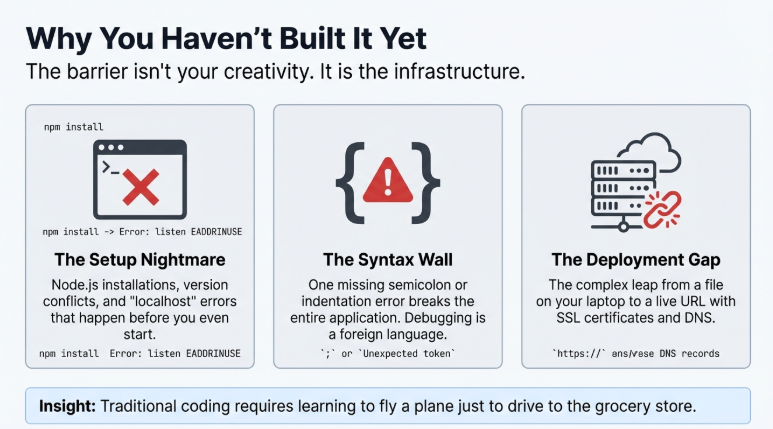
Setting up the development environment alone takes hours. You need to install Node.js, configure package managers, deal with version conflicts, and pray that your machine doesn’t throw permission errors. Before you’ve written anything useful, you’re already troubleshooting why localhost:3000 won’t load.
Then comes the syntax wall. One missing semicolon, one incorrect indentation, and your entire application breaks. The error messages don’t help either—they’re written for people who already understand the system.
Deployment is another disaster. You’ve built something locally, and now you need to figure out hosting, domain configuration, SSL certificates, and server management. For someone who just wanted to launch a simple booking system or portfolio site, this feels like learning to fly a plane just to drive to the grocery store.
AI code assistants solve these problems not by teaching you to code, but by removing the need to code in the first place.
Beginners choosing their first AI tool should start with → Choosing Your First AI Tool – Getting Started Guide
What Makes These Tools Different from Traditional No-Code Builders
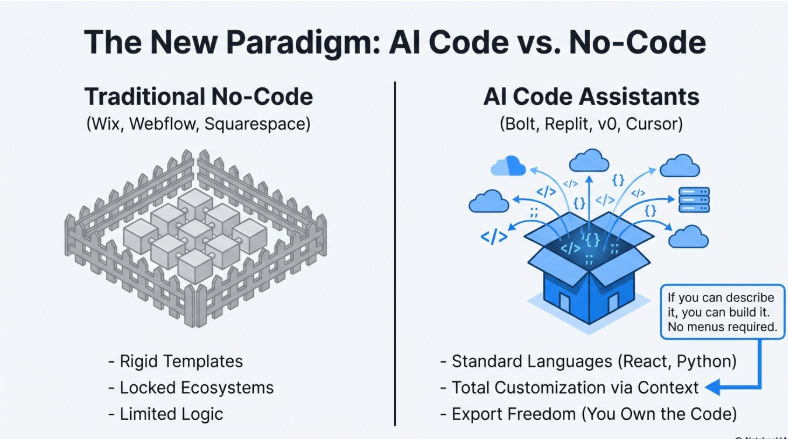
Traditional no-code platforms like Wix or Webflow give you drag-and-drop interfaces. They’re useful, but limiting. You’re stuck with their templates, their structure, their rules. The moment you want something slightly custom, you hit a wall.
AI code assistants work differently. You describe what you want, and they generate the actual code. This means you’re not boxed into pre-made templates. Want a specific layout that doesn’t exist in any template library? Describe it. Need custom logic for how your forms behave? Tell the AI what should happen.
The flexibility is real because you’re working with generated code, not proprietary platform limitations. And because these tools run in 2026, they understand context better than earlier AI models. You can say “make the button bigger and move it to the right,” and they know which button you mean without you having to navigate through menus.
Another massive difference: export freedom. Most no-code platforms lock your project inside their ecosystem. If you want to move your site elsewhere, you’re rebuilding from scratch. AI-generated code can be exported, hosted anywhere, and modified by a developer later if needed.
v0: Building UI Without the Design Struggle
Most non-developers don’t just struggle with code—they struggle with design. You know you want a “clean, modern interface,” but translating that into actual visual elements is harder than it sounds.
v0 by Vercel removes this translation layer. You type “create a pricing page with three tiers and a comparison table,” and within seconds, you’re looking at a fully designed, professional UI. Not a wireframe. Not a rough draft. An actual interface with proper spacing, typography, and responsive design.
Here’s what non-developers usually miss: v0 generates code using React and Tailwind CSS, which are industry-standard tools. This matters because if you ever hire a developer to expand your project, they’ll instantly understand the structure. You’re not handing them some proprietary mess that needs to be rebuilt.
One limitation to know upfront: v0 is strongest for frontend work—the visual part users see. If you need backend logic (databases, user authentication, payment processing), you’ll need to combine it with other tools or bring in some technical help.
The workflow is remarkably fast. You describe, it generates, you tweak by talking to it naturally. Testing different design directions that would take hours in Figma happens in minutes. This speed matters when you’re validating ideas or showing mockups to potential clients.
But there’s a catch worth mentioning. Because v0 focuses heavily on modern, trendy design patterns, sometimes the output looks too similar to other modern sites. If brand uniqueness is critical, you’ll need to push it with specific design requests or modify the generated code slightly.
For non-developers launching SaaS landing pages, portfolio sites, or simple web apps where the frontend is 90% of the work, v0 handles the job without requiring you to understand CSS frameworks.
Bolt.new: The Entire Dev Stack in Your Browser
The traditional web development setup requires installing multiple programs, managing dependencies, and dealing with local server configurations. Bolt.new eliminates all of it by running everything in your browser.
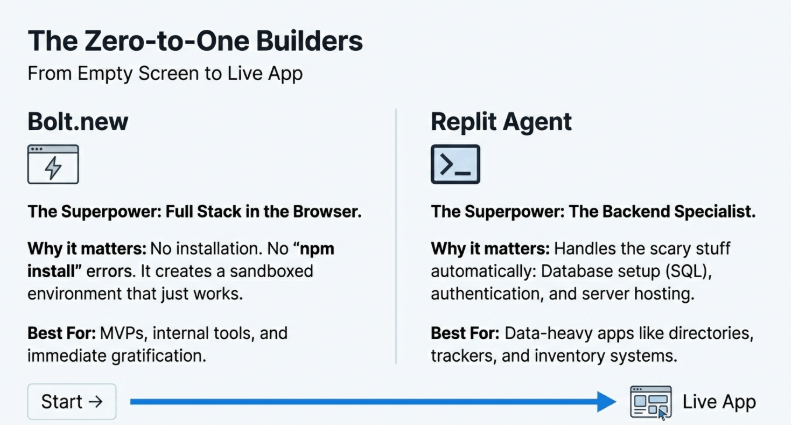
You don’t install Node.js. You don’t configure build tools. You don’t worry about “npm install” failing halfway through. You open Bolt.new, describe your application, and it builds, runs, and deploys without touching your computer’s file system.
This browser-based approach solves a problem most guides ignore: environment conflicts. On a traditional setup, your operating system, existing software, and even past projects can create conflicts that break new projects. Bolt.new isolates everything in the browser, so nothing interferes.
Here’s where it gets interesting for non-developers. Bolt.new isn’t just a code generator—it’s a full-stack agent. That means it handles the frontend (what users see), the backend (server logic), and even database setup. You can prompt it to “create a task management app with user accounts,” and it will scaffold the entire application structure.
The live preview updates as it generates code. You’re not waiting for builds or refresh cycles. Change a prompt, watch the app update instantly. This immediate feedback loop is what makes it usable for people without technical backgrounds.
But there’s a reality check needed: Bolt.new works best for small to medium projects. If you’re trying to build the next enterprise-level application with complex workflows, you’ll eventually need a traditional development setup. For MVPs, internal tools, or client projects that don’t require massive scale, it handles everything.
Deployment happens with one click. The app goes live with a shareable URL. No need to understand Vercel, Netlify, AWS, or any hosting platform. This is the part where non-developers usually give up on traditional coding, and Bolt.new removes that barrier completely.
One specific advantage: because it’s browser-based, you can work from any device. Chromebook, iPad, library computer—doesn’t matter. Your entire development environment is accessible anywhere with internet.
Lovable: The AI That Thinks Like a Product Manager
Most AI code tools wait for instructions. Lovable takes a different approach—it asks questions like a product manager trying to understand your vision.
You tell it “I need a booking system for my consulting business,” and instead of immediately generating code, it asks: “Should clients be able to reschedule? Do you want automated email confirmations? Should there be a waiting list if slots are full?”
This interrogative approach helps non-developers who don’t know what they don’t know. You might not realize you need email confirmations until Lovable suggests it. The AI acts as a thinking partner, not just a code executor.
Here’s what makes this particularly useful: Lovable generates production-ready applications. “Production-ready” means the code includes proper error handling, security basics, and responsive design—the stuff that separates hobby projects from professional applications.
For non-technical founders, this is critical. You’re not getting a prototype that breaks when real users touch it. The quality bar is set for actual use, which means you can show this to investors, launch to early customers, or use it as your MVP without embarrassment.
The design output leans toward modern SaaS aesthetics. Clean, minimal, professional. If your product needs a quirky, highly branded look, you’ll need to provide detailed design direction. But if “looks legitimate and professional” is the goal, Lovable delivers that by default.
One thing to manage: because Lovable asks questions and iterates conversationally, the process takes longer than tools that generate immediately. If you’re testing quick ideas, this back-and-forth might feel slow. But if you’re building something you plan to use seriously, the extra thinking time results in better architecture.
The platform handles both web and mobile-responsive layouts. Your app works on phones without you needing to think about breakpoints or mobile-specific design. For non-developers who don’t even know what “responsive design” means, this automatic handling is essential.
Replit Agent: From Idea to Deployed App in One Conversation
Replit has been around as a cloud IDE (Integrated Development Environment), but Replit Agent is what makes it accessible to non-developers. It’s not a code editor you need to learn—it’s a conversational agent you describe your needs to.
The workflow is conversational. You say “build a countdown timer for my product launch,” and Replit Agent doesn’t just write code. It sets up the project structure, installs necessary libraries, writes the code, and runs it—all without you clicking through menus or configuring settings.
Here’s a specific advantage over other tools: Replit Agent handles the entire backend stack, including databases. Most beginner-friendly tools shy away from database complexity, but Replit Agent will set up SQLite or PostgreSQL based on your needs without you understanding what those terms mean.
For non-developers building internal tools or simple apps that need to store data, this is massive. You can create an employee directory, a customer feedback tracker, or an inventory system without learning SQL or database management.
The deployment happens on Replit’s infrastructure automatically. Your app gets a live URL immediately, and Replit handles the server maintenance. This is different from tools that generate code but leave hosting to you.
One real limitation: Replit’s free tier has compute limits. If your app gets significant traffic, you’ll need to upgrade to a paid plan. For most non-developer projects (internal tools, small business apps, personal projects), the free tier works fine. But if you’re building something expecting thousands of users, budget for the hosting costs.
Replit also handles dependencies automatically. In traditional development, managing libraries and packages is a constant headache. Replit Agent installs and updates everything needed without asking you to understand package management.
The learning curve is almost flat. If you can describe what you want in plain English, you can use Replit Agent. There’s no “tutorial you need to complete first.” You start building immediately.
Claude Artifacts: Instant Code Rendering for Quick Prototypes
Claude, the AI assistant you’re interacting with right now, has a feature called Artifacts that works differently from dedicated code assistants. Instead of building full applications, it focuses on instant, visual code rendering.
You describe a dashboard, a data visualization, an interactive calculator, or a simple game, and Artifacts renders it immediately in a side window. You’re not switching between a chat interface and a separate preview—everything happens in one view.
This matters for non-developers who need quick, functional prototypes. Say you’re in a meeting and someone asks, “Can we see a mockup of that dashboard idea?” With Artifacts, you describe it, and within 30 seconds, you’re showing a working version.
The types of projects Artifacts handles best: data visualization tools, interactive components, small utilities, educational demos. It’s not designed for full-scale applications with multiple pages and complex routing, but for single-purpose tools, it’s incredibly fast.
Here’s a specific use case: creating custom calculators. If you run a business that needs a specialized pricing calculator, loan payment estimator, or unit converter, Artifacts generates these in seconds. You can then embed the code into your existing website.
One significant difference from other tools: Artifacts doesn’t handle deployment. You get the code, and it runs in the preview, but publishing it as a standalone site requires you to copy the code elsewhere. For non-developers, this means you’ll need a follow-up step that other tools handle automatically.
But there’s a unique advantage: because you’re already in a conversation with Claude, you can iterate extremely fast. “Make the chart taller, change the colors to match my brand, add a download button”—each change happens in seconds without navigating through different interfaces.
Artifacts uses standard web technologies (HTML, CSS, JavaScript, React), so the code is portable. A developer can take what Artifacts generates and integrate it into a larger project easily.
The cost is tied to Claude’s subscription, not a separate service. If you’re already paying for Claude Pro, Artifacts is included. For non-developers who use Claude for other work (writing, research, analysis), this makes it an efficient add-on capability.
Cursor: A Real Code Editor That Speaks Your Language
Cursor is technically a full code editor—a professional tool developers use. But its “Composer” mode bridges the gap for non-developers by letting you describe changes in plain English.
The difference from beginner tools: Cursor works with actual project files. If you have an existing website or app (maybe built by a developer you hired), you can open it in Cursor and ask for modifications without understanding the codebase.
Here’s why this matters: most non-developer tools force you to start from scratch. If you already have something built, you either rebuild it in the new tool or hire a developer for every small change. Cursor lets you make edits to existing code by describing what you want changed.
The Composer mode is the key feature for non-developers. You highlight a section of your app and type “add a contact form here” or “make this section only visible to logged-in users.” Cursor understands the context of your entire project and makes changes across multiple files if needed.
One specific advantage: Cursor is built on Visual Studio Code, the industry-standard editor. This means any tutorial, extension, or resource for VS Code works in Cursor. You’re not stuck in a proprietary ecosystem.
But there’s a learning curve. Cursor is more powerful than beginner tools, which means more complexity. If you’ve never worked with code files and project structures, the interface will feel overwhelming initially. The Composer mode helps, but you’re still working in a professional development environment.
For non-developers who want to learn while building, Cursor is ideal. You can ask it to make changes, then examine the code it wrote and gradually understand the patterns. Other tools hide the code entirely, which is easier but teaches you nothing.
The AI assistance is exceptional at debugging. If something breaks, you can describe the problem in plain English, and Cursor will suggest fixes. Traditional debugging requires understanding error logs and stack traces—Cursor translates that into human language.
Cost consideration: Cursor has a free tier with usage limits, then paid plans for heavier use. For someone maintaining one or two projects and making occasional updates, the free tier works. For active development, the paid plan is worth it compared to hiring a developer for every change.
Autocoder.cc: Purpose-Built for the Non-Technical Entrepreneur
Autocoder markets itself specifically to non-developers, and the interface reflects that focus. No assumptions that you understand technical concepts—everything is explained in business terms.
You start by describing your business need, not technical specifications. “I need to collect leads from my website and send them to my CRM” instead of “I need a form with API integration.” Autocoder translates business goals into technical implementation.
The full-stack generation includes frontend, backend, and database setup. This is critical because many non-developer tools only handle the visual layer. Autocoder gives you a complete, functional application with all the pieces connected.
Here’s a specific strength: pre-built business templates. Instead of starting from absolute zero, you can select “booking system,” “e-commerce store,” or “membership site” and customize from there. This scaffolding saves hours of describing basic functionality.
The generated apps include admin panels by default. For business owners, this is essential—you need to manage content, view data, and make updates without diving into code. Autocoder includes these management interfaces automatically.
One limitation compared to other tools: the design output is more functional than beautiful. If visual brand identity is critical, you’ll need additional design work. But if “works well and looks professional” meets your needs, it delivers that.
The deployment process is guided step-by-step. Even if you’ve never deployed a website, Autocoder walks through hosting setup with screenshots and explanations. This onboarding matters for people who’ve never connected a domain or configured DNS.
Pricing is structured for business use—monthly subscriptions based on projects and features. It’s not the cheapest option, but for someone replacing freelance developer costs, the math works out.
ChatGPT Canvas Mode: The Familiar AI with Code Superpowers
Most people already use ChatGPT for writing and research. Canvas mode adds a specialized interface specifically for code, making it accessible without switching to a new platform.
The side-by-side view shows your conversation on the left and the code on the right. You can highlight specific parts of the code and ask for changes, similar to editing a document. This familiarity helps non-developers who feel overwhelmed by traditional development interfaces.
Here’s what makes Canvas mode useful for non-technical users: it explains what the code does in plain language. You can ask “what does this section do?” and get an explanation without searching through documentation.
The iteration speed is fast. “Change the background color to navy blue” results in an immediate update. No save-refresh-check cycle. You see changes as you request them.
One specific advantage: ChatGPT’s general knowledge helps with context. If you’re building a fitness tracker, it understands fitness terminology and can suggest features you might not have considered. The AI brings domain knowledge beyond just coding ability.
But there’s a significant limitation: Canvas mode doesn’t handle deployment. You get working code in the interface, but publishing it as a live website requires copying the code to a hosting platform. For non-developers unfamiliar with hosting, this creates a gap.
The code quality is solid for small to medium projects. ChatGPT generates clean, readable code that follows modern best practices. If you later hire a developer to expand the project, they won’t be cleaning up messy AI-generated code.
For educational purposes, Canvas mode excels. You can build something functional while learning how code works. Other tools hide the code entirely—Canvas mode shows it and explains it, which is valuable if you want to understand what’s happening.
The cost is tied to ChatGPT Plus or Teams subscriptions. If you already pay for ChatGPT, Canvas mode is included. For non-developers using ChatGPT for other tasks, this makes it an efficient multi-purpose tool.
Windsurf: The AI That Navigates Your Entire Project
Most AI coding tools work on individual files or components. Windsurf takes an “agentic” approach—it understands your entire project structure and navigates between files autonomously.
Here’s why this matters for non-developers: when you request a feature, Windsurf doesn’t just write code in one place. It updates all the necessary files, maintains consistency across your project, and ensures everything connects properly.
For example, if you say “add user authentication,” Windsurf will:
- Create the login page
- Set up the authentication logic
- Update your navigation to show login/logout states
- Modify protected pages to check authentication
- Add the necessary database tables
Traditional tools require you to specify each of these steps. Windsurf infers the full scope of changes needed.
This autonomous navigation is powerful but also requires trust. The AI is making changes across your project without showing you every single edit. For non-developers who don’t understand the codebase anyway, this isn’t really a downside—you’re trusting the AI regardless.
One specific advantage: Windsurf handles refactoring intelligently. If you want to rename something or restructure how your app is organized, it updates all the references automatically. In manual coding, missed references cause bugs that take hours to find.
The interface is still a full IDE (code editor), so there’s more complexity than purely conversational tools. But the agentic behavior means you interact with it less frequently—you describe bigger changes, and it handles the detailed work.
For non-developers working on growing projects, Windsurf prevents the architectural mess that often happens when you keep adding features without understanding how they connect. The AI maintains clean project structure even as complexity increases.
The learning resources are designed for people transitioning from no-code to code. Windsurf’s documentation doesn’t assume you know developer terminology, which is rare in the professional tool space.
Cost is structured for serious projects—there’s a free tier for learning, but production use requires a subscription. For someone building a business application they plan to scale, the investment makes sense.
Appy Pie Vibe: AI for Workflow Automation, Not Just Apps
Appy Pie Vibe approaches the problem differently. Instead of focusing purely on building applications, it emphasizes workflow automation powered by AI.
For non-developers, this distinction matters. You might not need a full custom application—you might just need your tools to talk to each other. “When someone fills out this form, add them to my email list, create a task in my project management tool, and send me a Slack notification.”
Vibe handles these connections through natural language. You describe the workflow, and it sets up the integrations. Traditional automation tools like Zapier require understanding triggers, actions, and conditional logic. Vibe interprets your intent and builds the automation.
Here’s a specific use case: small business owners who use multiple tools (CRM, email marketing, scheduling, invoicing) but don’t want to manually transfer data between them. Vibe creates the bridges without you learning API documentation.
The platform includes AI-powered components beyond just connections. You can add AI that analyzes incoming data, generates responses, or makes decisions based on conditions you describe.
One limitation: Vibe is strongest for automation and integration, less strong for building custom interfaces. If you need a unique app design, other tools on this list are better. But if you need existing tools to work together intelligently, Vibe excels.
The pricing includes the automation runs, similar to how Zapier charges. For small volumes, it’s affordable. For businesses running hundreds of automations daily, costs scale up quickly.
For non-developers overwhelmed by the number of tools they use, Vibe reduces the manual work of moving data around. This time savings often justifies the cost, especially for solo entrepreneurs or small teams.
What Non-Developers Should Know Before Choosing a Tool
The biggest mistake is picking a tool based on marketing promises instead of your actual needs. Every tool claims to be “perfect for beginners” and “no coding required,” but they’re designed for different use cases.
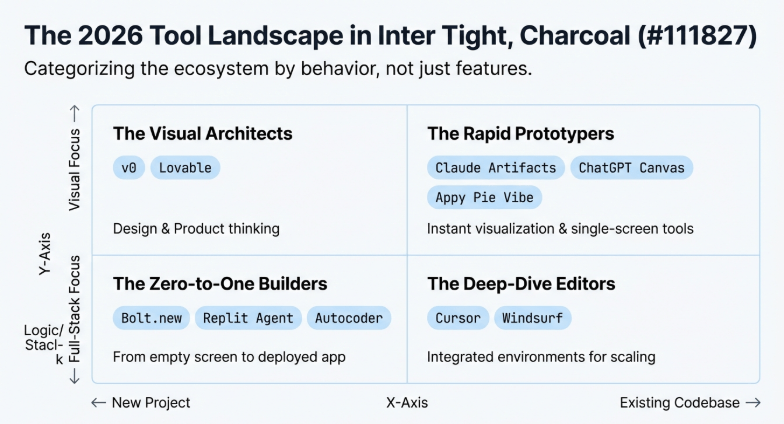
Ask yourself: are you building a public-facing product or an internal tool? Public products need great design and performance. Internal tools just need to work. This difference matters because some tools prioritize functionality (Replit, Windsurf) while others prioritize polished design (v0, Lovable).
Another critical question: do you need backend functionality? Many impressive demos show beautiful frontends, but can the tool actually store data, handle user accounts, or process payments? If your project needs these, verify the tool handles backend work before committing.
Consider your technical comfort level honestly. Some tools (Cursor, Windsurf) assume you’re comfortable working in code editors even if you don’t write code. Others (Bolt.new, Autocoder) hide all technical details completely. Choose based on whether you want to learn gradually or avoid code entirely.
Budget matters more than people admit. Free tiers are great for testing, but real projects often hit limits quickly. Calculate the monthly cost at your expected usage level, not just the free tier promises.
Here’s something most guides ignore: export and portability. Can you take your code and host it elsewhere? Or are you locked into that platform? For hobby projects, lock-in doesn’t matter. For business-critical applications, it’s essential.
The AI’s limitations are tool-specific. Some are excellent at design but weak at logic. Others handle complex backend work but generate ugly interfaces. Understanding these trade-offs prevents frustration when the tool can’t do something you assumed it could.
The Reality of “AI-Generated” Limitations
AI code assistants solve many problems, but they don’t eliminate all technical challenges. Being honest about this saves you from disappointment.
Complex business logic still requires human thinking. If your app needs intricate rules (“calculate commission based on region, product type, sales volume, and contract duration”), the AI might generate code that’s close but not quite right. You’ll need someone technical to refine it.
Security is another area where AI-generated code needs review. These tools create functional applications, but security requires paranoid thinking and edge case consideration that AI doesn’t naturally do. For apps handling sensitive data or payments, have a developer review the generated code.
Performance optimization isn’t automatic. AI generates code that works, but as your user base grows, you might hit performance bottlenecks. A developer can optimize database queries, reduce load times, and improve efficiency—AI rarely does this proactively.
Integration with legacy systems is difficult. If you need your new app to connect with existing software your business uses, AI tools struggle unless there’s a standard API. Custom integrations still require developer work.
Bug fixing can trap you. When something breaks, AI can help diagnose and fix it, but only if you can describe the problem clearly. Intermittent bugs or edge cases where the app “just acts weird sometimes” are harder for AI to solve.
The good news: these limitations mostly affect scaling and complexity. For MVPs, internal tools, and small business applications, AI code assistants handle the job completely. It’s when you’re ready to scale to thousands of users or need enterprise-level features that human expertise becomes necessary.
Browser-Based vs. Local Development: Why It Matters
This might seem like a technical detail, but it dramatically affects usability for non-developers.
Browser-based tools (Bolt.new, Replit, v0) require zero setup. You click a link and start building. No installation, no configuration, no “works on my machine” problems. For people who’ve never installed development software, this removes hours of frustration.
Local development tools (Cursor, Windsurf) require installation and setup. The tradeoff: they’re more powerful and offer better performance. But you’re committing to running software on your computer, which means dealing with updates, potential conflicts, and storage space.
Here’s the practical difference: browser-based tools let you work from any device. You can start a project on your desktop, edit it from your laptop at a coffee shop, and make a quick fix from your tablet. Local tools tie you to the device where they’re installed.
For collaboration, browser-based wins easily. Send a link, and someone else can view or edit your project immediately. Local development requires sharing files, ensuring they have the same setup, and troubleshooting environment differences.
One advantage of local tools: they work offline. If you need to build something without internet access, browser-based tools are useless. Local development continues regardless of connectivity.
Performance can favor local development for large projects. Everything runs on your machine’s hardware, which is usually faster than browser-based computing. For small projects, the difference is negligible.
The choice often comes down to: do you want maximum convenience or maximum power? Most non-developers benefit more from convenience.
The Deployment Gap Most Guides Don’t Mention
Creating the code is only half the journey. Getting your application live on the internet is where many non-developers get stuck, and not all tools handle this equally.
Some tools (Bolt.new, Replit, Lovable) include deployment as part of the workflow. Click a button, get a live URL. You’re not dealing with hosting providers, DNS configuration, or SSL certificates. The tool handles everything.
Other tools (Claude Artifacts, ChatGPT Canvas) generate code but leave deployment to you. You get a working application in their interface, but publishing it requires understanding how to use hosting platforms like Netlify, Vercel, or traditional web hosts.
For non-developers, this deployment gap is where projects die. You’ve built something functional, but the steps to make it publicly accessible feel overwhelming. Guides assume you know what “push to GitHub then deploy via Vercel” means.
Here’s what actually helps: look for tools with one-click deployment or guided deployment workflows. If a tool proudly shows off code generation but barely mentions deployment, that’s a warning sign.
The hosting cost matters too. Some tools include hosting in their subscription. Others generate code you’ll need to host yourself, which adds monthly costs ranging from $5 to $50+ depending on traffic and features.
Custom domain connection is another detail that varies. Can you use yourbusiness.com, or are you stuck with sometool.app/yourproject? For serious business applications, a custom domain is essential.
Pricing Reality: Free Tiers vs. Real Usage
Every tool advertises a free tier, but here’s what they don’t emphasize: free tiers are designed for testing, not real use.
Free limits typically include:
- Limited projects (usually 1-3)
- Usage caps (number of AI requests, builds, or deployments)
- No custom domains
- Community support only
- Branding or watermarks on your app
For learning or hobby projects, free tiers work fine. But if you’re building something for your business or clients, you’ll hit limits quickly.
The upgrade costs vary dramatically. Some tools charge $10-20/month for basic paid plans. Others start at $50+. The difference often reflects whether the tool includes hosting, how much AI processing you get, and support quality.
Here’s the honest math: if you’re replacing freelance developer work, even $100/month for an AI tool is cheaper than hiring developers at $50-150/hour. But if you’re a solo founder bootstrapping, those monthly costs add up across multiple tools.
Watch for usage-based pricing that can surprise you. “First 100 AI requests free, then $0.50 per request” sounds reasonable until you realize iterative development uses requests quickly.
Annual discounts are common—paying yearly often saves 20-30% compared to monthly. If you’re committed to a tool, the annual plan makes financial sense.
The best approach: start with free tiers to test, but budget for paid plans once you’re building something real. Don’t try to squeeze production use out of free limitations.
Solo founders and creators can build and scale faster using AI tools for solopreneurs designed for simplicity and speed.
Learning Curve: Which Tools Actually Feel Easy?
“No coding required” doesn’t mean “no learning required.” Each tool has a learning curve, even if it’s just understanding how to prompt it effectively.
Easiest learning curve (truly beginner-friendly):
- Bolt.new: Conversational, no technical concepts needed
- Autocoder: Business-focused language, guided workflows
- v0: Describe UI, see results immediately
Moderate learning curve (comfortable for tech-aware non-developers):
- Replit Agent: Need to understand basic project structure
- Lovable: Conversational but asks technical questions
- ChatGPT Canvas: Familiar interface, but code is visible
Steeper learning curve (professionals tools with AI assistance):
- Cursor: Real code editor, powerful but complex interface
- Windsurf: Requires understanding project navigation
- Appy Pie Vibe: Need to understand automation logic
The learning curve also depends on what you’re building. Simple landing pages are easy in any tool. Complex applications with user accounts, databases, and custom logic require more understanding regardless of the tool.
Here’s a practical test: spend 30 minutes with a tool building something simple. If you’re frustrated and confused, that tool might not match your current skill level. If you’re making progress and excited, that’s your signal.
Don’t feel pressure to use the “most powerful” tool. The best tool is the one you can actually use to complete your project.
Choosing the right platform becomes easier when users follow a guide on first AI tool selection based on goals and skill level.
Real-World Success Stories (What Actually Gets Built)
Understanding what people actually build with these tools helps set realistic expectations.
Common successful projects for non-developers:
- SaaS landing pages: Marketing sites for software products, built with v0 or Lovable, deployed in hours
- Internal business tools: Inventory trackers, employee directories, client databases built with Replit or Bolt.new
- Client project prototypes: Agencies showing mockups to clients before development, using Artifacts or v0
- Personal portfolios: Designers, writers, consultants showcasing work with custom-built sites
- Automation workflows: Small businesses connecting tools via Appy Pie Vibe, saving hours of manual data entry
What typically doesn’t work well:
- Complex e-commerce platforms: Payment processing and inventory management need serious security and reliability
- Social networks: Real-time features, scaling, and content moderation require technical depth
- Mobile apps with offline features: Most tools focus on web applications, mobile-native development is different
- Applications requiring heavy backend logic: Complex calculations, data processing, or algorithmic work still needs developers
The pattern: AI code assistants excel at CRUD applications (Create, Read, Update, Delete) and interfaces. They struggle with complex logic, real-time features, and scale.
A realistic example: a consulting business used Lovable to build a client intake system. Potential clients fill out a form, the system schedules an initial consultation, sends confirmation emails, and stores client information. Total build time: 4 hours for a non-developer. Previous option: hire a developer for $2,000-3,000 or use a generic tool that didn’t fit their workflow.
Another case: a content creator used v0 to build a landing page for their course launch. Previous attempts using Wix felt limited and generic. With v0, they described exactly what they wanted, got a custom design, and launched in a weekend. The page converted 23% higher than their Wix page.
Combining Tools for Better Results
The best approach often involves using multiple tools for their strengths rather than forcing one tool to do everything.
A practical workflow:
- Design the UI in v0: Get the visual design right first
- Add functionality in Bolt.new: Connect the frontend to backend logic
- Deploy via Replit: Use Replit’s hosting infrastructure
This multi-tool approach takes advantage of each platform’s strengths. v0 creates beautiful interfaces. Bolt.new handles complex functionality. Replit provides reliable hosting.
Another combination:
- Plan features with Claude: Describe your project, get suggestions and structure
- Build in Lovable: Implement the features conversationally
- Automate workflows with Appy Pie Vibe: Connect your app to other business tools
The key is understanding that no single tool is perfect for every aspect. Just like you might use Photoshop for images, Figma for design, and Webflow for building, using multiple AI coding tools for different purposes is completely valid.
One warning: avoid over-complicating by using too many tools. Two or three that complement each other makes sense. Six different tools creates a management nightmare.
Businesses looking to build faster without coding can rely on AI business tools to automate workflows, launch apps, and improve productivity.
When You’ll Still Need a Real Developer
Being realistic about limitations prevents frustration and wasted time.
You’ll likely need developer help for:
Security audits: Before launching anything handling user data or payments, have a security professional review the code. AI generates functional code, not necessarily secure code.
Performance optimization: When your app slows down as users increase, optimization requires understanding databases, caching, and server architecture. AI can’t diagnose “the app just feels sluggish.”
Custom integrations: Connecting to proprietary systems, legacy software, or anything without a standard API needs custom development work.
Complex algorithms: If your business logic requires mathematical modeling, data science, or algorithmic work, AI generates approximations that need expert refinement.
Scaling architecture: Growing from 100 users to 10,000 users often requires architectural changes AI can’t predict or implement.
The good news: you can build much further with AI tools before needing developer help than you could before. The point where you need expertise is much higher now.
A practical strategy: build your MVP with AI tools, validate your idea and get early users, then hire developers to scale and professionalize the application once you have revenue. This approach minimizes risk and avoids paying for development before you know your idea works.
Non-technical users who want to create software easily should explore the coding development category for beginner-friendly AI assistants.
The Future: What’s Coming in 2026-2027
Based on current trajectories and announced developments, AI code assistants are evolving rapidly.
Multimodal prompting is arriving—describe your UI verbally while sketching on paper, point your phone camera at the sketch, and the AI generates the application. No more typed descriptions.
Better understanding of business logic is coming. Current tools excel at structure but struggle with complex rules. Next-generation models will handle “commission structures” and “pricing tiers” with less hand-holding.
Mobile-native development is next. Most current tools focus on web applications. Tools that generate React Native or Flutter code for true mobile apps are in development.
Real-time collaboration features are expanding. Think Google Docs-style multiplayer editing where you and team members can build an application together, with AI assisting all of you simultaneously.
Better testing and debugging built-in. Current tools generate code but don’t thoroughly test edge cases. Future versions will automatically test, find bugs, and fix them before you see the application.
The line between no-code and AI-code will blur. No-code platforms will add AI capabilities, and AI coding tools will add visual builders. The distinction will matter less.
For non-developers, this means: the tools keep getting easier and more powerful. What requires AI assistance today might be click-button-simple next year.
Modern websites are now built using intelligent agents, and agentic AI makes web development accessible even for non-developers.
Privacy and Data Concerns Worth Knowing
When you use AI code assistants, you’re sending your project details, ideas, and potentially sensitive business information to these platforms.
Most tools state in their terms that your prompts and code are used to train their AI models unless you’re on enterprise plans with specific agreements. This means your business idea or proprietary logic could theoretically influence future AI training.
For public projects or non-sensitive applications, this typically doesn’t matter. But if you’re building something genuinely innovative or handling sensitive data, understand the privacy implications.
Some tools (like Claude, ChatGPT) offer settings to opt out of training. Check the platform’s privacy policy and account settings before describing confidential business processes.
Data residency matters for some businesses. Where is your code stored? Are you comfortable with it being processed on servers in other countries? Most non-developers don’t think about this, but it can have legal implications depending on your industry.
A practical approach: use AI tools for structure and general functionality. Don’t include sensitive API keys, proprietary algorithms, or confidential business data in your prompts. Add that information separately after the AI generates the framework.
For truly sensitive projects, consider enterprise plans that offer data isolation and no-training guarantees.
Today, anyone can create and publish tools quickly using an AI coding platform without needing technical experience.
Making Your First Choice: Decision Framework
Stop overthinking and pick based on these simple criteria:
If you need a beautiful landing page fast: v0 If you want a complete application with zero technical knowledge: Bolt.new If you’re building a serious business product: Lovable If you need database functionality: Replit Agent If you already use Claude or ChatGPT: Try Artifacts or Canvas first If you want to learn while building: Cursor If you need to automate existing tools: Appy Pie Vibe
Still unsure? Start with the free tier of Bolt.new and v0. Build the same simple project in both. Whichever feels more natural becomes your primary tool.
Don’t commit to paid plans immediately. Every tool offers free trials or tiers—use them to test with real projects, not tutorials.
The “best” tool is whichever you’ll actually use to complete your project. Perfect choice paralysis is worse than picking a good-enough tool and starting.
To use AI strategically across operations, non-developers can start with a complete AI toolkit designed for practical business use.
Common Mistakes Non-Developers Make
Learning from others’ mistakes saves you time and frustration.
Mistake #1: Trying to build too much at once Start with the smallest functional version possible. Don’t describe a complete application with 15 features. Build one core feature, test it, then add more.
Mistake #2: Being too vague in prompts “Build me a website” gives terrible results. “Build a pricing page with three subscription tiers: Basic ($10/month), Pro ($30/month), Enterprise (custom pricing). Each tier should list 5 features with checkmarks” gets exactly what you want.
Mistake #3: Not testing as you build Request a feature, test it immediately, fix issues before moving on. Don’t describe 10 features then test at the end—debugging becomes impossible.
Mistake #4: Ignoring mobile responsiveness Always test how your application looks on phones. Most tools handle this automatically, but verify it. The majority of your users will likely access via mobile.
Mistake #5: Expecting AI to read your mind The AI doesn’t know your business context. Describe specifics: “the contact form should send emails to [email protected] and store submissions in a database with name, email, and message fields.”
Mistake #6: Not keeping track of your prompts Save successful prompts in a document. When something works perfectly, you’ll want to replicate that approach for other features.
Mistake #7: Treating AI output as sacred If the generated code doesn’t look right, ask for changes. You’re not stuck with the first version. Iterate until it matches your vision.
Successful adoption becomes easier when companies follow a clear AI integration approach tailored for non-technical teams.
The Prompting Skills That Actually Matter
Effective prompting is a skill, but simpler than most guides suggest.
Be specific about output: Don’t just describe features. Describe what success looks like. “A user should be able to upload a profile photo, crop it to a circle, and see it displayed in the navigation bar.”
Mention edge cases: “What happens if the user doesn’t enter an email address?” Thinking through problems before they occur results in better code.
Provide examples: “The design should look similar to Stripe’s pricing page but with our brand colors.” Visual references help tremendously.
Specify technical preferences when you have them: “Use a dark mode design” or “Make sure it works in older browsers” guides the AI toward your requirements.
Ask for explanations: “Explain how the user authentication works in simple terms” helps you understand what’s happening and catches potential issues.
Iterate in small steps: Instead of “now add user accounts, payment processing, and an admin panel,” break it into three separate requests.
Use concrete examples in your descriptions: Rather than “show product information,” say “show product name, price, description, and a ‘Add to Cart’ button.”
The best prompts come from thinking through the user journey. Walk through how someone would actually use your application, describe that journey, and the AI will build accordingly.
Small businesses can save hours every week by using smart business automation tools powered by no-code AI platforms.
Cost Comparison: AI Tools vs Traditional Development
Let’s look at real numbers for a typical project: a client booking system for a consulting business.
Traditional development costs:
- Initial build: $3,000-8,000 (depending on developer rates)
- Revisions and changes: $100-150/hour
- Timeline: 2-4 weeks
- Hosting: $20-50/month
- Maintenance: $500-1,000/year
AI tool approach (using Lovable or Replit):
- Tool subscription: $20-50/month
- Your time building: 4-8 hours
- Timeline: 1-2 days
- Hosting: Included in subscription
- Changes: Make them yourself anytime
The difference isn’t just cost—it’s control. With traditional development, every change requires contacting your developer, explaining the change, waiting for their availability, and paying for their time.
With AI tools, you iterate instantly. Try different layouts, add features, remove what doesn’t work—all without additional costs or waiting.
The financial equation changes when you need complex features AI can’t handle. But for standard business applications (booking, forms, directories, simple e-commerce), AI tools cost 5-10% of traditional development.
One hidden cost: your learning time. The first project takes longer as you figure out how to prompt effectively. By your second or third project, you’re much faster.
Beginners who want to experiment without spending money can explore free AI tools that require no programming knowledge.
Comparison Table
| Tool | Best For | Pricing | Ease of Use | Deployment | Learning Time | Best Use Case |
| v0 | Beautiful UI/landing pages | Free tier; Pro at $20/mo | Very Easy | Manual (export code) | 30 mins | Marketing sites, portfolios |
| Bolt.new | Full-stack apps in browser | Free tier; Pro at $20/mo | Very Easy | One-click included | 1 hour | MVPs, web apps, prototypes |
| Lovable | Production business apps | Starts at $30/mo | Easy | One-click included | 2 hours | SaaS products, client projects |
| Replit Agent | Apps with databases | Free tier; Core at $25/mo | Easy | Automatic on Replit | 1 hour | Internal tools, data apps |
| Claude Artifacts | Quick prototypes/widgets | Included in Claude Pro ($20/mo) | Very Easy | Manual (copy code) | 15 mins | Calculators, dashboards, demos |
| Cursor | Editing existing projects | Free tier; Pro at $20/mo | Moderate | Manual | 3 hours | Maintaining codebases |
| Autocoder.cc | Non-technical entrepreneurs | Starts at $49/mo | Easy | Guided process | 2 hours | Business applications |
| ChatGPT Canvas | Learning while building | Included in Plus ($20/mo) | Easy | Manual (export code) | 1 hour | Educational projects |
| Windsurf | Complex multi-file projects | Free tier; Pro at $30/mo | Moderate | Manual | 4 hours | Larger applications |
| Appy Pie Vibe | Automation & integrations | Starts at $20/mo | Easy | Not applicable | 1 hour | Connecting existing tools |
Final Thoughts: Just Start Building
Analysis paralysis kills more projects than wrong tool choices ever will.
Every tool on this list can build functional applications. The differences matter less than actually using one to complete your project.
Pick a tool based on the decision framework earlier in this article. Set a deadline—”I’ll build version 1 in two weeks.” Then start describing what you want and iterating based on results.
You’ll make mistakes. The AI will generate code that doesn’t quite work. You’ll need to ask for changes multiple times. This is normal and expected. Progress beats perfection.
The breakthrough moment comes when you see something you described actually working. That’s when non-developers realize the barrier has actually lowered. You can build things now that would have been impossible without hiring developers.
Your first project won’t be perfect. It might not even be good. But it will be yours, it will work, and you’ll have learned enough to make your second project significantly better.
The AI coding revolution isn’t coming—it’s here. The tools exist. They work. The only question is whether you’ll use them or keep wishing you could build that idea you’ve been thinking about.
Stop reading guides. Stop researching tools. Pick one and start building today.
People also search:
Can AI code assistants handle e-commerce features like payment processing?
AI code assistants can generate the frontend for e-commerce (product pages, shopping carts, checkout flows), but payment processing requires careful security implementation. Tools like Replit Agent and Bolt.new can integrate with payment APIs like Stripe or PayPal, but you’ll need to follow the payment provider’s documentation carefully. The AI will set up the basic integration, but for production use with real transactions, having a developer review the security implementation is strongly recommended. For simple digital product sales or booking payments, AI tools handle this adequately. For complex inventory management, multiple payment methods, or high-volume transactions, consider using established e-commerce platforms or hiring developers for the payment logic specifically.
What happens to my project if the AI tool company shuts down or changes pricing dramatically?
This depends entirely on code ownership and export capabilities. Tools like v0, Cursor, and Claude Artifacts generate standard code (React, HTML, CSS, JavaScript) that you can export and host anywhere—you’re never locked in. Browser-based tools like Bolt.new and Replit also allow code export, though you’d need to set up hosting elsewhere. The risk is lowest with tools that generate standard, portable code. Before committing to any platform for serious projects, verify: (1) Can you export your complete codebase? (2) Is the code in standard languages or proprietary formats? (3) Does the tool provide database export options? For business-critical applications, maintain regular backups of your code and test that you can run it outside the platform. This exit strategy protects you from sudden pricing changes or service shutdowns.
Can multiple non-developers work on the same project simultaneously using these AI tools?
Collaboration support varies significantly across tools. Replit offers real-time collaborative editing where multiple people can work on the same project simultaneously, similar to Google Docs. Lovable includes team features in higher-tier plans. Bolt.new and v0 primarily work as single-user experiences, though you can share project links for viewing. For true collaboration, look for tools with “team” or “workspace” features in their pricing plans. A practical workaround: use one AI tool to generate code, then manage collaboration through GitHub (which has a learning curve but is industry-standard for team coding). Alternatively, designate one person as the “builder” who implements changes based on team feedback. The lack of robust collaboration features in some tools reflects their focus on solo founders and small teams rather than larger organizations.
