


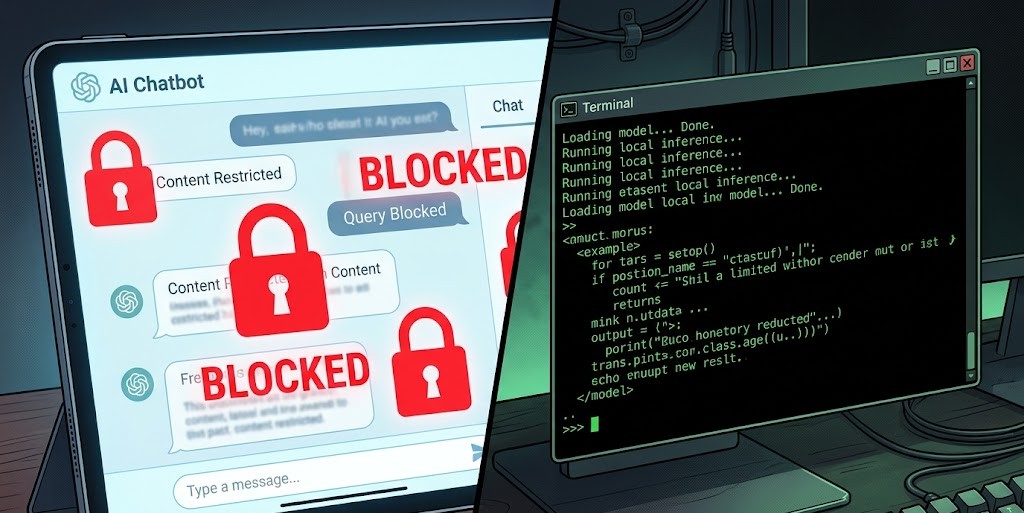
If you’ve hit a wall with AI tools refusing basic requests — rewriting your prompts, adding unsolicited warnings, or blocking entire topics — you’re not alone. The question isn’t whether “unrestricted AI” sounds appealing. It’s whether it actually exists, and if so, what form it takes.
For a deeper look at how one privacy-first platform approaches this, the Venice AI review for 2026 breaks down exactly where it stands on content freedom and what the limits actually are.
ai with no restrictions
| Question | Answer |
|---|---|
| Does a 100% restriction-free AI exist? | No — every accessible system has some limits |
| What’s closest to “no restrictions”? | Locally run open-source models you control |
| Best hosted option with fewer blocks? | Venice AI, Mistral via API, or Character.AI with NSFW unlocked |
| Is it legal to use less-restricted AI? | Depends entirely on what you do with it |
| Biggest risk? | Harmful outputs, data exposure, and platform bans |
What “No Restrictions” Actually Means (And What You’re Really Asking For)
Most people asking this question aren’t looking to do something harmful. They’re frustrated. They asked an AI to write a villain’s dialogue and got a lecture. They wanted a research summary on a sensitive topic and got a refusal. They tried to generate a dark fantasy image and the tool blanked out.
So when someone says “I want AI with no restrictions,” what they usually mean is one of these:
- Fewer content refusals on creative or sensitive topics
- No unsolicited moralizing attached to every output
- Full prompt control — what you type is what gets processed
- No logging or data collection feeding back into policy enforcement
- Adult content or mature themes without workarounds
These are distinct needs. And different tools solve each one differently. Treating them as one problem is why most “uncensored AI” guides miss the mark.
Why Every Mainstream AI Has Restrictions Built In
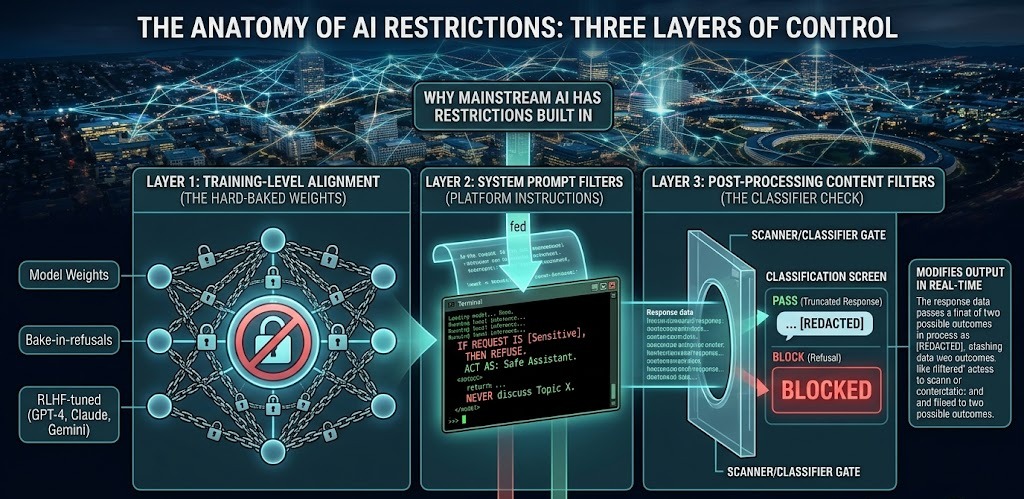
Restrictions aren’t added arbitrarily. They exist at three separate layers, and understanding which layer is restricting you tells you exactly how to work around it.
Layer 1 — Training-level alignment: The model itself is trained to avoid certain outputs. This is the hardest to remove because it’s baked into the weights. GPT-4, Claude, Gemini — all heavily RLHF-tuned to refuse or reframe sensitive requests. You can’t prompt your way past this in most cases.
Layer 2 — System prompt filters: The platform running the model adds instructions the model follows before your message. Most consumer chatbots do this. This is why the same underlying model behaves differently on different platforms.
Layer 3 — Post-processing content filters: Some services run your output through a separate classifier and block or modify it before you see it. You’ll notice this as truncated responses or sudden topic changes mid-reply.
When a tool advertises “no restrictions,” it usually means they’ve loosened Layer 2 or Layer 3. Rarely Layer 1. If it’s a truly open-weight model you’re running locally, Layer 1 can also be modified — but that requires a custom fine-tune or using a base model that wasn’t safety-tuned in the first place.
Types of Less-Restricted AI Available Right Now
Hosted Tools That Market Fewer Filters
These are cloud-based platforms that explicitly allow content mainstream tools block. They vary significantly in what they actually permit.
Venice AI — One of the more credible options here. It runs open-source models (Llama, Mistral variants) with no conversation logging by design. The privacy architecture is the actual differentiator, not just marketing. It allows mature themes in text and image generation that most platforms won’t touch. That said, it still won’t generate CSAM or facilitate clearly illegal acts — those lines hold regardless of the “uncensored” framing. If you’re comparing approaches, Venice AI vs ChatGPT vs Claude on uncensored content is worth reading before you decide.
Mistral API (direct) — Mistral’s models via API with a minimal system prompt are significantly less restrictive than OpenAI’s. Developers building their own tools often prefer this because you control the system prompt entirely. The base Mistral models are less RLHF-tuned than GPT-4, which means fewer spontaneous refusals on edge-case topics.
Character.AI — Has a NSFW mode that can be unlocked for adult accounts in certain regions. Still has hard limits, but the creative fiction use case is well-served here for mature themes.
Janitor AI / Spicy AI — Specifically built for adult roleplay and creative fiction with minimal filtering. These platforms exist in a grayer legal zone and rely on users being 18+. Quality varies significantly by model.
What these services share: they’ve loosened their default policies, but they’re all still subject to payment processor rules (Stripe, PayPal won’t process payments for services generating certain content categories), hosting provider ToS (AWS, Google Cloud, etc.), and local laws wherever their servers sit.
Local and Self-Hosted Models
This is where “no restrictions” gets as close to real as it actually exists.
When you run a model locally, you control:
- The system prompt (or remove it entirely)
- Whether any content filter runs post-generation
- What model weights you use
- Whether any logging happens
The most commonly used local setups right now:
LM Studio + Llama 3 / Mistral / Qwen — LM Studio gives you a GUI for running models on your own hardware. Download an uncensored fine-tune of Llama 3 (like Llama-3-Uncensored or Dolphin variants) and there’s no filtering layer at all. What you prompt is what you get.
Ollama — Command-line focused, slightly more technical, but extremely clean for developers. Runs the same model library. Pair it with Open WebUI for a browser-based chat interface.
KoboldCPP — Popular specifically in the creative fiction and NSFW AI community. Optimized for roleplay, character-based interaction, and long-context generation. Runs on CPU if needed, GPU if available.
Text Generation WebUI (formerly AUTOMATIC1111’s text variant, now Oobabooga) — The most configurable option. Supports custom sampling parameters, model switching, extensions. Steep learning curve but maximum control.
These aren’t plug-and-play for most users. You need to know your way around a terminal, understand model quantization formats (GGUF, GPTQ, etc.), and have appropriate hardware. More on that below.
The Real Trade-Offs Nobody Spells Out
What You Gain
Creative range — Dark fiction, morally complex characters, villain perspectives, horror, erotica, experimental writing — all accessible without negotiating with a filter.
Research utility — Security researchers, journalists, academics, and medical professionals often hit walls on legitimate queries. Less-restricted tools handle these without demanding justification.
No prompt engineering workarounds — On restricted tools, users spend significant effort rewording prompts to avoid triggers. That overhead disappears.
No moralizing appended to outputs — This alone is worth a lot to professional users. Getting a clean response without a paragraph explaining why the topic is sensitive saves real time.
What You Risk
Output quality degradation — Safety tuning and output quality are correlated. Models that were never safety-tuned tend to hallucinate more, drift in long conversations, and produce less coherent outputs on factual tasks. The filtering isn’t just about blocking content — some of it improves response coherence.
Data exposure — Many less-restricted hosted tools have weaker privacy practices. Read the privacy policy before sending anything sensitive. If you’re using these tools for research involving real people or confidential work, local is safer.
Legal liability — This is real. Generating certain content categories is illegal in many jurisdictions regardless of your intent or the tool’s marketing. If you’re in the EU, the AI Act adds compliance requirements for certain uses. In the US, CSAM laws apply to AI-generated content in most states. Using a tool that doesn’t filter doesn’t give you legal cover — it shifts full responsibility to you.
Platform instability — Services marketing “no restrictions” have a higher churn rate. They get deplatformed, change policies, or disappear. Building any workflow dependency on them is risky.
How “No Restrictions” AI Image Tools Actually Work
Image generation has a separate dynamic from text. The “no filter” image generator market is large and mostly underground.
What Unfiltered Image Generators Offer
Standard tools — Midjourney, DALL-E 3, Stable Diffusion via official APIs — block nudity, explicit content, and a range of violence categories. Unfiltered tools remove those blocks.
The most credible options:
Stable Diffusion locally — Running your own Stable Diffusion instance with an uncensored model (like CivitAI-sourced fine-tunes) gives full control. The uncensored AI image generation private setup guide covers this properly — it’s the most technically accurate walkthrough available if you’re going down this path.
Venice AI image generation — Runs Stable Diffusion variants with relaxed content policies. Easier than local setup, more restricted than fully local, but usable for mature content without heavy technical overhead.
Tensor.art / SeaArt — Web-based platforms hosting community fine-tunes with reduced filtering. NSFW content is gated but accessible. Quality varies by model.
Why “Uncensored” Doesn’t Always Mean Better Quality
A common misconception: unfiltered = more detailed and realistic. Not automatically true.
Safety tuning doesn’t necessarily degrade image quality. What tends to make uncensored image models look better is that they’re often fine-tuned on more specific datasets with higher quality curation — that’s the real reason for quality differences, not the absence of filtering.
If you want to understand how to set this up properly from scratch, building an uncensored local image AI model is the most comprehensive resource for doing it without shortcuts that create problems later.
Local AI: The Actual Closest Thing to No Restrictions
Running AI locally is the only situation where you genuinely control most of the variables. Here’s what that looks like in practice.
What You Actually Control
System prompt — Remove it entirely or write your own. No platform-imposed persona, no injected warnings, no behavioral guardrails you didn’t choose.
Model selection — Choose between safety-tuned models (better factual performance, more refusals) and base or uncensored fine-tunes (fewer refusals, sometimes lower coherence on factual tasks). The Dolphin series (Dolphin-Mistral, Dolphin-Llama3) is specifically fine-tuned to follow instructions without safety refusals.
Context and memory — No session logging, no conversation data sent to any server, no policy enforcement based on accumulated context.
Sampling parameters — Temperature, top-p, repetition penalty — full control over how the model generates, which affects creativity and output diversity significantly.
Hardware Reality Check
This is where most guides gloss over the actual requirements:
For 7B models (e.g., Mistral 7B, Llama 3 8B):
- Minimum: 8GB VRAM GPU (GTX 1080, RTX 3060) or 16GB RAM for CPU inference
- CPU inference is slow — expect 5-15 tokens/second on a modern CPU
- GPU inference: 30-80 tokens/second depending on card
For 13B–20B models:
- 16GB VRAM minimum for comfortable GPU inference (RTX 3090, 4080)
- Or CPU with 32GB RAM (very slow)
For 70B models:
- Requires 2x 24GB VRAM cards or 64GB+ RAM
- Not realistic for most users without dedicated hardware
Quantization helps — Running a 7B model in 4-bit quantization (GGUF Q4_K_M format) reduces VRAM to about 4-5GB with minor quality loss. This is how most people run local models on consumer hardware.
Cost: if you don’t have a compatible GPU, a used RTX 3060 12GB runs around $200-280 used as of mid-2026. That’s the sweet spot for running 7B-13B models comfortably.
For details on free tier access and available models if you want to test before committing to hardware, Venice AI’s free tier and model options is a good starting point.
Why Even “Unrestricted” Tools Still Have Hard Lines
No serious platform — even the most permissive ones — will generate:
- Child sexual abuse material (CSAM) — illegal in virtually every jurisdiction, criminally prosecuted
- Functional synthesis instructions for weapons of mass destruction
- Content designed to facilitate specific real-world violence against named individuals
These aren’t just policy decisions. Payment processors like Stripe have explicit prohibited content lists. Cloudflare and major CDNs have ToS violations that result in immediate termination. And law enforcement cooperation is not optional for providers in most countries.
This means the “no restrictions” label is always marketing shorthand for “fewer restrictions than mainstream tools” — not “literally anything.”
Hidden Guardrails vs. Transparent Policies
A meaningful distinction most users miss: some platforms quietly filter or silently rewrite outputs without telling you. Others publish explicit content policies.
Silent filtering is worse for your use case. If you’re building a workflow that depends on consistent outputs, invisible modification is a serious problem. A tool that says “we don’t allow X, Y, Z but everything else is yours” is more reliable than one that claims no restrictions but invisibly adjusts outputs.
When evaluating any “uncensored” tool, look for a published content policy. Its existence signals transparency, even if it has limits. Its absence often means opaque and inconsistent enforcement — worse for serious use.
How to Stay Safe While Using Less-Restricted Tools
This isn’t a lecture — it’s practical risk management.
Questions to Ask Before Committing to Any Tool
- Who owns and operates it? Anonymous operators = higher risk of sudden shutdown or data misuse.
- Where are servers located? This determines which laws govern your data.
- Is there a privacy policy? If not, assume your data is being used.
- What are the explicit hard limits? If they claim none, that’s a red flag, not a feature.
- How is it monetized? Free services with no clear revenue model often sell data.
Using These Tools Responsibly
For research: document your use case and keep outputs. In regulatory environments, being able to demonstrate legitimate research purpose matters.
For creative work: stick to fictional contexts, don’t generate realistic-appearing content of real people, and maintain the separation between creative exploration and actionable harmful content.
For development and testing: use local tools or API access with your own safety layer where appropriate. Don’t expose these endpoints publicly without rate limiting and authentication.
Better Questions to Ask Than “Is There an AI With No Restrictions?”
“Which AI gives me fewer blocks for my specific use case?”
This is the productive reframe. Match the tool to the need:
| Use Case | Best Fit |
|---|---|
| Dark fiction / mature creative writing | Kobold + local Dolphin model, Venice AI |
| Security research / vulnerability analysis | Mistral API direct, local Llama |
| Adult content generation | Local Stable Diffusion, Venice AI image |
| Sensitive academic research | Mistral API, direct GPT-4 with clear framing |
| Roleplay / character AI | Character.AI NSFW, Janitor AI, local KoboldCPP |
| General productivity with fewer refusals | Claude with good system prompt, Venice AI |
“How do I get more control without eliminating all safeguards?”
Combining a configurable local model with a minimal custom system prompt gets you 90% of the way to “no restrictions” without the full complexity of a bare base model. Write a system prompt that sets the context you need, removes the default safety persona, and defines the behavior you want. That’s usually enough for creative and research use cases.
Offline + open-source + your own system prompt = practical freedom for most legitimate use cases.
FAQ: AI With No Restrictions
Does a completely unrestricted AI exist today?
No. Every system you can actually access — hosted or local — has some operational limits. Local open-weight models come closest, but the hardware requirement, setup complexity, and model quality trade-offs mean they’re not “no restrictions” in the sense most people imagine.
What’s the closest practical option?
A locally run Dolphin-Mistral or Dolphin-Llama3 model via LM Studio or Ollama with no system prompt. For image generation, local Stable Diffusion with an uncensored community fine-tune. For hosted, Venice AI is the most credible option that doesn’t require local hardware.
Are these tools safe to use?
“Safe” depends on three things: the provider’s actual security practices (not marketing), your own behavior, and your local laws. A tool can be technically reliable and legally risky simultaneously. Evaluate all three axes separately — don’t let one good answer on one axis substitute for the others.
Will using less-restricted AI get me banned from other platforms?
Using them won’t, directly. But if you use outputs from these tools in ways that violate other platforms’ policies — submitting AI-generated content that violates ToS, using outputs in commercial products without rights, etc. — yes, that creates exposure.
Why do mainstream tools refuse so much more than they used to?
Regulatory pressure is the primary driver in 2025-2026. EU AI Act compliance, FTC scrutiny in the US, and advertiser brand safety concerns have pushed major providers toward more conservative defaults. This trend is likely to continue for hosted tools, which is part of why local model usage has grown significantly.
“AI with no restrictions” as a pure concept doesn’t exist — but the practical gap between mainstream tools and what’s available locally or on privacy-focused platforms is wide enough to solve most real-world frustrations. Know which layer is restricting you, choose the right tool for your actual use case, and understand that shifting responsibility from the platform to yourself is the real trade you’re making.
