



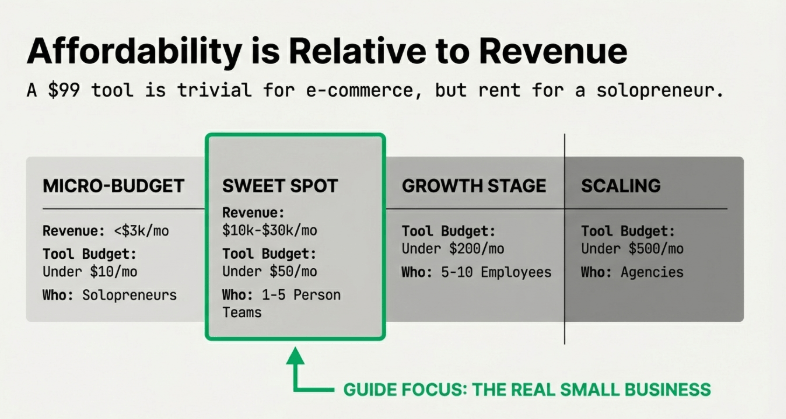
A practical framework by business stage:
- Under $10/month — Micro-budget. Solopreneurs, side hustles, day-zero startups. Use free tiers and cheapest paid plans.
- Under $50/month — Small business sweet spot. 1-5 person teams, bootstrapped operations. You can afford 3-5 tools without bleeding out.
- Under $200/month — Growth stage. 5-10 employees, replacing at least one part-time hire with AI.
- Under $500/month — Agency or scaling startup tier. Multiple team members, multiple tools.
This guide focuses on the $10–$100 range because that’s where real small businesses live. Not the venture-backed startup with a $5K software budget. The actual business where the owner is also the marketer, the writer, the customer service rep, and the bookkeeper.
| KEY INSIGHTThe real affordability question isn’t just the monthly fee. It’s whether the tool saves you more than it costs. A $20/month AI writing tool that saves 8 hours/month at $25/hour = $200 saved. That’s a 10x return. |
Why Do Small Businesses Waste $1,968/Year on the Wrong AI Subscriptions?
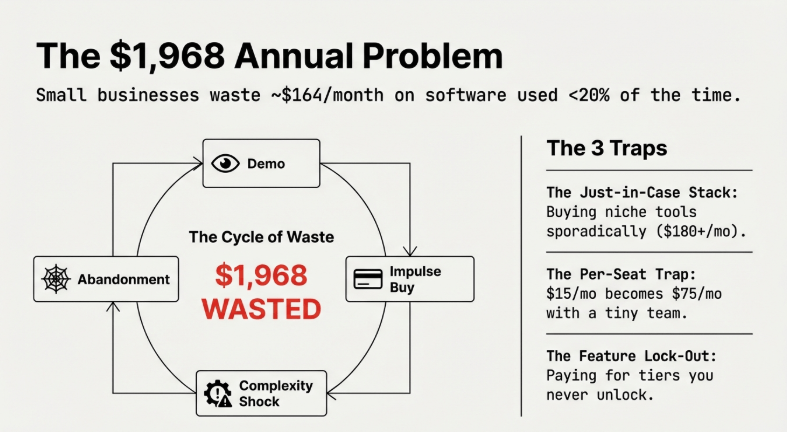
That number isn’t random. It’s $164/month — the average amount small business owners overspend on software they use less than 20% of.
The problem is how people buy AI tools. They see a product demo, it looks incredible, they sign up on emotion. Then three things happen: the tool is more complex than expected, the free trial auto-converts to paid, and they have five tools that each do one thing when one tool could do all five.
The three most common money-wasting patterns:
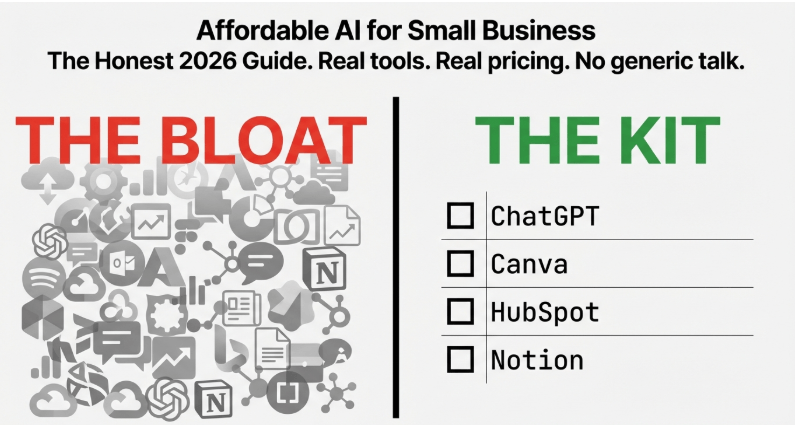
- Pattern 1: The ‘Just in Case’ Stack — Jasper for writing, Midjourney for images, Descript for video, Calendly for scheduling, Notion AI for notes. That’s $180+/month for tools you use sporadically. One ChatGPT Plus subscription at $20 handles most of this.
- Pattern 2: The Per-Seat Trap — Sign up at $15/month per user. Add two employees: $45/month. Add a VA: $60/month. The pricing page said ‘starting at $15’ and you’re now at $75 without upgrading a single feature.
- Pattern 3: Paying for Capabilities You Never Unlock — Premium AI tools lock their best features behind higher tiers. Small businesses pay for the mid-tier hoping to ‘grow into it’ and never do.
| ACTION STEPFix: Audit every AI subscription quarterly. Ask — Did I use this 10+ times last month? Does a cheaper alternative exist? Is this doing something I couldn’t do with a tool I already pay for? |
What’s the Hidden Cost Crisis in ‘Affordable’ AI Tools (And How to Avoid It)?
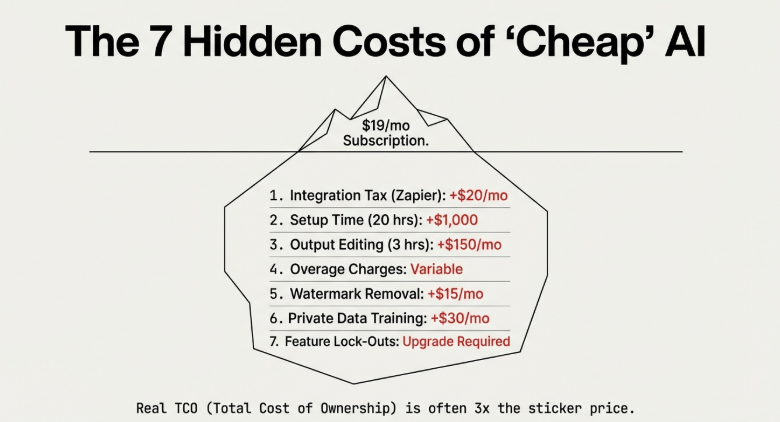
The sticker price is never the real price. A tool priced at $19/month sounds fine. But then: you need Zapier to connect it ($20/month minimum), the AI outputs need human editing (2 hours/month of your time), the output quality requires prompt engineering (another hour of learning upfront), and customer support takes 3 days to respond via forum.
Suddenly your ‘$19 tool’ is costing you $60+ in time and integrations.
The real hidden costs to calculate before subscribing:
- Setup time — Some tools take 15 minutes. Others need a week. A tool that takes 20 hours to set up at your $50/hour value = $1,000 hidden cost before you get a single output.
- Integration fees — If a tool doesn’t natively connect to what you already use, you’ll pay for middleware. Zapier Starter is $20/month — that needs to be added to every ‘affordable’ tool that requires it.
- Usage limits and overage charges — Many tools have caps that hit faster than you expect. ‘Unlimited’ almost never means unlimited. Read the fine print.
- Output quality costs — Cheap AI tools produce lower-quality outputs. That means more editing time. If you spend 3 hours editing $10/month AI writing vs. 30 minutes editing $30/month AI writing, the expensive tool is cheaper in practice.
- Vendor lock-in — Some tools store your data in proprietary formats. Switching costs money and time. Ask: ‘Can I export everything if I want to leave?’
How Much Should a 1-Person Business Really Spend on AI Tools Monthly?
Short answer: $0–$75/month, depending on how central AI is to your revenue.
| Business Type | Budget/Month | Priority AI Tools |
|---|---|---|
| Service (consulting, coaching, freelancing) | $30–$75 | Writing assistant, scheduling, proposal generator |
| Product-based (e-commerce) | $50–$100 | Product descriptions, customer service chatbot, email automation |
| Content creators | $20–$60 | AI writing, image generation, video editing assistance |
| Local businesses (restaurants, retail) | $0–$30 | Social media content, email newsletters — free tiers often enough |
| RULE OF THUMBOne rule across all types: Don’t pay for more than 3 AI tools until you’re getting clear ROI from at least 2 of them. Most businesses with 6-7 AI subscriptions are using 2 of them productively. |
What’s the TCO of ‘Free’ AI Tools (When Free Costs You $200/Month in Time)?
TCO stands for Total Cost of Ownership. The idea: add up every cost associated with using a tool, not just the subscription.
Real example: You use the free tier of an AI image generator for e-commerce product photos. Cost: $0/month. But the free tier allows only 10 images/day, has watermarks requiring removal, and produces lower resolution requiring regeneration. Total time wasted: 6 hours. At your $50/hour value = $300. The paid plan that removes all these limits costs $15/month. You ‘saved’ $15 and lost $300.
When free tiers actually work:
- ChatGPT Free — Fine for occasional drafting and brainstorming. Falls short if you’re hitting daily message limits.
- Canva Free — Legitimately useful for social media graphics and simple designs. Only upgrade for Brand Kit and premium templates.
- Notion Free — Works for small teams (up to 10 members), personal notes, and basic project tracking.
- Google Gemini Free — Solid for basic AI assistance inside Gmail and Google Docs.
- Buffer Free — 3 social channels, 10 posts per channel queue. Fine for simple scheduling.
| REMINDERHonest rule: Evaluate free tiers by whether they handle your actual volume. If you hit the free limit in the first week, the upgrade cost is your real price. |
Why Are All-in-One AI Platforms Cheaper Than 6 Separate Subscriptions?
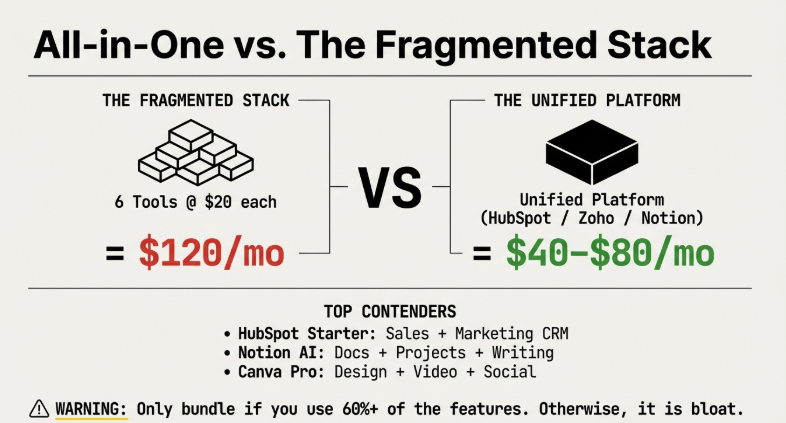
Six separate tools at an average of $20 each = $120/month. One all-in-one platform covering the same functions = $40–$80/month. The math is clear. But most small businesses still end up with the fragmented stack because they discovered tools one at a time, solving one problem at a time.
The best all-in-one platforms worth knowing:
- HubSpot (Free + $20/month Starter) — CRM, email marketing, live chat, social scheduling, and landing pages. For small businesses that need sales + marketing in one place, nothing comes close at this price.
- Notion AI ($16/month) — Notes, project management, databases, docs, and AI writing assistance. Replaces a project management tool, notes app, and writing assistant.
- Canva Pro ($15/month) — Design, social scheduling, video editing, AI image generation, brand kit management, and presentation creation.
- Durable ($25/month) — Builds and manages your entire small business website with AI content and basic CRM.
- Zoho One ($37/month per employee) — CRM, HR, finance, marketing, email, and project management. Unbeatable value for teams that need everything.
| WATCH OUTWarning: All-in-ones only beat individual tools if you actually use most of the features. Only pay for a bundle when you’re genuinely using 60%+ of it. |
What Are the Best AI Tools Under $10/Month for Solopreneurs (2026)?
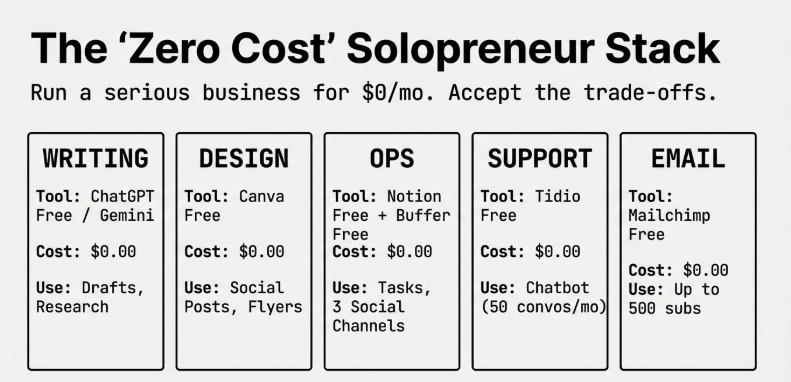
You can run a serious one-person business on under $10/month in AI tools. In fact, you can run it on $0.
| Tool | Cost | What It Covers |
|---|---|---|
| ChatGPT Free | $0 | Writing, brainstorming, email drafts, social captions, research |
| Canva Free | $0 | Social posts, presentations, simple logos, flyers |
| Google Gemini Free | $0 | AI assistant built into Gmail and Google Docs |
| Notion Free | $0 | Notes, tasks, content calendars, client databases |
| Buffer Free | $0 | 3 social channels, 10 posts/channel queue |
| Tidio Free | $0 | AI chatbot for website, 50 AI conversations/month |
| Mailchimp Free | $0 | Email list up to 500 subscribers, AI writing assistance |
Total cost for all of the above: $0/month. You have writing help, design, social scheduling, project management, a website chatbot, and email marketing.
| RULEWhen to start paying: When you’re hitting free limits weekly, not occasionally. Until then, exhaust what you can do for free. |
Which AI Tools Offer Generous Free Tiers You Can Actually Use for Business?
Actually useful free tiers:
- Claude Free (Anthropic) — Solid access to Claude Sonnet. Good for long-form writing, nuanced analysis, coding, and document review.
- Perplexity Free — AI-powered search with real-time web results. 5 Pro searches/day, unlimited standard searches. Invaluable for research.
- Otter.ai Free — 300 minutes of audio transcription per month. For customer calls, team meetings, or interviews.
- Copy.ai Free — 2,000 words/month free. The marketing copy template library is the best free resource in this category.
- Loom Free — AI-powered video messages with auto-summary. 25 videos max — enough for regular client communication.
- Zoho CRM Free — Up to 3 users, core CRM features, 5,000 record storage. Legitimately functional for small teams.
Free tiers that hit limits fast (be warned):
- Jasper Free — Extremely limited word count, pushes you to $49/month quickly
- Notion AI Free — AI features require paid plan
- Midjourney Free — Discontinued; paid only
What’s the Best $20/Month AI Stack for a 2-Person Startup?
If you have $20/month and two people, here’s the most efficient allocation:
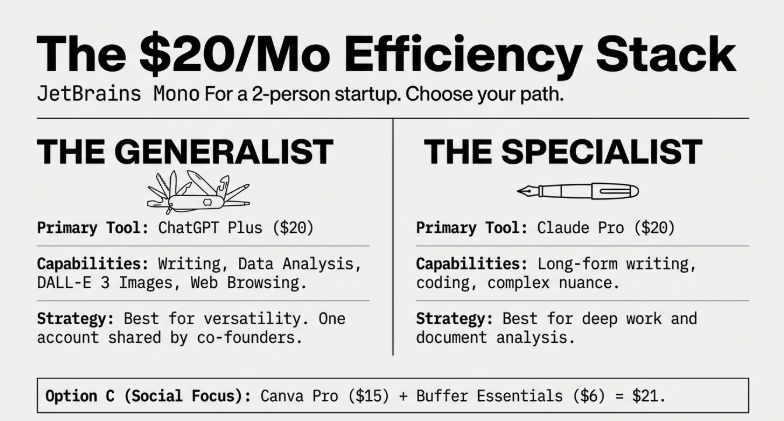
Option A: ChatGPT Plus at $20/month
Covers: Writing, brainstorming, email drafting, social captions, image generation via DALL-E 3, data analysis, customer response templates. Two people can share one account by one person acting as the designated AI operator for both.
Option B: Split across two specialized tools
- Claude Pro at $20 — best for long-form writing, research, complex analysis
- Or: Canva Pro ($15) + Buffer Essentials ($6) = $21/month — professional design + social scheduling
| RECOMMENDATIONHonest recommendation: Start with ChatGPT Plus only. Use it daily for everything. Figure out what it doesn’t do well for YOUR use case. Then add one targeted tool that fills exactly that gap. Don’t guess — discover through use. |
How Do You Build a Complete AI Toolkit for Under $50/Month?
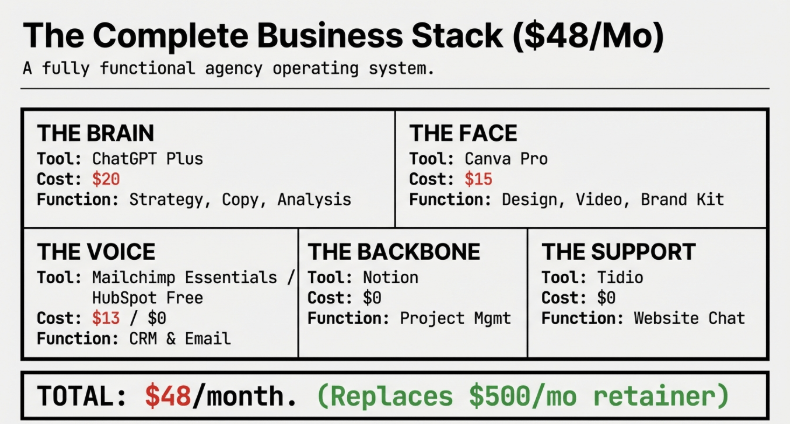
$50/month is a real budget. Here’s a complete, functional AI stack:
| Function | Tool | Plan | Cost |
|---|---|---|---|
| AI Writing + Thinking | ChatGPT Plus | Plus | $20/month |
| Design + Social Graphics | Canva Pro | Pro | $15/month |
| Email Marketing | Mailchimp Essentials | Essentials | $13/month |
| Social Scheduling | Buffer | Free | $0 |
| Project Management | Notion | Free | $0 |
| Website Chat | Tidio | Free | $0 |
| TOTAL | $48/month |
Where to cut if $48 is too much:
- Drop Mailchimp and use HubSpot Free (includes email + CRM)
- Drop Canva Pro and use Canva Free (lose brand kit and premium templates)
- Use Claude Free instead of paid (hit daily limits occasionally)
- Total with these cuts: $0–$20/month
What AI Tools Have Pay-As-You-Go Pricing (No Monthly Commitment)?
Pay-as-you-go is ideal when your AI usage is unpredictable. Some months you need a lot, some months almost nothing.
- OpenAI API — Access GPT-4o-mini at roughly $0.15 per 1M input tokens. 100 emails/month = under $1 total. Requires technical setup.
- Anthropic API — Claude Haiku at $0.25 per 1M input tokens. Realistic small business cost often under $5/month.
- Stability AI Credits — AI image generation. Buy credits as needed. $10 buys roughly 500 image generations.
- Adobe Firefly Credits — Pay per image or video generation. Free users get 25 monthly credits.
- Ideogram.ai — AI image generation with pay-per-image pricing beyond free tier.
| USE THIS WHENWhen pay-as-you-go makes sense: Seasonal businesses, project-based work, or any situation where usage is genuinely sporadic. Don’t pay $20/month for a tool you use twice a month. Pay $3 for what you actually used. |
Which ‘Premium’ AI Tools Have Secret Budget Plans (Under $50)?
- Jasper — Runs frequent discounts. 40-50% off annual billing gets Creator plan under $30/month.
- Writesonic — Individual plan at $16/month (annual) is rarely the first option shown.
- Descript — Hobbyist plan at $24/month includes 10 hours transcription. Most reviews only mention the $40 Creator plan.
- Midjourney — Basic plan at $10/month gives 200 images. Most people assume they need the $30 plan when they don’t.
- Notion AI — The AI add-on at $10/member/month on top of Plus ($16/month) = $26/month total with full AI + project management.
| PRO TIPPattern: Always check annual billing, ask about nonprofit/student discounts, and look for plans buried below the ‘recommended’ option on pricing pages. |
What’s the Cheapest AI Writing Tool That Beats ChatGPT Quality?
Direct answer: For most use cases, nothing consistently beats GPT-4o or Claude 3.5 Sonnet at a cheaper price. But there are specific scenarios where alternatives win:
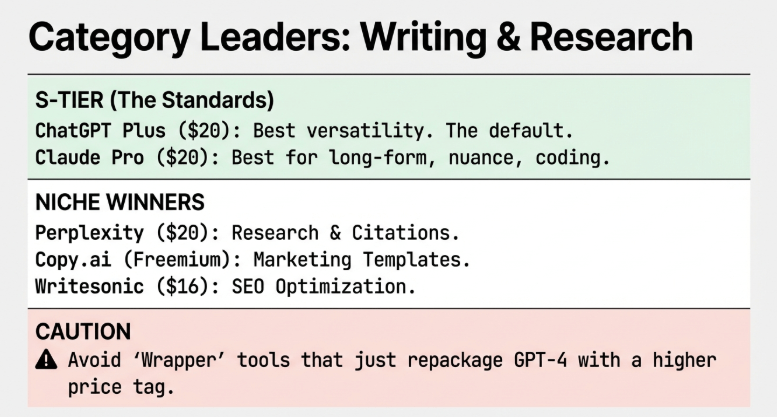
- For marketing copy specifically: Copy.ai ($49/month or free) — tuned for conversion-focused content. Templates and workflows are faster for pure marketing output.
- For SEO-optimized writing: Writesonic ($16/month) — natively adds headers, optimizes keyword placement, checks readability scores.
- For factual, research-backed content: Perplexity AI Pro ($20/month) — sources claims in real-time, cites sources, less hallucination on factual topics.
- For long-form article writing: Claude Pro ($20/month) — consistently produces best long-form writing quality. More human-sounding, handles nuance better.
- For pure cost efficiency: GPT-4o-mini via API at fractions of a cent per request. Under $5/month for light business use.
| AVOID THISWhat NOT to do: Don’t subscribe to multiple writing tools to ‘compare.’ Pick one, use it for 30 days, get good at prompting it, then switch only if a specific gap appears. |
Which AI Image Generator Gives Professional Results for Under $15/Month?
- Adobe Firefly ($9.99/month) — Every image cleared for commercial use. No copyright ambiguity. Best for product mockups, marketing backgrounds, social visuals.
- Canva Pro ($15/month) — Built-in AI image generator. If you’re already using Canva for design, this is included. Good enough for most social media and marketing uses.
- Ideogram.ai ($8/month) — Best for AI images with text in them. Historically where AI generators fail most — Ideogram handles it well. Best for promotional materials and posters.
- Leonardo.ai ($12/month) — Fine-grained control over art style and character consistency. Best for consistent characters across multiple images (brand mascot, illustrated content).
| START HEREPractical tip: For most small business image needs (social posts, website graphics, product backgrounds), Canva Pro’s built-in AI image generation is sufficient and bundled with design tools. Start there. |
What’s the Best Budget AI Video Tool for Small Business Marketing?
- CapCut Free ($0) — For short-form video (TikTok, Instagram Reels, YouTube Shorts). Includes AI background removal, auto-captions, auto-translation, text-to-speech, AI script generation. Extraordinary value for free.
- Descript ($24/month Hobbyist) — Best for podcast editing, screen recordings, tutorials, interview content. Edit video by editing the transcript. Revolutionary for non-editors.
- InVideo AI ($25/month) — Type a prompt, get a complete video with stock footage, voiceover, and captions. Functional for social media ads and product showcases.
- Runway ML ($15/month Basic) — AI video generation from text or images. Best for creative product visualizations and abstract branding content.
- Loom + CapCut combo ($0/$0) — For service businesses: record in Loom, edit in CapCut, add auto-captions. Total cost: nothing.
| RULEWhen NOT to pay for video AI: If you’re making fewer than one video per week, free tools cover you completely. Only upgrade when video production is a consistent, revenue-generating activity. |
How Do You Automate Customer Service for Under $30/Month (AI Chatbot)?
Customer service AI is the category where small businesses save the most time per dollar spent. A chatbot that answers 40% of your incoming questions at 2am saves hours of email per week.
Tidio Starter ($29/month) — Step-by-step setup:
- Go to tidio.com, sign up free
- Copy the JavaScript widget code from your dashboard
- Paste it into the <head> section of your website (or install via WordPress plugin)
- In Lyro settings, paste your FAQ page URL — it scrapes and learns automatically
- Test by opening an incognito window and asking common customer questions
- Review conversation logs weekly and add missed questions to your FAQ
- Turn on email notifications for conversations Lyro escalates
What Lyro handles well: product questions, shipping policies, return processes, business hours, pricing, appointment scheduling. What it struggles with: complex complaints, custom orders, anything requiring human judgment. Set it to escalate those automatically.
| WARNINGDO NOT: Turn Lyro on without testing it first. An untrained chatbot giving wrong answers damages customer trust more than no chatbot at all. |
What’s the Most Affordable AI CRM for 1-10 Person Teams?
- HubSpot Free CRM ($0) — Best answer for businesses under 10 people. Unlimited contacts, contact management, deal pipeline, email tracking, meeting scheduling, live chat, AI-powered email drafting. Free forever.
- Zoho CRM Free ($0) — 3 users, core CRM, basic automation, 5,000 records. Good if already in Zoho ecosystem.
- Notion + CRM template ($0) — Free CRM templates create functional contact database and deal pipeline entirely in Notion. Not as powerful but requires no new tool.
- Pipedrive ($14/month Essential) — Best CRM for sales-focused businesses. Pipeline view is more intuitive than HubSpot for active deal management. AI sales assistant included.
HubSpot Free CRM — How to set it up (2 hours):
- Sign up at hubspot.com
- Import your contact list as a CSV
- Create deal pipeline stages: Lead > Qualified > Proposal > Closed Won
- Install the HubSpot Gmail or Outlook email extension
- Done — you have a fully functional CRM
| UPGRADE TRIGGERWhen to upgrade from free CRM: When you need email sequences (automated follow-up drips), predictive lead scoring, or multiple team members with different permission levels. Until then, HubSpot Free handles everything. |
Which AI Accounting Tool Saves More Than It Costs (Under $25/Month)?
- Wave Free ($0) — Free accounting with bank connection, invoicing, expense tracking. Auto-categorizes transactions using ML. For businesses under $500K/year revenue, legitimately complete.
- Xero Starter ($29/month) — Most AI-forward option. Bank reconciliation automation, receipt scanning, cash flow forecasting. Covers 20 invoices and 5 bills per month.
- QuickBooks Simple Start ($17.50/month with promotions) — Standard choice. AI receipt capture, auto-categorization, mileage tracking via mobile app.
- FreshBooks ($17/month) — Best for service businesses. AI expense categorization, time tracking, client portal, automated invoice reminders.
The ROI calculation for FreshBooks at $17/month:
| Benefit | Monthly Value |
|---|---|
| 1 hour saved on manual invoicing | $50 |
| 2 expenses caught/recovered per month | $40 |
| 5 automated invoice reminder emails | $25 |
| Total monthly value | $115 |
| Tool cost | $17 |
| Net monthly ROI | 6.7x |
| CRITICALDO NOT use Excel/Google Sheets as your accounting system if you have more than $5K/month in revenue. The time you spend manually tracking is worth more than any accounting tool costs. |
The 2026 Affordable AI Tools Rankings: S/A/B/C Tiers by Value
Direct value ranking — not based on features alone, but on cost vs. genuine business impact.
S-Tier: Exceptional value — use these first
| Tool | Cost | Why S-Tier |
|---|---|---|
| ChatGPT Plus | $20/month | Most versatile AI tool. Writing, research, coding, images, data analysis. Replaces five tools. |
| Canva Pro | $15/month | Replaces graphic designer for 80% of small business design needs. |
| HubSpot Free CRM | $0 | Fully functional sales + marketing CRM better than tools costing $50-100/month. |
A-Tier: Very good value, strong ROI
| Tool | Cost | Why A-Tier |
|---|---|---|
| Claude Pro | $20/month | Superior for writing quality and instruction-following. Best for content-heavy businesses. |
| Notion Free/Plus | $0–$16/month | Combines project management, notes, databases, and AI. Replaces $60-80/month of tools. |
| Tidio Starter | $29/month | Customer service chatbot with meaningful automation. Usually positive ROI in month one. |
| Otter.ai Pro | $16.99/month | Meeting transcription that works. Saves hours/week for businesses doing regular calls. |
B-Tier: Good for specific use cases
- Perplexity Pro ($20/month) — Excellent for research-heavy businesses. Not necessary for general use.
- Descript Hobbyist ($24/month) — Remarkable for audio/video editing. Only makes sense for regular content producers.
- Writesonic Individual ($16/month) — Good SEO-optimized writing. Gets outcompeted by ChatGPT with good prompting for most users.
C-Tier: Easy to overpay — use carefully
- Jasper Creator ($49/month) — Expensive relative to ChatGPT at $20. Only justified for team-scale marketing copy collaboration.
- Grammarly Pro ($30/month) — ChatGPT edits grammar and improves style simultaneously for less money.
What Are the 7 Hidden Fees in ‘Affordable’ AI Tools (Read the Fine Print)?
- 1. Per-seat pricing that compounds fast — $15/seat sounds fine. 4 team members = $60/month. Each new hire adds $15-20 more.
- 2. Storage overages — Video tools especially charge extra for generated content stored above a threshold.
- 3. API call limits — Tools built on OpenAI/Anthropic pass through API costs. Exceed the base plan’s allowance and pay per extra call.
- 4. Integration fees — Connecting tools to your CRM or email might require Zapier. Add $20/month before any integration works.
- 5. Watermarks on free output — Many free image and video generators add visible watermarks. You’re not getting free output — you’re getting output you can’t use professionally without paying.
- 6. Training data storage — If the tool trains on your custom data, you often pay for that storage separately.
- 7. Feature unlocks mid-workflow — You build a workflow, then discover the specific feature you need is behind the next pricing tier. This is intentional product design.
| CHECKLISTHow to protect yourself: Read the pricing FAQ completely. Search ‘[tool name] hidden costs’ on Reddit. Calculate your expected usage against per-unit costs. Check whether integrations require middleware before subscribing. |
Why Does Your $9.99 AI Tool Suddenly Cost $89.99 (Usage Limit Traps)?
Here’s exactly how the ‘freemium shock’ works: A writing tool offers 10,000 words/month at $9.99. Month one: 8,000 words — fine. Month two: product launch, you hit 10,000 words by the 15th. Banner appears: ‘Upgrade to Pro for unlimited words — $89.99/month.’
You either stop working for two weeks or upgrade to a plan 9x your original budget. This is designed. The $9.99 plan exists to get you invested in the product. The real business model is the $89.99 plan.
| BE WARNEDTools most notorious for this: Jasper (limit hits fast for content-heavy businesses), Simplified (hard limits on actual outputs), Anyword (per-word pricing that escalates). For writing specifically, ChatGPT Plus at $20/month is effectively unlimited for individual business use. |
How Do You Calculate ROI on a $15/Month AI Tool (Step-by-Step)?
The 5-step ROI framework:
- Step 1: Identify what the tool replaces or enables. What were you doing before?
- Step 2: Calculate the before-cost. Example: 4 hours/month writing social captions at $50/hour = $200/month of your time.
- Step 3: Calculate the after-cost. AI generates captions, you spend 30 minutes reviewing. Time cost: $25. Tool cost: $15. After-cost = $40/month.
- Step 4: Calculate monthly ROI. $200 before – $40 after = $160 net gain. Tool cost: $15. Net: $145/month.
- Step 5: Annualize it. $145 x 12 = $1,740/year returned from a $180/year investment = 10x ROI.
| AI Tool Category | Monthly Cost | Time Saved | Monthly Value | ROI |
|---|---|---|---|---|
| AI writing tool | $20 | 5 hours/month | $250 | 10x |
| Customer service chatbot | $29 | 173 hours/year | $360/month | 12x |
| AI image tool | $15 | 2 designer hours | $120 | 7x |
| AI accounting tool | $17 | 3 hours manual tracking | $120 | 6x |
| BENCHMARKBenchmark: If your ROI calculation comes out below 2x for a tool, reconsider. You should be getting at least 3-5x on any AI tool worth the subscription. |
When Does a $50 AI Tool Replace a $500 Freelancer (Break-Even Analysis)?
A freelance graphic designer charges $75/hour. You need 10 social media graphics per month. At 30 minutes per graphic: 5 hours = $375/month.
Canva Pro + AI image generation: $15/month. You spend 2 hours creating 10 graphics yourself with AI help. Your time cost at $50/hour: $100. Total monthly cost: $115.
Break-even: $375 (freelancer) vs. $115 (AI + your time). Monthly saving: $260. Annual saving: $3,120.
Predictable pricing matters for businesses managing tight cash flows. Explore vetted AI tools under $50 per month across marketing, operations, and customer service categories, each evaluated for actual business impact rather than feature bloat that drives up costs unnecessarily.
When the freelancer still wins:
- Quality matters more than cost — AI graphics look AI-generated to trained eyes. High-end brand presentations, complex infographics, brand identity packages still require human designers.
- Your time has higher-value uses — If 2 hours in Canva means 2 fewer hours on $200/hour work, the freelancer is the right choice.
- The output is strategic — AI handles execution well. Strategy, brand judgment, and deep creative work still need humans.
| KEY PRINCIPLEThe honest rule: AI tools replace execution. Humans provide judgment, strategy, and creativity that requires real context and relationship. |
AI Tool vs. Virtual Assistant: Which Costs Less for Your Workflow?
A VA in the US costs $20-30/hour. In the Philippines or Eastern Europe, $5-12/hour. For 20 hours/month: $100-600/month depending on location and skill. A comprehensive AI stack: $35-50/month. On pure cost, AI wins.
What a VA does better:
- Navigates complex websites, forms, and tools AI can’t access
- Makes judgment calls based on context shared over time
- Handles email communication requiring real human relationship
- Manages calendar back-and-forth with real people
What AI does better:
- Works instantly, 24/7, no timezone delays
- Generates content at volume without quality degradation
- Consistent output that follows format exactly every time
- Handles multiple tasks simultaneously
| BEST APPROACHThe hybrid approach most successful small businesses use: AI handles all content creation, scheduling, research, and templated communication. A part-time VA (5-10 hours/month) handles complex email, vendor relationships, and anything requiring judgment. Total: $85-150/month — way cheaper than a human assistant. |
Which Open-Source AI Tools Match Paid Alternatives (Free Setup Guide)?
Ollama — Local AI models on your computer (Free)
Runs Llama 3.1, Mistral, and Gemma 2 directly on your laptop. No subscription, no API fees, no data sent externally.
- Download installer from ollama.ai
- Open Terminal, run: ollama pull llama3.1
- Run: ollama run llama3.1
- You now have a ChatGPT-equivalent running locally, free, forever
Quality: 80-90% of GPT-4o capability at 0% of the cost. Requires 8GB RAM minimum, 16GB recommended.
Stable Diffusion — Local AI image generation (Free)
- Install Python 3.10 from python.org
- Clone Automatic1111 repository from GitHub
- Run webui.bat (Windows) or webui.sh (Mac/Linux)
- Access via browser at localhost:7860
- Download community models from civitai.com (free) for different art styles
Quality matches or exceeds Midjourney for many styles. Zero per-image cost after setup.
| HONEST TRADE-OFFTrade-off: Open-source tools cost time, not money. Setup takes hours to days. No customer support. Only worth it if you have technical comfort and significant ongoing usage. |
The $50/Month Complete AI Stack: Writing, Design, Video, CRM, Support
| Function | Tool | Plan | Cost |
|---|---|---|---|
| AI Writing & Research | ChatGPT Plus | Plus | $20/month |
| Design & Social Graphics | Canva Pro | Pro | $15/month |
| CRM & Email Marketing | HubSpot | Free | $0 |
| Social Scheduling | Buffer | Free | $0 |
| Website Chat & Support | Tidio | Free | $0 |
| Project Management | Notion | Free | $0 |
| Transcription | Otter.ai | Free (300 min) | $0 |
| Video Editing | CapCut | Free | $0 |
| TOTAL | $35/month |
You have $15 left in your $50 budget. Options: Add Buffer Essentials ($6) for more channels, or save it until you identify an actual workflow gap.
Before investing in premium subscriptions, test these proven free alternatives. Our analysis of 7 free AI tools covers writing assistants, image generators, and automation platforms that compete with paid options, helping SMBs stretch limited budgets while accessing professional-grade capabilities.
The $100/Month AI-Powered Business: Full Automation on a Budget
| Function | Tool | Plan | Cost |
|---|---|---|---|
| AI Writing & Research | Claude Pro | Pro | $20/month |
| Design + AI Images | Canva Pro | Pro | $15/month |
| CRM + Email Marketing | HubSpot Starter | Starter | $20/month |
| Customer Support | Tidio Starter | Starter | $29/month |
| Transcription | Otter.ai Pro | Pro | $17/month |
| TOTAL | $101/month |
Slight cut to get under $100: Claude Pro replaces ChatGPT Plus for writing. Use Canva Pro’s built-in image generation instead of paying for DALL-E separately. Total: $84/month for writing, design, CRM, customer service, and transcription.
Solo operators face unique constraints requiring lean, multi-functional solutions. Discover best AI tools for solopreneurs in 2026 that replace entire departments—handling marketing, bookkeeping, and project management affordably without hiring additional staff or learning complex software.
The 2026 Affordable AI Roadmap: Start Free, Scale Smart, Never Overpay
Stage 1: Zero cost (months 1-2)
Start with ChatGPT Free + Canva Free + HubSpot Free + Buffer Free + Notion Free. Goal: Figure out which AI functions you actually use daily through real use — not assumption.
Stage 2: $20/month (month 3)
Upgrade only the tool whose free limit you hit every week. Usually the AI writing tool (ChatGPT Plus at $20) or design tool (Canva Pro at $15). Removes your most frequent friction point.
Stage 3: $35-50/month (months 4-6)
Add Canva Pro if not upgraded. Add one specialized tool based on primary business activity. Now you have a complete, no-friction stack for your specific business type.
Stage 4: $75-100/month (months 7-12)
Add tools that enable growth: HubSpot Starter for email sequences, better transcription, a second AI model for quality checking. AI tools are now generating or saving more than they cost — measurably.
Stage 5: Annual review and cut
Every year, audit every subscription. Which tools did you use fewer than 15 times last month? Cut them. Remove overlaps. Renegotiate annual plans.
| ANNUAL RULEThe discipline: Never let your AI stack grow unchecked. Every tool should have a clear, measurable reason it exists in your budget. |
Automation shouldn’t require enterprise budgets or technical teams. Our curated list of AI tools for small business automation in 2026 focuses on affordable platforms under $50 monthly that handle invoicing, scheduling, and customer communication with minimal setup time.
How Do You Get Premium Results From Budget AI (Prompt Engineering)?
The biggest factor in AI output quality isn’t the tool — it’s how you talk to it. A $20/month AI tool with excellent prompting produces better results than a $100/month tool with weak prompting.
The three-part prompt structure that works:
- 1. Role + Context — ‘You are a marketing copywriter for a handmade jewelry business. Our audience is women aged 28-45 who value artisan craftsmanship. Brand voice: warm, personal, story-driven.’
- 2. Specific task — ‘Write a 150-word Instagram caption for a new turquoise necklace launching Friday. Include one CTA to visit the link in bio. End with three relevant hashtags.’
- 3. Format instruction — ‘Format as: first two lines are the hook. Next 3-4 sentences are the description. Last line is the CTA. Hashtags on a separate line.’
Advanced techniques:
- Chain prompting — Instead of one massive prompt, chain smaller ones. List angles > choose one > outline > write section by section.
- The critic technique — After getting a draft, ask: ‘What are the three weakest parts of this and how would you strengthen them?’
- Give negative examples — Say what you DON’T want. ‘Do NOT use the words cutting-edge, innovative, or seamless. No exclamation points.’
- Save your best prompts — Build a prompt library in Notion. Your best prompts are one of your most valuable business assets.
Cost-conscious SMB owners need options that deliver value at zero upfront investment. We tested and ranked the best free AI tools for entrepreneurs that handle content creation, image generation, and data analysis without subscription fees, perfect for validating AI benefits before committing to paid platforms.
| HIGH-LEVERAGE MOVEThe 20-minute prompt investment: Write a detailed ‘company context’ block — brand voice, audience, key differentiators, tone preferences. Paste this at the top of every AI conversation. Outputs improve 40-60% immediately. |
Final Thoughts: The Affordable AI Mindset
One last thing that doesn’t fit neatly into any category but matters more than any specific tool recommendation:
AI tools don’t work if you don’t use them consistently.
The single biggest reason small businesses fail to get ROI from AI is inconsistent use. They sign up, try it twice, don’t get perfect results immediately, and go back to doing things manually. Then they complain AI didn’t work for them.
The businesses getting 10x returns from AI tools are using them daily, iterating their prompts weekly, and treating AI proficiency as a core business skill — not a feature to test occasionally.
That means 20 minutes every morning using your AI tools. Building your prompt library. Developing your own templates for your specific use cases.
The tools themselves are genuinely affordable. The limiting factor is your willingness to integrate them into how you actually work.
| THE STRATEGYStart with one tool. Use it every single day for 30 days. Get good at it. Then add the next one. That’s the whole strategy. Everything else is optimization. |
Affordable AI Tools for Small Businesses | 2026 Guide | thebizaihub.com
Finding affordable solutions means nothing without proper implementation strategy. Our guide to AI for small and mid-sized businesses SMB implementation shows how to deploy budget-friendly tools without expensive consultants, covering phased rollouts that minimize disruption while maximizing early ROI for resource-constrained organizations.
