


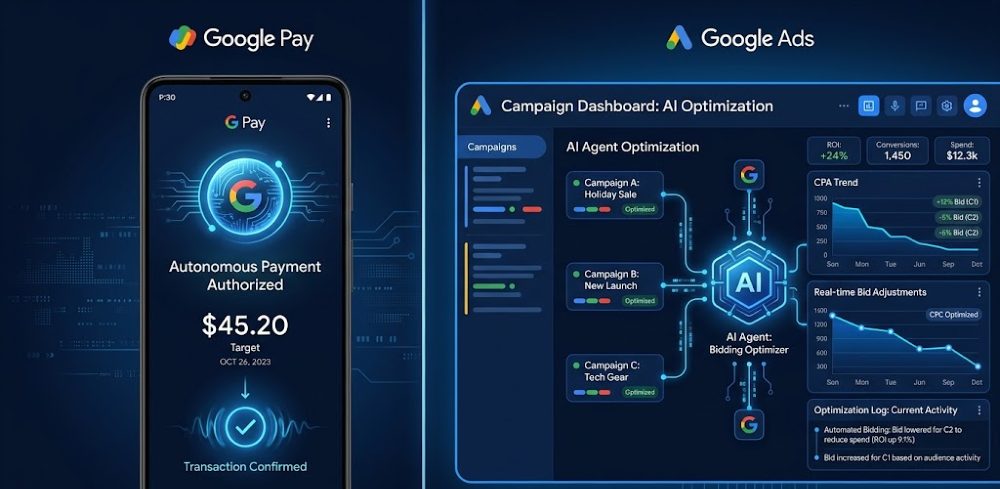
Google just moved from experimenting with AI agents to deploying them inside two of its most revenue-critical products — Google Pay and Google Ads. This isn’t a beta feature. It’s a structural shift in how Google’s core commercial infrastructure operates, and it directly affects every business that advertises or transacts through Google.
If you want to understand what’s actually happening behind the scenes — and what it means for your campaigns, your payments stack, and your competitive position — this article gives you the complete picture, without the hype.
For broader context on how AI agents are reshaping business tools beyond just Google, see this breakdown of AI marketing tools transforming business technology.
| Question | Answer |
|---|---|
| Are Google AI agents live now in Pay and Ads? | Yes, actively rolling out in 2025–2026 |
| Does this change how Google Ads bids and optimizes? | Yes — agent-driven automation is layering on top of Smart Bidding |
| Will AI agents handle Google Pay transactions autonomously? | Yes, for pre-authorized, routine, and agentic commerce flows |
| Do advertisers need to change anything right now? | Yes — campaign structures built for manual control are becoming liabilities |
| Is this the same as Smart Bidding or Performance Max? | No — this is a layer above both, with goal-driven reasoning |
| What’s the real risk? | Losing control over budget pacing, audience targeting, and transaction attribution if you don’t adapt |
| Who benefits most immediately? | Advertisers with clean conversion data and businesses using Google Pay for recurring payments |
What Google Actually Deployed — Not the PR Version
The announcements around Google I/O 2025 and subsequent product updates confirmed something specific: Google is embedding agentic AI — systems that take multi-step autonomous actions toward a goal — directly into the Ads and Pay product stacks.
This is different from Smart Bidding. Smart Bidding predicts the best bid for an auction using a fixed objective. An AI agent can change the objective, restructure the campaign logic, pause underperforming elements, and initiate follow-through actions across connected systems — all without a human triggering each step.
In Google Pay, the agentic layer enables what Google calls “agentic commerce” — where the AI can act on a user’s behalf to complete tasks like bill payments, subscription management, and purchase flows inside apps and websites, with minimal friction. The agent understands user intent, verifies context, and executes.
For businesses, this creates two simultaneous shifts:
- The buying side (your customers) will have AI agents completing purchases on their behalf, changing how conversion events are initiated and attributed.
- The advertising side (your campaigns) will have AI agents managing more decisions autonomously, reducing how often human input drives outcomes.
Both require you to rethink assumptions built over the last decade of Google Ads management.
Google AI Agents in Google Pay: The Exact Mechanics
What the agent actually does in Pay
Google’s Pay agent operates on a delegated-action model. A user sets a goal — “pay my utility bill when it’s due,” “reorder from this merchant every month,” or “buy this product if the price drops below X” — and the agent handles the transaction flow autonomously.
That sounds simple. The implications aren’t.
For merchants and businesses accepting Google Pay:
- Transaction initiation no longer always comes from a human clicking “buy.” It comes from an agent completing a task. Your checkout flow needs to handle this gracefully. Silent failures (where the agent gets a confusing error state) mean abandoned transactions with no user awareness.
- Subscription and recurring payment logic becomes more dynamic. Agents can modify, pause, or renegotiate on the user’s side. Your payment infrastructure needs to log agent-initiated transactions distinctly so your attribution data doesn’t get corrupted.
- Refund and dispute flows change. When an agent executes a purchase the user later disputes, the evidence trail looks different from a standard manual transaction. Chargeback logic needs to account for this.
Practically speaking, if you’re a developer or e-commerce operator, review your Google Pay integration against the updated Payments API documentation. Agent-initiated transactions send different metadata signals in the payment object — specifically around initiatorType and session context flags. If you’re parsing payment metadata for fraud scoring or attribution, these new fields matter.
For consumers and what it means for your business’s conversion data:
Agent-initiated purchases create a new class of conversion event. In your Google Ads account, these will increasingly appear as conversions that aren’t directly preceded by an ad click in the standard attribution window — because the agent acted on a goal set days or weeks ago. Your ROAS figures can look artificially inflated or deflated depending on how your attribution model handles this.
If you’re running last-click attribution still (and many accounts are), this is a live data integrity problem right now.
Google AI Agents in Google Ads: Where Control Actually Moves
The hierarchy has changed
Most advertisers think of Google Ads automation in layers: keywords → Smart Bidding → Performance Max → campaign-level settings. The AI agent layer sits above all of this.
The agent doesn’t just optimize within your campaign. It can:
- Recommend and, with sufficient permissions, implement structural changes to campaign architecture
- Reallocate budget between campaigns based on goal-level performance, not just campaign-level
- Generate new ad creative variants, test them, and suppress underperformers — at a pace no human team can match
- Adjust audience signals in real time, not just at the scheduled optimization intervals you’re used to
This is what Google means when it talks about AI agents in the “agent era” — they’re not assistants waiting for commands. They’re actors with a goal, taking initiative.
What this looks like in practice:
In accounts where Google’s AI agent access is enabled (either via Demand Gen, Performance Max with broad asset groups, or the newer AI-native campaign types), you’ll see the agent surface in the Recommendations tab — but now with a different behavior pattern. Instead of one-click suggestions, the agent starts proposing sequences of changes: “Adjust bid strategy AND expand audience AND add these asset variants.” These are linked recommendations, not independent ones.
Accepting one without the others breaks the agent’s intended logic. That’s not explained clearly in the interface. It’s something you learn by watching performance crater after partial implementation.
What No One Is Telling Advertisers Right Now
The permission creep problem
Every time you accept an automated recommendation without reviewing its downstream effects, you’re implicitly expanding what the AI agent can influence in your account. Google’s terms for automated tools have been updated to reflect broader agent authority — but the UI doesn’t surface this clearly.
Practically: go into your Google Ads account settings right now and check your Auto-apply recommendations settings. Many accounts, especially those managed by agencies using automated management platforms, have these set to “apply automatically” for categories that now include agent-driven structural changes — not just bid adjustments.
This has caused real problems. Accounts have had campaign types changed, audience targeting expanded beyond intended geographic scope, and ad copy modified to match “agent-optimized” variants — all without explicit approval. The post-change performance data doesn’t always make the cause obvious.
Action step: Disable auto-apply for anything beyond bid adjustments until you’ve audited what the agent has permission to change. Review the Google Ads automated rules documentation and cross-reference with your current auto-apply settings.
The attribution signal collapse
Google’s AI agents rely on conversion data to make good decisions. The quality of the agent’s optimization is directly proportional to the cleanliness of your conversion tracking.
Here’s the critical thing most guides skip: Enhanced Conversions and Consent Mode v2 aren’t optional upgrades anymore — they’re prerequisites for the agent to work correctly. Without them, the agent is operating on incomplete data and will make systematically wrong decisions. It’ll look like poor campaign performance. The actual cause is broken data input.
If you haven’t implemented:
- Enhanced Conversions (passing hashed first-party data with conversion events)
- Consent Mode v2 (handling user consent signals correctly so Google can model conversions for non-consenting users)
…then your AI agent-managed campaigns are already underperforming their potential, and the gap will widen as agent reliance increases.
The setup for Enhanced Conversions via Google Tag Manager is documented at support.google.com/google-ads/answer/9888656. The consent mode implementation guide is at developers.google.com/tag-platform/security/guides/consent. Do both before anything else.
How This Connects to the Broader Agent Era
Google isn’t acting alone here. The shift to AI agents in commercial infrastructure is happening across every major platform. What makes Google’s rollout distinct is the scale of the data feedback loop — Google’s agents learn from billions of daily transactions and ad interactions, which gives them an optimization edge that standalone AI tools can’t replicate.
But that also means Google’s agents are optimizing for Google’s objectives as well as yours. Revenue from advertising is Google’s core business. When an agent “optimizes” your campaign, it’s optimizing within a system designed to sustain and grow Google’s ad revenue. These are usually aligned with your goals — but not always.
Understanding how AI agents compare to other automation approaches matters for anyone deciding where to invest in automation tooling. The differences between AI agents and traditional chatbots or rule-based systems in a business context are covered in detail in AI agents vs chatbots in 2026 for business automation.
Performance Max and the Agent Layer: What’s Actually Different
Performance Max already uses machine learning to serve ads across all of Google’s inventory — Search, Shopping, YouTube, Display, Gmail, Maps — from a single campaign. Many advertisers treat it as the “AI campaign type.” The agent layer changes what PMax can do.
Before agents: PMax optimizes asset combinations and bidding within the campaign parameters you set. It can’t change campaign type, can’t add new campaigns, can’t modify account-level settings.
With agents: The agent can propose — and with appropriate permissions, execute — changes that go across campaign boundaries. It can suggest that budget currently allocated to a standard Search campaign would perform better within a PMax campaign for a specific product category, and initiate that shift.
This matters because PMax already has a known transparency problem. You get limited visibility into which search queries triggered your ads, which placements consumed your budget, and which asset combinations are driving performance. Adding an agent layer on top of limited-transparency campaigns amplifies the opacity.
How to handle this:
- Use asset group-level reporting aggressively. It’s imperfect but it’s the primary window into PMax performance.
- Set campaign-level budget caps and keep them at a level you’re comfortable with the agent spending autonomously — because it will.
- For brand campaigns, always run separate Search campaigns with exact match and broad match negatives. Don’t let PMax cannibalize branded traffic and then obscure it in the reporting.
- Check your Search Impression Share data at the account level weekly. An agent expanding PMax aggressively into new territory will show up here before it shows up in cost-per-conversion reports.
Google Pay Agentic Commerce: The Business Opportunity Most Are Missing
The framing around Google Pay’s agent capabilities has been almost entirely consumer-focused in coverage — “the AI pays your bills for you.” The business-side opportunity is more significant.
Subscriptions and recurring revenue: If your business runs subscription products, Google Pay’s agent layer can handle renewal authorization, payment failure recovery, and plan modification flows with less friction than your current flow. Google has published APIs specifically for merchants who want to integrate with the agentic payment model. This isn’t available to everyone yet, but early API access is available to businesses in the Google Pay developer preview program.
The intent signal advantage: When an AI agent initiates a payment on a user’s behalf, Google has access to the goal-setting context that preceded it. That context (anonymized and aggregated) feeds back into advertising signals. In practical terms, this means users whose agents are actively executing purchase goals are becoming a higher-value audience signal — one that brands running tight Google Ads integrations with first-party data will be able to reach more precisely.
Conversion flow redesign: Agentic buyers don’t browse the way manual buyers do. They often skip the consideration phase entirely — the agent evaluated options and decided. Your product listing quality (titles, descriptions, structured data, pricing signals) becomes more important than your homepage experience or ad creative, because the agent evaluates it differently than a human scrolling through search results. Structured data and Google Merchant Center feed quality aren’t just SEO levers anymore — they’re agent inputs.
Google’s Pomeli and What It Signals About Agent-Era Tools
Google has also been developing internal workflow and analysis tooling that reflects the same agentic design philosophy — building systems that operate toward goals, not just respond to queries. Understanding how these tools work and where they’re strong or limited helps calibrate how much autonomy to give your campaigns.
For a practical look at how Google’s newer tooling fits into marketing workflows, this comparison of Google Pomeli vs other tools in 2025 gives concrete context. And if you’re already working with Google’s tooling and want to structure it more effectively, these Google Pomeli workflows are worth walking through.
Honest Pros and Cons: What Google AI Agents Actually Deliver
What works well
Speed of optimization. An AI agent can run thousands of micro-tests per day — creative variants, bid adjustments, audience combinations — at a scale no human team can match. For accounts spending $50K+ per month, this speed advantage is real and measurable. Campaigns that would take 3–4 weeks to stabilize manually can reach optimized performance in 7–10 days with agent-assisted management.
Cross-channel coherence. The agent can maintain a consistent optimization logic across Search, Shopping, YouTube, and Display simultaneously, adjusting each in relation to the others. Manual campaign management almost always produces inconsistencies — especially in attribution — that the agent avoids structurally.
Conversion recovery. In Google Pay, the agent layer has demonstrated measurable improvement in payment completion rates by handling friction points (authentication steps, session timeouts, payment method fallbacks) autonomously. For merchants seeing cart abandonment at the payment stage, this is a real improvement.
What doesn’t work well
Niche targeting. The agent optimizes for signal volume. If your product serves a small, highly specific audience, the agent often lacks sufficient data to make good decisions and defaults to broader targeting that wastes budget. You’ll see this as cost-per-conversion rising while impression volume also rises — a typical “the agent went exploring” pattern.
Brand safety in display and YouTube. The agent optimizing for conversion volume will place ads where users convert, not necessarily where you want your brand to appear. Brand suitability controls exist but they’re blunt instruments. In practice, agent-managed PMax campaigns regularly surface in placements that manual management would have explicitly excluded.
Explainability. When performance drops, the agent can’t tell you why in a useful way. You’ll see what changed in the change history log, but you won’t get a causal explanation. Diagnosing agent-driven performance problems requires correlating multiple data sources (change history, auction insights, search term reports, asset reporting) manually — and many teams don’t have the analytical capacity to do this effectively.
Budget pacing during volatility. Agents struggle with sudden external events — product launches, PR crises, competitive pricing changes — that alter the signal environment faster than the model can adapt. Manual intervention is still critical during these windows, and many accounts lose significant budget to poor performance in the days after a major external change while the agent recalibrates.
What to Actually Do Now: Specific, Ordered Steps
These aren’t generic “best practices.” These are the specific actions that address the actual risks and opportunities the agent rollout creates.
Step 1: Audit auto-apply settings immediately Google Ads → Tools → Automated rules → Auto-apply recommendations. Turn off auto-apply for anything beyond bid-only changes. Review every category — some have been silently enabled in accounts managed through third-party platforms.
Step 2: Implement Enhanced Conversions and Consent Mode v2 If either is missing, the agent is flying blind. This is the single highest-impact technical change you can make for agent-managed campaign performance. Documentation links above. Timeline: do this in the next two weeks.
Step 3: Separate brand from non-brand in campaign structure Create a dedicated exact-match brand campaign with a fixed, lower bid strategy. Exclude all brand terms from PMax and agent-managed campaigns via negative keyword lists at the campaign level. This prevents the agent from claiming credit for brand traffic that was never actually influenced by its optimization.
Step 4: Review your Google Pay integration for agent-transaction handling Check your payment object parsing logic against the updated Google Pay API specifications. Add logging for initiatorType field values so you can distinguish agent-initiated from user-initiated transactions. Update your attribution model to reflect this distinction.
Step 5: Set hard budget constraints at the campaign level Don’t rely on portfolio-level or account-level budget caps alone. The agent manages toward goals, not budget limits, and will exhaust available budget pursuing a conversion rate improvement if hard constraints aren’t in place at the campaign level.
Step 6: Build a weekly agent behavior review Review: change history log, search impression share changes, audience targeting expansion, new placements in placement reports. Ten minutes per week. This is the minimum viable oversight for agent-managed accounts. Most performance problems that get attributed to “the market changed” are actually agent decisions that went unreviewed for too long.
Step 7: Test your conversion flows as an agentic buyer Use Google Pay in a test environment and simulate an agent-initiated purchase through your checkout. Document every failure state. Your conversion flow likely has edge cases that break gracefully for human users but fail silently for agent-initiated transactions.
What to Avoid — Specifically
Don’t treat agent recommendations as free optimizations. Every accepted recommendation shifts budget, targeting, or creative in ways that have downstream effects on other campaigns in your account. Review the full impact before accepting, especially for linked multi-step recommendations.
Don’t conflate agent-managed PMax performance with brand equity. PMax with agents will often show strong ROAS — but a significant portion of those conversions are from branded searches and retargeting that would have converted anyway. The agent isn’t creating demand; it’s efficiently capturing existing demand. Confusing these produces overconfident budget allocation decisions.
Don’t let the agent manage accounts with sparse conversion data. Fewer than 30 conversions per month per campaign is below the threshold where agent optimization produces positive results consistently. Below that threshold, manual or rules-based bidding outperforms agent-driven approaches.
Don’t assume the agent is neutral on campaign type. The agent has structural incentives (built into how Google has deployed it) to move budget toward campaign types that are less transparent — primarily Performance Max. This isn’t necessarily bad for performance, but it’s worth being conscious of as a dynamic.
Don’t skip the asset quality step. For agent-managed campaigns, creative quality is more important than ever because the agent will suppress weak assets automatically, and if your asset pool is thin, it’ll run the same creative repeatedly until frequency fatigue kills performance. Build deep asset libraries across every format before enabling aggressive agent management.
Alternatives If You’re Not Ready to Trust the Agent Layer
If the level of autonomy the agent requires conflicts with your business constraints (regulatory environment, brand safety requirements, or simply insufficient conversion data), you have real options.
Rules-based automation with Target CPA/ROAS bidding gives you predictable, explainable behavior at the cost of optimization speed. For regulated industries (financial services, healthcare, legal) where ad content approval processes are slow, this is often the right tradeoff.
Third-party AI bidding platforms (SA360, Kenshoo, Marin) give you agent-like optimization with more transparency and control than Google’s native agent layer. The tradeoff is cost and integration complexity.
Hybrid management: Run agent-managed campaigns for product categories with strong conversion data, and manual/rules-based campaigns for products with thin data or strict targeting requirements. This is the configuration that works best for most mid-market advertisers right now — let the agent do what it’s good at, keep human control where data is thin.
For a more complete view of where Google’s tools fit in the broader landscape of marketing automation, this overview of AI marketing tools provides useful comparative context.
The Competitive Reality Right Now
Advertisers who understand the agent layer and work with it deliberately will widen their performance gap over competitors who either resist it entirely or accept it uncritically. Both error modes — over-trust and under-trust — cost money.
The businesses positioned best right now share a few characteristics:
- Clean, complete conversion tracking (Enhanced Conversions + Consent Mode v2)
- Deep creative asset libraries across formats
- Structured campaign architecture that separates brand from non-brand, and high-data from low-data products
- Active human oversight cadence that catches agent behavior problems before they compound
- Technical comfort with Google Pay’s updated API for merchant integrations
None of these require a large team. They require deliberate setup and a weekly review habit.
For a deeper look at how Google’s newer search and query tools are integrating into this landscape, this overview of the Google Pomeli tool is worth reading alongside this article.
Final Checks Before You Act
Is your attribution model current? Last-click attribution in a world of AI agents and agentic payments produces systematically wrong data. Switch to data-driven attribution now.
Do you have a change management process for AI-assisted accounts? Define who reviews agent recommendations, on what cadence, and who has authority to accept or reject structural changes. Without this, agent authority expands by default.
Are your Google Merchant Center feeds optimized for agent evaluation? Product title quality, structured pricing data, availability accuracy, and review data aren’t just SEO inputs — they’re signals the agent uses to evaluate and rank your products for agentic buyers.
The agent era is live. The window to set up for it deliberately is right now, before your competitors have built their infrastructure and the gap becomes harder to close.
