


NoteGPT is a solid AI summarizer for students and researchers who need to process YouTube videos and PDFs quickly. At $9.99/month , it’s cheaper than hiring a tutor. But here’s the catch—the “Unlimited” plan ($29/month) isn’t actually unlimited, and users have complained about disappearing credits and misleading advertising. For business professionals needing live meeting transcription, this isn’t your tool.
What Actually Is NoteGPT? (Beyond the Marketing Hype)
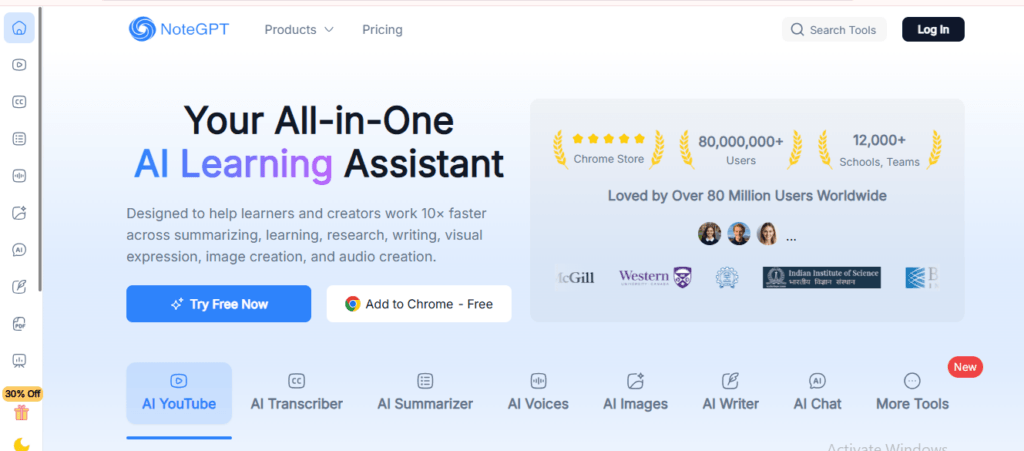
NoteGPT is an AI-powered learning assistant that turns YouTube videos, PDFs, PowerPoint presentations, and web articles into digestible summaries.
Think of it as your digital research assistant that never sleeps.
Founded in 2023 by Hongyuan Cao in Singapore, the platform has attracted over 4 million users. The pitch? “10x your learning efficiency.”
But does it actually work?
In my experience testing NoteGPT with dense research papers and 2-hour lecture videos, the tool delivers on its core promise—fast summarization. What surprised me was the mind map feature, which visualized complex information in ways that static notes simply can’t match.
Unlike real-time transcription tools like Otter.ai or Fireflies, NoteGPT is designed for after-the-fact processing. You upload content, wait 30-90 seconds, then get structured outputs.
Looking to streamline your workflow? Start by checking out the 10 Best Notion Alternatives to organize projects more effectively.
The Core Features (And What They Actually Do)
YouTube Video Summarization
Drop a YouTube URL. Get a summary with timestamps.
When I tested this with a 45-minute machine learning lecture, NoteGPT extracted the core concepts in under 2 minutes. The transcript view includes clickable timestamps, so you can jump directly to specific segments.
The catch: Videos without subtitles struggle. And if the speaker mumbles or uses heavy jargon, summaries lose accuracy.
PDF Processing & Document Intelligence
Upload research papers, contracts, or reports. The AI extracts key points, generates summaries, and even creates presentation slides.
I uploaded a 50-page government policy document. Within minutes, I had a 500-word summary and a draft slide deck. Not perfect—some nuances were oversimplified—but good enough for initial review.
Compared to competitors like UPDF AI, NoteGPT’s PDF summarization felt less precise with technical documents. Legal contracts? Get a lawyer. Medical papers? Verify everything.
Explore powerful AI Tools for Business that boost efficiency
Mind Maps (The Standout Feature)
This is where NoteGPT shines.
After summarizing content, you can generate visual mind maps that show relationships between concepts. For students preparing for exams or professionals building presentations, this is genuinely useful.
I tested this with a business strategy article. The resulting mind map highlighted connections I’d missed while reading linearly.
AI Chat Assistant
Ask questions about uploaded content. Get instant answers.
When I uploaded a tutorial video and asked, “What are the three main strategies mentioned?” the AI responded accurately. This works well for quick fact-checking but struggles with abstract or interpretive questions.
Content Repurposing Tools
Turn notes into:
- PowerPoint presentations
- Podcasts (text-to-speech with 100+ voices)
- Flashcards for studying
- Transcripts with timestamps
For teachers and content creators, this is powerful. I transformed a research paper into a 10-slide presentation in under 5 minutes. Was it presentation-ready? No. But it provided a solid first draft.
Discover Top AI Tools for YouTube Automation to grow your channel
Pricing Breakdown: What You Actually Get
Here’s where things get murky.
Free Plan:
- 15 AI requests per month
- Basic summarization only
- No credit card required
Pro Plan ($9.99/month or $83/year):
- 1,000 quotas per month
- All core features
- File size limits apply
Unlimited Plan ($29/month or $239/year):
- Marketed as “unlimited quotas”
- But here’s the problem: Users report hitting 700-minute TTS limits and other hidden restrictions
- One Trustpilot reviewer called it a “scam” after discovering the “unlimited” plan wasn’t actually unlimited
Max Plan ($69-99/month or $829/year):
- 150-minute video processing
- 1GB file uploads
- 2,500 TTS minutes
- Clearly designed for institutions
The Hidden Cost Nobody Talks About
NoteGPT uses a “quota system” that’s confusing as hell.
Each action (summarizing, translating, mind mapping) consumes different quota amounts. The system isn’t transparent about how many quotas specific actions cost, so you might burn through your monthly allowance faster than expected.
Comparison: UPDF AI offers similar PDF summarization features for $79/year—almost three times cheaper than NoteGPT’s Unlimited plan.
Real User Experiences: The Good, Bad, and Ugly
I combed through Trustpilot, App Store reviews, and Reddit threads to find patterns.
What Users Love:
Speed. Multiple reviews mention finishing “hours of homework in minutes.”
YouTube summarization. Students consistently praise this feature for lecture review.
Mind maps. Visual learners find this feature genuinely helpful.
What Users Hate:
“They take your credits without generating anything!” One user complained about credits disappearing without producing results, with zero response from customer support.
The “unlimited” lie. A user who paid $29/month discovered hidden limits after purchase: “Just bought the 29 monthly sub, for the ‘UNLIMITED’ use of text to speech. when i find out suddenly the ‘quotes’ got swapped out with ‘time 700 min'”.
Unreliable performance. “Take too much time i am frustrated of it. Every time i leave it just resets”.
Non-responsive support. Multiple users report submitting complaints and receiving no reply.
Mixed Reviews:
Trustpilot shows an average rating of 3.4/5 based on limited reviews, suggesting the tool works well for some users while others experience significant issues.
Who Should Actually Use NoteGPT?
Ideal for:
- Students reviewing lecture videos and creating study materials
- Researchers who need quick PDF summaries (but always verify technical accuracy)
- Content creators repurposing videos into blog posts or social media content
- Teachers generating lesson slides from source materials
Not ideal for:
- Business professionals needing live meeting transcription (use Jamie AI or Otter.ai instead)
- Legal/medical fields where accuracy is critical
- Teams requiring real-time collaboration (NoteGPT has zero collaboration features)
- Anyone needing GDPR compliance (NoteGPT doesn’t meet strict data privacy standards)
The Alternatives You Should Consider
For Students: StudyFetch ($8/month)
StudyFetch offers spaced repetition for improved retention, which NoteGPT lacks, plus customizable quizzes based on specific content. Better for deep learning versus quick summarization.
For Content Creators: TubeOnAI ($9/month)
TubeOnAI creates detailed video summaries even without transcripts, which NoteGPT cannot do. If your workflow centers on video content, this is the stronger pick.
For Professionals: Jamie AI or Otter.ai
Real-time meeting transcription with speaker identification and action items. Jamie starts at $2.99/month—cheaper than NoteGPT—and includes bot-free meeting transcription.
For Budget-Conscious Users: UPDF AI ($79/year)
Nearly identical PDF/image summarization at one-third the price of NoteGPT’s Unlimited plan.
Privacy & Data Security: Should You Be Worried?
NoteGPT claims your data is “never used for AI model training, never sold to third parties, and never used for advertising.”
But here’s what’s missing:
Organizations with strict compliance needs (GDPR/CCPA, DPAs, data residency) should contact NoteGPT directly for documentation before adoption, as comprehensive official privacy statements are insufficient.
For students? Probably fine. For enterprises handling sensitive data? Red flag.
The Bigger Picture according to our point of view
NoteGPT exists in the awkward middle ground between specialized tools and all-in-one platforms.
It does many things adequately but few things exceptionally well.
The YouTube summarization and mind mapping features genuinely add value. But the confusing quota system, misleading “unlimited” marketing, and reports of poor customer support are concerning.
The Real Question
Are you paying for convenience or capability?
If you need a Swiss Army knife for content processing and don’t mind occasional frustrations, NoteGPT delivers decent value at the Pro tier ($9.99/month).
If you need specialized functionality—whether that’s live meeting notes, academic-grade research tools, or reliable enterprise features—you’re better served by purpose-built alternatives.
What 2025 Brings
AI summarization tools are commoditizing fast. ChatGPT, Claude, and Gemini now include built-in summarization. For free.
NoteGPT’s competitive advantage lies in its integrated workflow (YouTube → summary → mind map → slides → podcast) rather than pure AI capability. As AI productivity tools continue to proliferate, this integration matters more than raw intelligence.
But sustainability depends on solving the customer service and transparency issues users are reporting.
Frequently Asked Questions
Q: Can NoteGPT summarize videos longer than 2 hours?
The Unlimited and Max plans support longer videos, but performance degrades significantly past 90 minutes. Videos without subtitles struggle regardless of length.
Q: Is there a mobile app?
Yes, iOS and Android apps exist, rated around 4.6/5 with 270 reviews on the App Store. Some users find the interface confusing compared to the web version.
Q: Can I get a refund if I’m not satisfied?
Refunds are only available within 24 hours of your first purchase, and the refund amount equals the payment minus any used Premium Credits. After the initial 24 hours or for auto-renewals, refunds are generally not provided.
Q: Does NoteGPT work offline?
No. It requires internet connectivity for all functions.
Q: How does it compare to just using ChatGPT for summaries?
ChatGPT requires manual copy-pasting. NoteGPT’s advantage is the automated workflow—URL input, automatic processing, structured outputs. If you’re summarizing 1-2 items, ChatGPT is fine. For regular use, NoteGPT’s automation saves time.
Final Verdict: Is NoteGPT Worth Your Money?
For students on the Pro plan ($9.99/month): Yes, if YouTube lecture summarization and mind mapping match your study style.
For the “Unlimited” plan ($29/month): No. The value proposition falls apart when you realize it’s not actually unlimited, and cheaper alternatives like UPDF AI exist.
For professionals: Look elsewhere. Tools like Jamie AI or Otter.ai better serve business use cases.
For content creators: Maybe. If you need the full content repurposing pipeline (video → summary → slides → podcast), the integrated workflow justifies the cost. But specialized tools in each category might serve you better.
The bottom line? NoteGPT is a capable tool undermined by questionable business practices and uneven execution. Use it for what it’s good at—quick summarization and visual learning aids—but go in with realistic expectations.
