


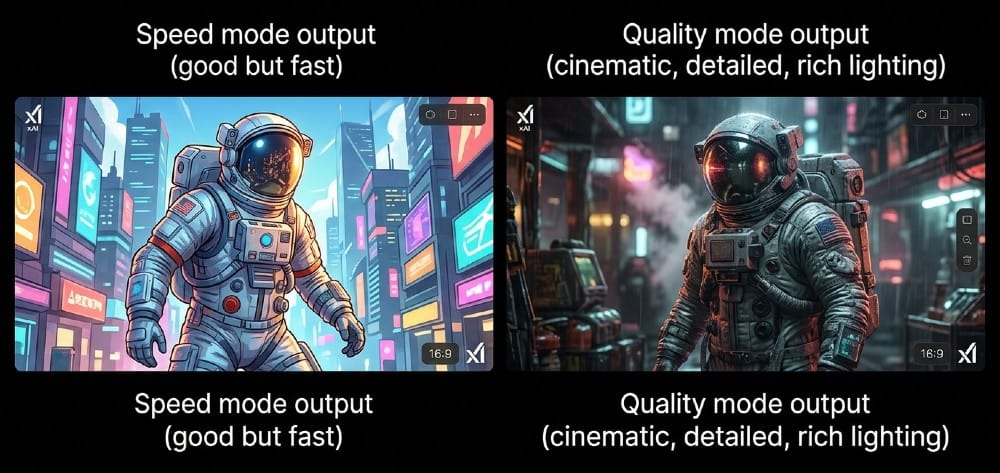
xAI just quietly flipped a switch on April 3 — and the AI image generation game shifted overnight.
The Grok Imagine Quality Mode update dropped with almost no warning, and the reaction online has been immediate. Posts showing Quality mode outputs are still trending hard across X, racking up millions of views from creators who simply couldn’t believe what a text prompt was producing. Knights in full armor. Mystical forests with god rays. Portraits so sharp they look like photography.
This isn’t just an update. It’s a reset button on what people expected from Grok Imagine.
Plan selection impacts voice availability—choose wisely via Grok Voice Mode best practices.
So What Actually Changed on April 3?
Before this update, Grok Imagine operated on a single fast-generation mode — infinite scroll, images appearing rapidly one after another. Great for brainstorming. Not great when you actually care about the result.
xAI has now introduced two distinct generation modes in the Imagine prompt bar: Quality and Speed. Quality mode produces next-level images with jaw-dropping detail, realism, and creativity, generating four high-quality images at once instead of an infinite scroll. Speed mode delivers lightning-fast generations with consistently impressive results, exactly as before.
Simple toggle. Massive difference in output.
xAI describes Quality mode as powered by their most advanced image generation model, delivering enhanced details, stronger text rendering, and higher levels of creative control — available now on both web and mobile.
What “Quality Mode” Actually Looks Like in Practice
Let’s skip the marketing language for a second.
Quality mode leans hard into photorealism — more natural lighting, richer textures, and fewer of those uncanny details that immediately give AI images away at first glance. The light actually falls the way light does in the real world. Shadows have depth. Fabric has texture. Skin doesn’t look plastic.
xAI says Quality mode brings dramatically stronger world knowledge and prompt understanding — better handling of complex scenes, more realistic physics, clearer object relationships, and more precise interpretation of references to brands, locations, culture, and fictional or artistic worlds.
That last part matters more than people realize. Prompting “a knight in a gothic cathedral at dusk, volumetric light beams, candlelit stone floor” used to produce something approximate. Now it produces something that looks like a still from a feature film. The model actually understands what you’re describing — not just the words but the world behind them.
Who Is This Actually For?
Speed mode is still the right choice when you’re iterating — generating 20 ideas fast to find the direction you want. Nothing changed there.
Quality mode is what you switch to when the output is the final product. Real use cases:
- Content creators building thumbnails, social posts, or campaign visuals
- Marketers needing ad creatives without a design budget
- Storytellers and game designers visualizing characters, scenes, environments
- Anyone who’s been screenshoting AI images and immediately cropping out the weird bits
Quality mode is the pick when the final look matters more than a slightly longer wait — especially for client work, thumbnails, ad creatives, and polished social posts.
That’s not a niche audience. That’s most of the people who use image generation tools.
The Honest Review: What Works, What Doesn’t
An early hands-on test from Tremendous gave Quality mode a B- overall — and the breakdown is worth knowing before you dive in.
For photorealistic images and video, Grok outperforms competing tools with unbelievably sharp outputs and strong instruction-following. However, for infographic and text-heavy image tasks, the model struggled significantly — inventing numbers and details not present in the prompt.
So: breathtaking for visual storytelling, cinematic scenes, product photography, and character art. Still rough when you need precise text or structured data rendered inside the image. Keep that in mind before pitching it to a client as an infographic tool.
Text rendering inside images is genuinely hard for every AI model right now. Grok Imagine is better than it was — but not yet reliable enough for text-critical work.
The Architecture Behind It: Why It Looks Different
Grok Imagine runs on xAI’s proprietary Aurora autoregressive engine, trained on 110,000 NVIDIA GB200 GPUs — an enormous compute investment for a company that only entered video generation in mid-2025.
The autoregressive approach means the model generates images token by token, predicting visual patches sequentially rather than all at once. This patch-based framework is exactly why human anatomy generation has improved so much — fingers and limbs are no longer a blurry guess but calculated, tokenized sequences.
That’s the real reason Quality mode looks so different from what came before. It’s not just a settings change. The underlying generation pipeline is fundamentally more considered.
Grok Imagine 2.0 Was Supposed to Be This Week…
Here’s the context most articles are skipping.
Elon Musk had previously hyped “Grok Imagine 2.0″ as a big release coming imminently — but confirmed a delay of a few weeks, citing the need for more training time. He indicated version 2.0 will bring significant upgrades in speech, audio, and face and detail consistency.
The Quality and Speed mode rollout appears to be what xAI could ship now, while the bigger update continues baking. That’s actually a reasonable call — shipping a real, meaningful improvement on schedule rather than waiting for the full 2.0 package.
Face consistency across frames has been a known weakness. If 2.0 solves that, it removes the last major complaint from creators using Grok for video and character work.
Pro Mode Is Coming — And It’s a Big Deal
Elon Musk has confirmed that Grok Imagine Pro mode is scheduled to launch by the end of April 2026, supporting 1080p resolution for both images and video, expected to require a SuperGrok subscription at $30/month.
Right now, Grok Imagine tops out at 720p for video. The Imagine 2.0 update scheduled for late April introduces native 1080p generation, replacing the previous 720p standard — with 5-second 1080p clips with synchronized native audio in under 45 seconds.
For creators, that’s the jump from “social media quality” to “genuinely usable for professional production.” One tier up, and the output becomes something you could put on a client reel.
Check about Grok 4.20 Beta Hits #1 in Medicine and Search
Where Grok Imagine Stands vs. the Competition
In March 2026, Grok Imagine achieved #1 overall in Multi Image to Video Arena, alongside leadership in Video Arena, Video-to-Video, Image-to-Video, and Multi-Image-to-Video categories — outperforming competitors including Veo 3.1, Sora, and Kling.
That’s not a benchmark in a lab. That’s a human-preference leaderboard. Real people, blind comparisons, voting on what they actually prefer. Grok is winning that fight right now — and Quality mode was built to extend that lead.
One honest note: xAI moved Grok Imagine behind a paywall in mid-March 2026, ending free-tier access and restricting image and video generation to paid subscribers, primarily at the SuperGrok level. If you haven’t subscribed yet, free access is gone.
What’s Next
- Grok Imagine Pro mode — 1080p images and video, late April 2026
- Grok Imagine 2.0 — a few more weeks of training; major upgrades in face consistency, audio, and detail
- API access for Quality mode — already available via
x.ai/api/imaginefor developers building on the platform - Continued weekly model updates as xAI iterates in public beta style
Bottom Line
The Grok Imagine Quality Mode update on April 3 is the most significant visual upgrade xAI has shipped since launching Imagine. Four high-quality images per prompt. Photorealism that actually looks photorealistic. Deeper world knowledge that makes complex prompts land the way they were intended.
It’s not perfect — text rendering inside images is still a work in progress, and the free tier is gone. But for creators who are serious about AI-generated visuals, this is now a tool worth paying for.
And with Pro mode at 1080p still coming this month? The next few weeks are going to be interesting.
Here you can check Grok ranking trackers
check latest news about Claude Mythos Just Crashed Cybersecurity Stocks And the Fallout Is Only Beginning
