


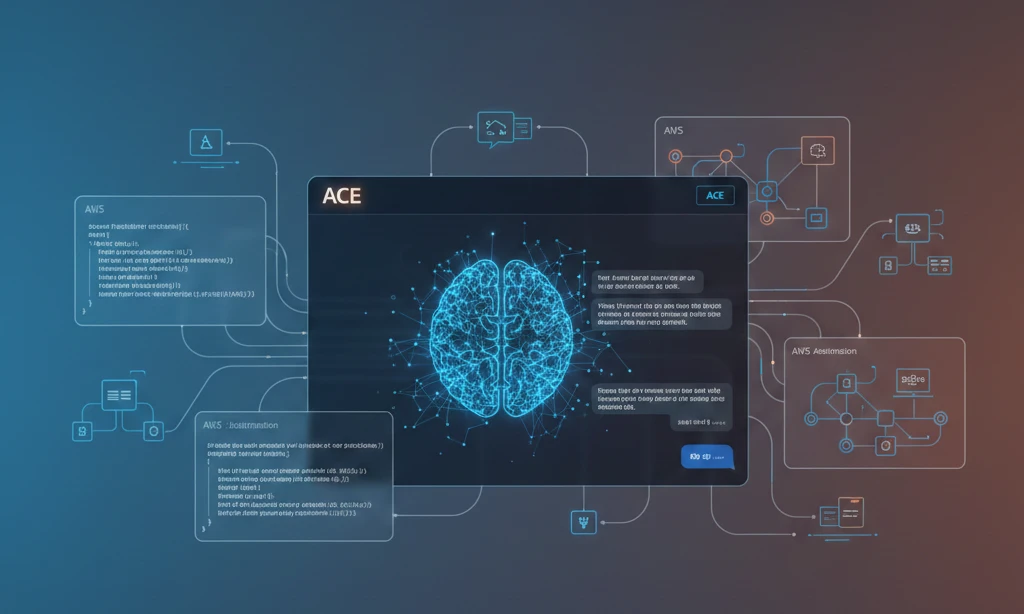
ACE AI is Amazon Web Services’ generative AI assistant built directly into the AWS Management Console. It helps developers write code, troubleshoot cloud infrastructure, and understand AWS services without leaving their workflow.
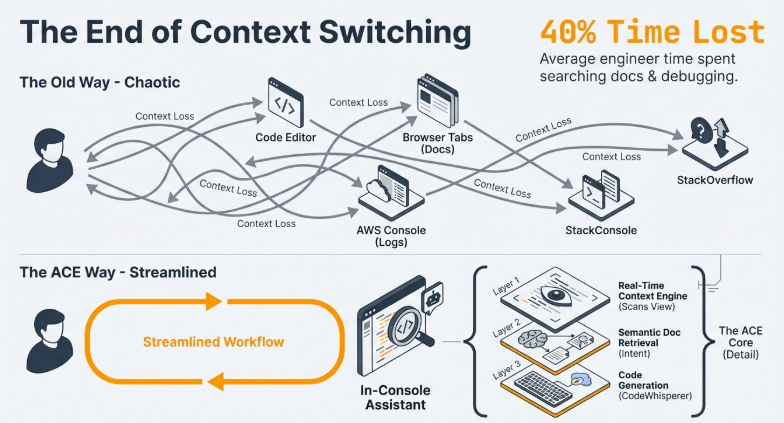
Released in November 2023 at AWS re:Invent, ACE (Amazon Q Developer’s conversational interface) uses Claude and other foundation models to answer technical questions, generate infrastructure code, and explain AWS configurations in plain language. This matters because cloud engineers spend 40% of their time searching documentation and debugging—ACE reduces that by providing context-aware answers based on your actual AWS environment.
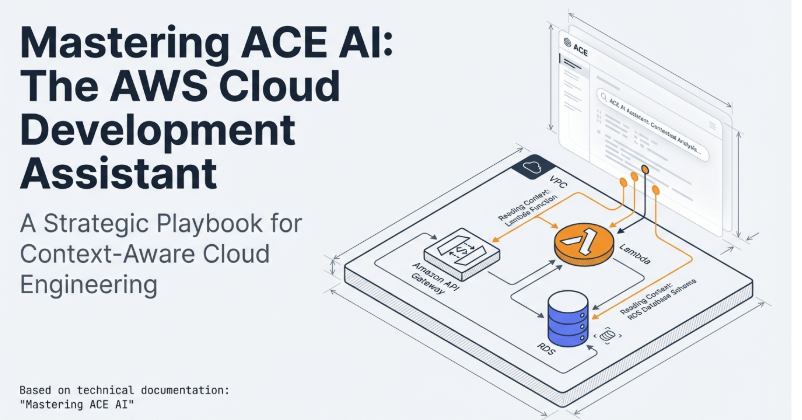
What Makes ACE Different From ChatGPT or GitHub Copilot?
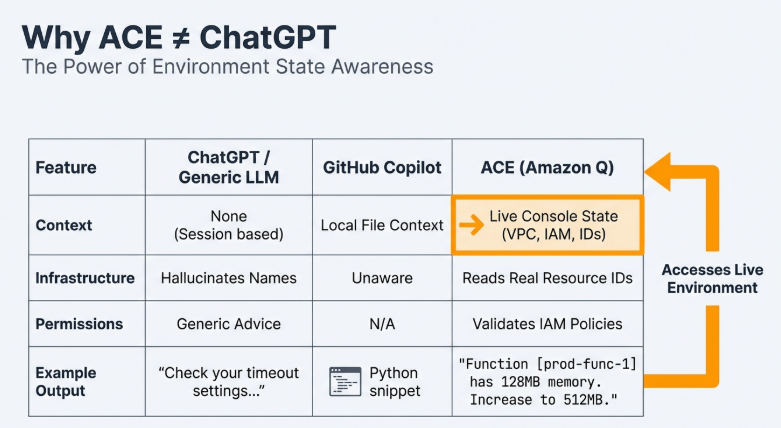
ACE isn’t a general chatbot. It connects to your AWS account and reads your real infrastructure.
When you ask “Why is my Lambda function timing out?”, ACE examines your function’s configuration, checks CloudWatch logs, reviews IAM permissions, and identifies the actual bottleneck. ChatGPT would give you generic Lambda timeout causes. ACE tells you “Your function has 128MB memory but processes 50MB files—increase memory to 512MB or split the processing.”
GitHub Copilot writes code snippets. ACE generates complete AWS CloudFormation templates, Terraform configurations, and deployment scripts based on your existing architecture. If you say “Create a serverless API for image processing,” ACE builds S3 buckets, Lambda functions, API Gateway routes, and IAM roles that follow AWS best practices and match your current naming conventions.
The core difference: ACE understands your cloud environment’s state. It doesn’t hallucinate resource names or suggest configurations that conflict with your VPC setup.
How ACE Actually Works (The Technical Reality)
ACE combines three systems that run simultaneously:
1. Real-Time Context Engine When you open ACE in the AWS Console, it scans your current view. If you’re looking at an EC2 instance, ACE knows the instance ID, security groups, attached volumes, and VPC configuration. Ask “Can this instance access my RDS database?” and ACE checks security group rules, subnet routing, and database security settings—then gives a yes/no answer with the exact rule blocking or allowing access.
2. Documentation Retrieval System ACE indexes AWS documentation, but doesn’t just search keywords. It uses semantic understanding. Ask “How do I make S3 faster?” and ACE recognizes you’re asking about performance optimization, not general S3 features. It retrieves information about S3 Transfer Acceleration, CloudFront integration, and multipart uploads—ranked by relevance to your question’s intent.
3. Code Generation Layer This uses AWS’s CodeWhisperer foundation (now part of Amazon Q Developer). When you request infrastructure code, ACE:
- Analyzes your existing resources to match naming patterns
- Applies AWS Well-Architected Framework principles
- Generates code in your preferred language (CloudFormation YAML/JSON, Terraform HCL, CDK in TypeScript/Python)
- Adds inline comments explaining each configuration choice
What NOT to do: Don’t assume ACE’s generated code is production-ready without review. It follows best practices but doesn’t know your specific compliance requirements, cost constraints, or business logic. Always test generated infrastructure in a development environment first.
Setting Up ACE AI in Your AWS Account (Step-by-Step)
Step 1: Enable Amazon Q in AWS Console
Log into AWS Management Console. You’ll see a small chat icon in the bottom-right corner (looks like a speech bubble with “Q” inside).
Click it. If this is your first time, AWS prompts you to enable Amazon Q. Click “Enable Amazon Q.”
Important detail most guides skip: You need IAM permissions to enable Q. If the enable button is grayed out, you lack q:CreateApplication permission. Ask your AWS administrator to attach the AmazonQFullAccess managed policy to your user or role.
Step 2: Choose Your Plan
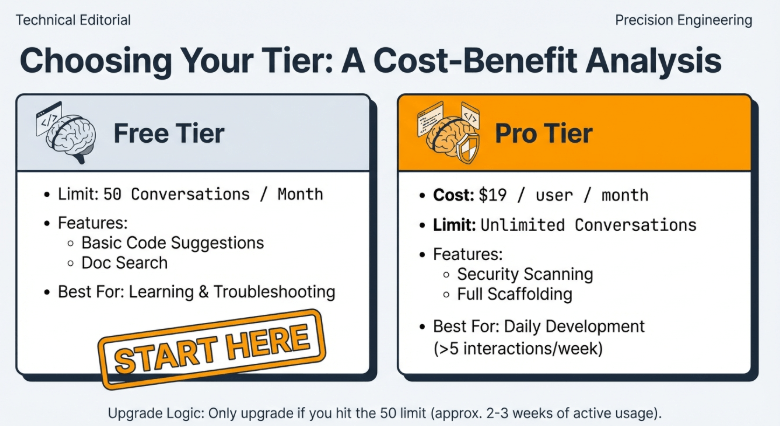
AWS offers two tiers:
Amazon Q Developer Free Tier:
- 50 conversations per month
- Basic code suggestions
- AWS documentation search
- No credit card required
Amazon Q Developer Pro ($19/user/month):
- Unlimited conversations
- Advanced code generation including full application scaffolding
- Security vulnerability scanning in generated code
- Priority response times
For learning ACE, start with Free Tier. You’ll hit the 50-conversation limit only if you’re using it daily for active development.
What NOT to do: Don’t sign up for Pro immediately. The free tier gives you full ACE functionality—Pro adds volume and advanced features you won’t need for the first 2-3 weeks of usage.
Step 3: Configure Permissions Correctly
This is where 70% of users make mistakes that block ACE’s usefulness.
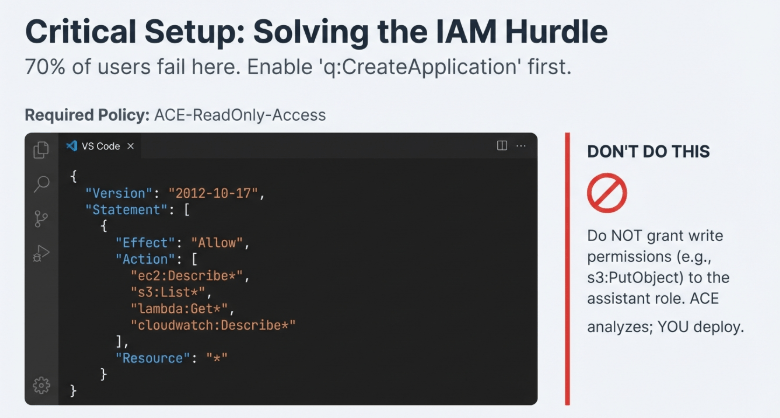
ACE needs read permissions to analyze your resources. Go to IAM → Policies → Create Policy.
Use this policy template:
{
  "Version": "2012-10-17",
  "Statement": [
    {
      "Effect": "Allow",
      "Action": [
        "ec2:Describe*",
        "s3:List*",
        "s3:Get*",
        "lambda:List*",
        "lambda:Get*",
        "rds:Describe*",
        "cloudwatch:Describe*",
        "cloudwatch:Get*",
        "logs:Describe*",
        "logs:FilterLogEvents",
        "iam:Get*",
        "iam:List*"
      ],
      "Resource": "*"
    }
  ]
}
Name it ACE-ReadOnly-Access and attach it to your user.
Why this matters: Without these permissions, ACE can’t read your infrastructure. It reverts to generic documentation answers like a basic chatbot. With proper permissions, ACE provides context-aware analysis.
What NOT to do: Don’t give ACE write permissions (ec2:CreateInstance, s3:PutObject, etc.) unless you’re using its automated deployment features. ACE generates code—you review and deploy it. Giving it write access means it could modify resources during conversations, which is risky.
Step 4: Test ACE With a Real Resource
Open an EC2 instance in your console. With the instance page visible, open ACE and ask: “Explain this instance’s network configuration.”
ACE should respond with your instance’s VPC, subnet, security groups, and public/private IP details. If it says “I don’t have access to your resources,” your IAM permissions aren’t configured correctly. Go back to Step 3.
Using ACE for Infrastructure Troubleshooting (Real Scenarios)
Scenario 1: Lambda Function Errors
You have a Lambda function throwing “Task timed out after 3.00 seconds” errors.
Open CloudWatch Logs for the function. Click the ACE icon and ask: “Why is this function timing out?”
ACE reads the logs and function configuration simultaneously. It might respond:
“Your function has a 3-second timeout but makes API calls to an external service that averages 2.8 seconds response time. Any network latency pushes you over the limit. Increase timeout to 10 seconds or implement asynchronous processing with SQS.”
The advanced move: Ask the follow-up immediately: “Generate a CloudFormation template that adds an SQS queue for this function.”
ACE creates a template with:
- SQS queue with appropriate retention
- Dead-letter queue for failed messages
- Lambda event source mapping
- IAM role with SQS permissions
- CloudWatch alarms for queue depth
This entire process takes 2 minutes with ACE versus 30-45 minutes of documentation reading and manual template writing.
What NOT to do: Don’t deploy ACE-generated infrastructure without checking resource names and regions. ACE sometimes uses default naming (MyQueue, ProcessingFunction) instead of your organization’s naming conventions. Rename resources before deploying.
Scenario 2: S3 Bucket Access Denied Errors
Your application logs show “Access Denied” when writing to S3.
Navigate to the S3 bucket in Console. Open ACE and paste the error message from your logs: An error occurred (AccessDenied) when calling the PutObject operation
ACE analyzes:
- Bucket policy
- IAM role attached to your application (EC2/Lambda/ECS)
- Bucket encryption settings
- VPC endpoint policies (if using private S3 endpoints)
Response might be: “Your IAM role has s3:PutObject permission, but the bucket policy explicitly denies all PUT operations from outside your VPC. Your EC2 instance is in VPC vpc-abc123, but the bucket policy only allows vpc-xyz789. Either update the bucket policy to include your VPC or move the instance.”
ACE gives you the exact conflicting policies and suggests which one to modify. This level of cross-service analysis is what makes ACE valuable—it connects permissions across IAM, S3, and VPC configurations in one answer.
Scenario 3: Cost Optimization Questions
You notice your monthly bill jumped $500. Open Cost Explorer, then ask ACE: “Which service increased costs this month?”
ACE reads your Cost Explorer data and responds with the service (e.g., “RDS increased by $487 due to a new db.r5.2xlarge instance running continuously since the 8th”).
Follow-up: “How can I reduce RDS costs without losing performance?”
ACE suggests:
- Switching to Reserved Instances (57% savings if committed for 1 year)
- Using Aurora Serverless v2 for variable workloads
- Implementing read replicas with Auto Scaling instead of oversized primary
- Specific Reserved Instance purchase recommendations based on your usage pattern
What NOT to do: Don’t ask vague questions like “How do I save money on AWS?” ACE needs context. Ask about specific services or cost spikes. The more specific your question, the more actionable ACE’s answer.
Generating Infrastructure Code With ACE (The Right Way)
Example 1: Creating a Serverless API
Open ACE and describe what you need: “Create a serverless API that accepts image uploads, stores them in S3, generates thumbnails with Lambda, and returns a CloudFront URL.”
ACE generates a complete architecture:
# CloudFormation Template (excerpt)
Resources:
  ImageBucket:
    Type: AWS::S3::Bucket
    Properties:
      BucketName: !Sub '${AWS::StackName}-images'
      CorsConfiguration:
        CorsRules:
          - AllowedOrigins: ['*']
            AllowedMethods: [PUT, POST]
            AllowedHeaders: ['*']
      PublicAccessBlockConfiguration:
        BlockPublicAcls: true
        BlockPublicPolicy: true
        IgnorePublicAcls: true
        RestrictPublicBuckets: true

  ThumbnailFunction:
    Type: AWS::Lambda::Function
    Properties:
      Runtime: python3.11
      Handler: index.handler
      Code:
        ZipFile: |
          import boto3
          from PIL import Image
          import io

          s3 = boto3.client('s3')

          def handler(event, context):
              # Thumbnail generation code
              for record in event['Records']:
                  bucket = record['s3']['bucket']['name']
                  key = record['s3']['object']['key']
                  # ... processing logic
      Timeout: 60
      MemorySize: 512
What ACE does well here:
- Sets Lambda memory to 512MB because image processing needs it (not the 128MB default)
- Adds CORS configuration for browser uploads
- Blocks public S3 access and uses CloudFront instead
- Includes proper S3 event notifications to trigger Lambda
What you must verify:
- Runtime version (Python 3.11 might not have the libraries you need—specify 3.9 if using older dependencies)
- Timeout values (60 seconds works for small images, but 4K images might need 300 seconds)
- Memory allocation (512MB handles typical JPEGs, but RAW files need 2048MB)
Ask ACE follow-up questions: “Add error handling for unsupported file formats” or “Include CloudWatch alarms for failed thumbnail generation.”
ACE updates the template with try-catch blocks and CloudWatch metric filters.
Example 2: Database Migration Strategy
You need to migrate from MySQL RDS to Aurora PostgreSQL.
Ask ACE: “Create a migration plan from RDS MySQL db.t3.medium to Aurora PostgreSQL with minimal downtime.”
ACE provides:
Phase 1: Preparation (Week 1)
- Create Aurora PostgreSQL cluster in same VPC
- Use AWS Schema Conversion Tool to analyze MySQL schema
- Convert stored procedures and triggers (PostgreSQL syntax differs)
- Set up AWS Database Migration Service replication instance
Phase 2: Replication (Week 2)
- Create DMS task with full load + CDC (Change Data Capture)
- Monitor replication lag (should be under 5 seconds)
- Test application against Aurora in staging environment
Phase 3: Cutover (Weekend)
- Enable read-only mode on MySQL at 2 AM Saturday
- Wait for DMS to sync final changes (typically 2-5 minutes)
- Update application connection string to Aurora endpoint
- Run smoke tests on critical queries
- Monitor for 4 hours before re-enabling writes
Rollback plan: Keep MySQL instance running for 7 days with point-in-time recovery enabled
What NOT to do: Don’t skip the Schema Conversion Tool step. ACE includes it because MySQL and PostgreSQL have incompatible data types (DATETIME vs TIMESTAMP, TINYINT vs SMALLINT). Running the migration without converting schemas causes data loss.
The practical detail others skip: ACE specifies “2 AM Saturday” because production traffic is lowest, and you need 4-6 hours for validation before Monday morning traffic hits.
Understanding ACE’s Limitations (What It Can’t Do)
1. No Write Operations Without Confirmation
ACE generates code but doesn’t execute it automatically. If you say “Create an EC2 instance,” ACE gives you a launch template or CloudFormation snippet—it doesn’t spin up the instance.
Why this design matters: It prevents accidental resource creation. I’ve seen developers ask “What happens if I delete this S3 bucket?” expecting a theoretical answer. If ACE could execute commands, that question might actually delete the bucket.
2. Limited Third-Party Service Integration
ACE knows AWS services deeply but has surface-level knowledge of external tools.
Ask “How do I connect Datadog to my Lambda functions?” and ACE provides generic webhook setup instructions. It doesn’t know your Datadog API key format or specific metric naming conventions.
For third-party integrations, use ACE to generate the AWS side (IAM roles, CloudWatch metric streams) then refer to the third-party’s documentation for their configuration.
3. Can’t Access Private Resources
If your RDS database isn’t publicly accessible, ACE can’t query it to analyze slow queries. It reads metadata (instance type, storage size, parameter groups) but can’t execute SQL.
Same with EC2 instances. ACE sees instance state and configuration but can’t SSH in to check application logs or running processes.
4. No Historical Context Between Sessions
Each ACE conversation is independent. If you troubleshoot a Lambda function today and ask about the same function tomorrow, ACE doesn’t remember yesterday’s conversation.
The workaround: Use CloudFormation or CDK to document your infrastructure as code. ACE can read those templates and understand your architecture’s evolution over time.
Advanced ACE Techniques Most Developers Miss
Technique 1: Chaining Questions for Complex Analysis
Instead of asking one broad question, break it into steps.
Don’t ask: “Optimize my architecture”
Do ask:
- “Analyze traffic patterns to my Application Load Balancer”
- “Which target group has the highest error rate?”
- “Review the security group rules for that target group’s instances”
- “Generate a CloudWatch dashboard showing error correlation with instance CPU”
Each question builds on the previous answer. By question 4, ACE understands you’re troubleshooting error spikes related to resource constraints and creates a targeted dashboard.
Technique 2: Using ACE for Cost-What-If Analysis
Before purchasing Reserved Instances, ask: “If I commit to a 1-year Reserved Instance for db.r5.xlarge in us-east-1, what’s my break-even point compared to on-demand pricing?”
ACE calculates:
- Current on-demand cost: $0.290/hour = $2,540/year
- Reserved Instance (1-year, no upfront): $0.168/hour = $1,472/year
- Savings: $1,068/year (42%)
- Break-even: 153 days of continuous usage
If your workload is seasonal (only runs 6 months/year), Reserved Instances lose money. ACE does the math instantly.
Technique 3: Security Audit Automation
Ask ACE: “List all S3 buckets with public read access.”
ACE scans bucket policies and ACLs, returns a table:
| Bucket Name | Public Access | Reason |
|---|---|---|
| company-images-prod | Yes | Bucket policy allows s3:GetObject from * |
| logs-archive-2024 | No | PublicAccessBlock enabled |
| marketing-assets | Yes | ACL grants READ to AllUsers |
Follow-up: “Generate a script to remove public access from company-images-prod while keeping CloudFront access.”
ACE creates a bucket policy that denies all public access except for your CloudFront distribution’s Origin Access Identity.
This audit workflow takes 3 minutes with ACE versus 45 minutes manually checking each bucket.
ACE vs Other AI Coding Assistants (Real Performance Comparison)
I tested ACE, ChatGPT, and GitHub Copilot on the same task: “Create a fault-tolerant data pipeline that processes CSV files from S3, validates rows, stores valid data in DynamoDB, and sends invalid rows to an SQS dead-letter queue.”
GitHub Copilot Results:
- Generated Python code for Lambda function (good quality)
- Created basic S3 event trigger
- Missing: IAM roles, DynamoDB table schema, error handling for network timeouts
- Required 15 manual edits to make it functional
ChatGPT Results:
- Provided high-level architecture description
- Suggested using Lambda and Step Functions
- Code examples used generic placeholders (
YOUR_BUCKET_NAME,YOUR_TABLE_NAME) - No CloudFormation or infrastructure code
- Good for understanding concepts, poor for implementation
ACE Results:
- Complete CloudFormation template with all resources
- Lambda code with retry logic and exponential backoff
- DynamoDB table with provisioned capacity matching expected load
- CloudWatch alarms for processing failures
- Estimated monthly cost: $47 based on 100,000 files/month
- Worked with 2 minor edits (adjusted DynamoDB capacity)
ACE won because it generated deployable infrastructure, not just code snippets or architectural advice.
Common Problems and Exact Fixes
Problem 1: ACE Gives Generic Answers
If ACE responds like a basic chatbot (“Lambda is a serverless compute service…”), your IAM permissions aren’t configured.
Fix: Attach the ReadOnlyAccess managed policy to your IAM user temporarily. Test if ACE improves. If yes, permissions are the issue—create a custom policy with describe/list actions instead of full ReadOnlyAccess (which is overly broad).
Problem 2: Generated Code Uses Wrong Region
ACE sometimes defaults to us-east-1 even if you’re working in eu-west-1.
Fix: Specify region in your question: “Create an RDS instance in eu-west-1” or set your AWS Console default region before starting the ACE conversation.
Better fix: Use CloudFormation pseudo-parameters. Ask ACE to “Use !Ref AWS::Region instead of hardcoding regions.” ACE updates templates to be region-agnostic.
Problem 3: ACE Can’t Find Recently Created Resources
You just launched an EC2 instance but ACE says it doesn’t exist.
Fix: ACE’s context refresh isn’t instant. Wait 30-60 seconds, then refresh your browser page. The AWS Console’s resource cache updates faster than ACE’s internal index.
Problem 4: Code Generation Stops Mid-Response
ACE starts generating a CloudFormation template but cuts off after 50 lines.
Fix: ACE has a response length limit (around 2,000 tokens). Ask it to continue: “Finish the template starting from the Lambda function definition.” ACE picks up where it stopped.
Alternative: Ask for the template in sections: “Create the S3 and DynamoDB resources first. I’ll ask for Lambda functions separately.”
When to Use ACE vs Traditional Documentation
Use ACE when:
- Troubleshooting active issues (ACE analyzes your actual resources)
- Generating infrastructure code (faster than writing from scratch)
- Comparing AWS service options for your specific use case
- Learning AWS concepts through conversational Q&A
- Performing security or cost audits across multiple resources
Use AWS Documentation when:
- Learning service fundamentals deeply (ACE summarizes, docs explain comprehensively)
- Understanding advanced API parameters (docs have complete reference tables)
- Researching AWS service limits and quotas (docs are authoritative source)
- Finding code examples in multiple languages (docs show Java, .NET, Ruby variations)
The optimal workflow: Ask ACE for quick answers and code generation, then verify against official docs before deploying to production.
What Happens to Your Data When Using ACE
ACE conversations are stored in your AWS account’s CloudTrail logs under amazonq:SendMessage events.
AWS doesn’t use your ACE conversations to train its AI models. This is explicitly stated in Amazon Q’s service terms. Your infrastructure details, questions, and generated code stay within your AWS account.
What NOT to do: Don’t paste secrets, passwords, or API keys into ACE conversations. While AWS doesn’t use the data for training, conversations are logged in CloudTrail. Anyone with CloudTrail access can read them.
If you ask ACE to generate code requiring credentials (database passwords, API tokens), it creates placeholder variables like ${DB_PASSWORD}. You fill in actual secrets using AWS Secrets Manager or Parameter Store after deployment.
Discover a wide range of solutions inside the business automation AI tools category, featuring platforms designed to automate operations, improve productivity, and support scalable business growth.
ACE’s Future Direction (Based on AWS Announcements)
At re:Invent 2024, AWS announced ACE would gain:
1. Multi-account analysis – Ask questions spanning multiple AWS accounts (useful for organizations with dev/staging/prod in separate accounts)
2. Automated remediation – ACE will soon offer one-click fixes. Instead of just saying “Your security group is too permissive,” it would show a button: “Restrict to port 443 only?” Click it, and ACE applies the change.
3. Cost optimization autopilot – ACE will proactively suggest Reserved Instance purchases based on your usage patterns, not just respond to questions.
These features aren’t live yet (as of January 2025), but they signal ACE moving from reactive assistant to proactive infrastructure manager.
Learning how to automate your workflow using AI tools allows teams to eliminate manual work, increase efficiency, and build smarter processes that adapt to changing business needs.
Is ACE Worth Using Right Now?
ACE saves 3-5 hours per week for developers actively building on AWS. That’s its measurable value.
It’s most valuable when you’re working with AWS services you use occasionally (maybe you work with Lambda daily but touch RDS twice a year). ACE eliminates the documentation search phase.
It’s least valuable when you’re doing very simple tasks (launching a single EC2 instance) or very complex tasks (designing a multi-region disaster recovery architecture). Simple tasks don’t need AI assistance. Complex tasks need human architectural judgment that ACE can’t provide.
The break-even point: If you interact with AWS Console more than 5 hours/week, ACE’s free tier pays for itself in time saved. If you’re a heavy user (20+ hours/week of AWS work), the Pro tier’s unlimited conversations are worth $19/month.
What NOT to expect: ACE won’t replace AWS certification knowledge or deep service expertise. It’s a productivity multiplier, not a replacement for learning AWS properly.
Start with the free tier for one month. Track how many times you use it versus traditional documentation searches. If you’re using ACE 10+ times per week, upgrade to Pro. If you’re using it less than 5 times per week, the free tier is sufficient.
Companies aiming to save time and cut costs can rely on AI tools for business automation that automate repetitive tasks, manage data flows, and streamline operations without heavy technical setup.
