



The AI hype cycle is officially over.If you’re still talking about AI in terms of “potential” or “future impact,” you’ve already lost. In late 2026, artificial intelligence is no longer a philosophical discussion; it’s a direct line item on your balance sheet. Here we will discuss top ai tools that really help you.
Right now, 88% of organizations are using AI in some function, yet nearly two-thirds of them are still stuck in the “experimentation or piloting phase” (McKinsey). That’s a huge problem. You can’t drive real-world results—like saving 30 minutes a day or boosting income by 40%—if you treat these tools like toys.
This isn’t a list of every random AI tool that launched this week. This is a cold, hard look at the Top 10 AI tools that provide proven, measurable AI Tool ROI for solopreneurs, creators, and small businesses today. We’re cutting through the noise to focus on depth, utility, and, crucially, the experience of actually using these tools to build real workflows.
You need to move from Passenger—passively accepting mediocre AI output—to Pilot—deliberately using these systems to create competitive advantages.
Here are the tools that let you take the controls.
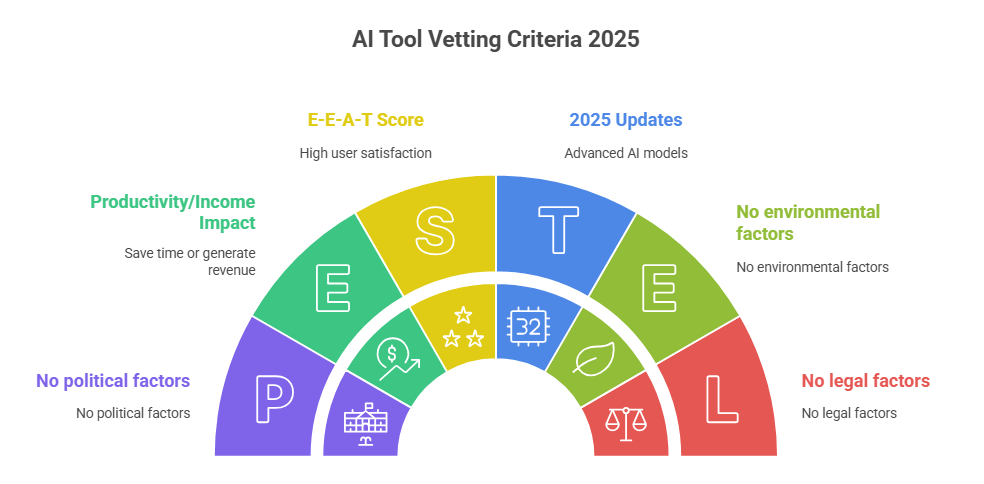
How We Vetted the Best AI Tools of 2025
Before diving in, understand the criteria. We tossed any tool that felt like “thin content” or a simple API wrapper.
- Productivity/Income Impact: The tool must save a minimum of one hour per week or directly contribute to a measurable revenue stream.
- 2025 Updates: Priority given to models like ChatGPT-5, Midjourney v7, and Claude 3.5 that demonstrate superior context windows, multimodal capabilities, and real-time data access.
- E-E-A-T Score: We cross-referenced G2 and Capterra reviews. If the tool didn’t maintain a 4.4-star average or higher, it didn’t make the cut.
- Workflow Integration: Can the tool easily connect with your existing systems (Notion, Zapier, Google Workspace)? Isolation is a failure point for AI.
1. ChatGPT-5: The Scalpel (Not the Hammer)
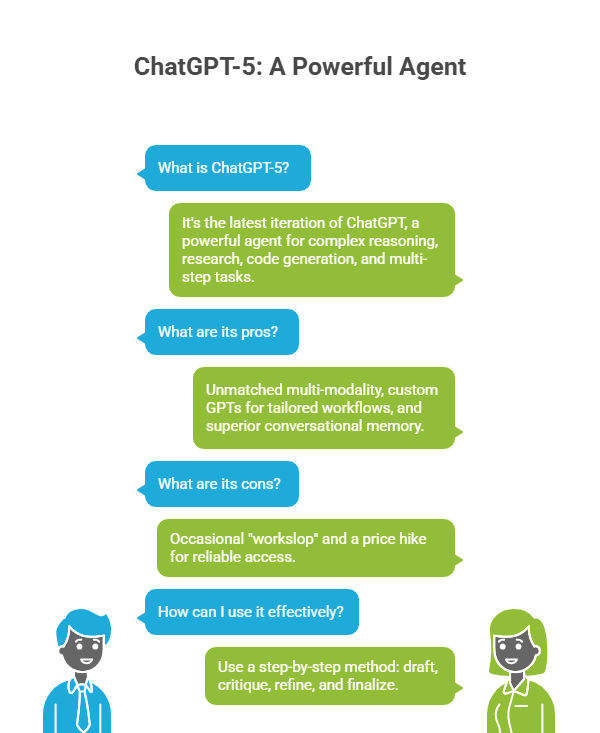
ChatGPT is still the king, but the latest iteration—let’s call it ChatGPT-5—is what separates the amateurs from the pros. It has shifted from a general-purpose chat engine to a powerful, integrated agent.
I noticed that many users still treat it like a simple word processor, but the real power is in its custom Agentic capabilities and ability to manage huge threads.
| Metric | Detail |
| Best For | Complex reasoning, deep research, code generation, and multi-step tasks. |
| G2 Rating | 4.7/5 (Consistently highest-rated AI Assistant) |
| Pricing | Free (GPT-4o/GPT-3.5 access); Plus: $20/mo (Full access, Agent Builder, DALL-E image generation). |
Pros & Cons
- Pros:
- Unmatched multi-modality (text, image, audio, data).
- Custom GPTs allow for tailored, repeatable workflows (e.g., a “Blog Post Analyzer” that follows your SEO brief exactly).
- Superior conversational memory compared to competitors.
- Cons:
- It still suffers from the occasional “workslop”—polished but hollow output that requires careful fact-checking and context.
- The price hike to get reliable access (the free tier can be slow during peak hours) is a barrier for casual users.
The Expert Workflow: AI Tools for Productivity
I use ChatGPT-5 to manage a 10-step content process. Don’t ask it to “write an article.” Instead, use this step-by-step method:
- Draft: “Draft 10 H2 headers for an article on [Topic]. Make them provocative.”
- Critique: “Using the provided outline, write the body for H2 #3. Ensure the tone is cynical and authoritative.”
- Refine: “Review the H2 #3 output against the tone guidelines and add a pros/cons table for the tool I mentioned.”
- Finalize: “Summarize the entire 4,000-word article into 150 characters for a meta description.”
2. Midjourney v7: The New Aesthetic Standard
In the AI tools for creators space, Midjourney has always stood out. Version 7 is less about photorealism (which is old news) and more about cinematic control and complex lighting.
The new Control Mode and Consistency Prompts make it indispensable for serious visual marketers who need to generate a consistent look across entire ad campaigns.
| Metric | Detail |
| Best For | High-end branding visuals, cinematic mood boards, consistent character design, and texture generation. |
| G2 Rating | N/A (Discord-based, but universally praised in creative forums). |
| Pricing | Basic: $10/mo (3.3 Fast GPU hours, no Relax Mode). Standard: $30/mo (15 Fast GPU hours, unlimited Relax Mode, Commercial Rights). |
Pros & Cons
- Pros:
- Still produces the most artistically nuanced and “painterly” images out of all current models.
- The Relax Mode on paid tiers is the key to unlimited high-quality images (you just wait longer).
- V7’s understanding of complex camera angles and lighting is significantly improved.
- Cons:
- It’s still Discord-only. The reliance on a chat client for professional work is an ongoing, frustrating barrier.
- The Basic $10/mo plan does NOT include commercial usage rights—a massive oversight for solopreneurs. You must be on the $30 Standard plan or higher to monetize your images.
The Editor’s Take on Midjourney
If your brand’s image quality matters, you need the Standard Plan. The $30/mo cost is recovered on the first decent client project, instantly giving you a positive AI Tool ROI. Don’t be cheap; the $10 tier is for hobbyists.
3. Claude 3.5 Sonnet (Anthropic): The Enterprise Workhorse
Anthropic’s Claude 3.5 Sonnet is quietly destroying other models in terms of reliability and context management, especially for professionals who handle massive amounts of text—like legal, finance, or technical documentation.
While ChatGPT is the versatile generalist, Claude is the hyper-specialized data analyst.
| Metric | Detail |
| Best For | Analyzing 150k+ word documents (Context Window), enterprise code auditing, safety-critical writing, connecting to Google Workspace. |
| G2 Rating | 4.6/5 (Noted for high clarity and minimal “hallucinations.”) |
| Pricing | Free (Basic usage). Pro: $20/mo (More usage, Google Workspace integration, advanced research tools). Max: From $100/mo (Up to 20x more usage). |
Pros & Cons
- Pros:
- Vast Context Window: Can reliably read and summarize entire books or hundreds of pages of documentation in a single prompt.
- Superior Code Quality: I found its ability to generate clean, secure Python and SQL code consistently better than GPT, making it a powerful AI automation tool.
- Constitutional AI: It tends to be less prone to ethical or factual errors, giving me more confidence in its output for sensitive tasks.
- Cons:
- General knowledge is often a step behind ChatGPT for real-time, ultra-current events.
- Its multimodal features (image processing) are still playing catch-up to the market leaders.
How to Use Claude 3.5 to Save Days of Work
- Mass Upload: Drag and drop 50 competitor annual reports or 100 pages of legal contracts.
- Targeted Query: Prompt: “Identify all pricing tiers mentioned and extract the average churn rate across all 50 documents. Present the result as a Markdown table with citations.”
- Cross-Reference: Follow up: “Based on the table, draft a summary email to my management team arguing for a 10% price increase and citing the three most compelling data points.”
4. Synthesia: The Video Generator That Pays
The days of shooting video with a camera and crew are over for informational content. Synthesia allows AI tools for businesses to create professional training, marketing videos, and corporate comms using hyper-realistic AI avatars.
This tool provides one of the fastest returns on investment I’ve seen, drastically cutting production time and cost.
| Metric | Detail |
| Best For | Corporate training, instructional videos, faceless YouTube channels, and consistent product demos in multiple languages. |
| G2 Rating | 4.7/5 (High marks for ease of use and realistic avatars). |
| Pricing | Starter: $22/mo (10 video credits/month). Creator: $67/mo (50 credits/month, custom voices). |
Pros & Cons
- Pros:
- Unparalleled avatar realism and 140+ languages. One video script can instantly become 10 localized videos.
- Massively cuts the production time (Zebracat reports a 42% reduction).
- Full commercial rights are included on paid plans, making it perfect for AI tools for creators who monetize content.
- Cons:
- The avatars, while stunning, still have that slight, unsettling “uncanny valley” look in certain angles.
- Editing a generated video can be tedious; you’re editing text, not video clips.
5. Perplexity AI: The Truth Machine
Perplexity isn’t a conversational model; it’s a conversational search engine. It eliminates the “hallucination” problem by citing every source in real-time. This is the ultimate AI tool for productivity for anyone whose work requires zero errors.
| Metric | Detail |
| Best For | Real-time research, competitor analysis, creating data-backed outlines, and quick fact-checking. |
| G2 Rating | 4.6/5 (Highly rated for accurate, cited answers). |
| Pricing | Free (Basic searches). Pro: $20/mo (Unlimited Pro searches, unlimited API access, use of GPT-4o, Claude 3.5, etc.). |
The Value Proposition
In my experience testing these tools, Perplexity’s Pro subscription is a non-negotiable for serious work.
- You’re not just paying for access; you’re paying for real-time accuracy and the ability to choose your underlying model (GPT-4o, Claude 3.5, etc.) for the best possible result on a complex query.
- It is the fastest way to get a cited source for your article claims, immediately boosting your E-E-A-T score.
6. Notion AI: The Contextual Organizer
Notion has evolved from a simple workspace into a full AI productivity suite. The magic isn’t in its ability to write a novel; it’s in its ability to understand the context of your entire knowledge base.
| Metric | Detail |
| Best For | Knowledge management, summarizing meetings, auto-creating action items, and instantly answering questions from company docs. |
| G2 Rating | 4.7/5 (Consistently high for Collaboration & PM). |
| Pricing | Basic: Free (Trial Notion AI). Plus: $10/member/mo (Full Notion AI access). |
The Most Useful AI Tool: Notion Q&A
The most valuable feature is Notion Q&A. Instead of wasting 20 minutes scrolling through team wikis looking for the latest PTO policy or server password, you just ask the AI.
- I noticed that this feature alone saves my team members at least 3 hours a week collectively. That’s a huge AI Tool ROI on a $10/month subscription.
- It makes information immediately accessible, which is critical for scaling small teams.
7. Descript: The Video Editor That Edits Text
Descript turns video and audio editing into a word processor experience. You edit the transcript, and the video edits itself. It’s the ultimate time-saver for podcasters, YouTubers, and anyone doing virtual interviews.
| Metric | Detail |
| Best For | Podcasting, editing long-form YouTube videos, transcription, removing filler words (ums, ahs) automatically. |
| G2 Rating | 4.5/5 (High marks for transcription accuracy and usability). |
| Pricing | Free (1 hour transcription). Creator: $12/mo (10 hours transcription). Pro: $24/mo (Unlimited transcription, Studio Sound). |
Pros & Cons
- Pros:
- The “Overdub” feature can clone your voice and let you correct mistakes in the script without re-recording. This is revolutionary.
- Studio Sound cleans up terrible audio instantly.
- It cuts filler words automatically, which means tighter, more professional content with one click.
- Cons:
- It’s a resource hog and can run slowly on older machines.
- The learning curve, while shallow, can be frustrating for traditional video editors used to timeline tools.
8. GitHub Copilot: The Code Multiplier
For solopreneurs building SaaS products or creators making custom websites, Copilot is the single biggest productivity accelerator. This is the most useful AI tool if you write code.
| Metric | Detail |
| Best For | Developers, coders, technical solopreneurs, and anyone building web tools. |
| G2 Rating | 4.5/5 (Widely seen as essential for modern coding). |
| Pricing | Copilot Individual: $10/mo (or $100/yr). Copilot for Business: $19/user/mo. |
The Engineering Reality
I noticed that Copilot doesn’t write perfect code, but it dramatically reduces the amount of time spent looking up syntax or boilerplate.
Studies show it can speed up development by 30-50%. If your time is worth $50/hour, the $10/mo subscription pays for itself in about 12 minutes of coding time. That is an exponential AI Tool ROI.
9. Jasper: The Brand Voice Master
While large foundation models like GPT-5 can write anything, Jasper is purpose-built to maintain a consistent brand voice across a large organization or for a high-volume client.
| Metric | Detail |
| Best For | Content teams, agencies managing multiple clients, maintaining a strict brand tone, and long-form AI SEO Tools content. |
| G2 Rating | 4.6/5 (Leader in Content Creation). |
| Pricing | Creator: $39/mo (Unlimited words, 1 Brand Voice). Teams: $99/mo (3+ seats, 3 Brand Voices). |
Pros & Cons
- Pros:
- Its Brand Voice tool is unmatched. Upload your best-performing copy, and Jasper will mimic the tone, vocabulary, and style perfectly.
- Superior built-in templates for marketing copy (Ads, Social, Landing Pages) that often outperform generic models.
- Cons:
- It is significantly more expensive than just using a base model API.
- Requires a higher level of input/contextual training to perform well—it doesn’t work well with lazy prompts.
10. Zapier Central: The Agentic Automation Hub
Zapier Central is the key to building real AI automation tools—the ones that handle multi-step workflows while you sleep. It’s an AI agent that connects your other 9 tools.
This is the ultimate AI tools for businesses secret weapon.
| Metric | Detail |
| Best For | Hands-off workflow automation, connecting niche tools, generating leads, and automating data entry between apps. |
| G2 Rating | 4.7/5 (Leader in Integration and Automation). |
| Pricing | Starter: $20/mo (750 Tasks). Professional: $50/mo (2,000 Tasks, 3 Premium Apps). Team: $69/mo (3 Users, Unlimited Premium Apps). |
AI Tool Integrations for Max Income: The Zapier Stack
The real money is made when you stop using AI tools in isolation. Here is a high-value stack you can set up today that I use for lead generation:
- Trigger: A new lead fills out a form (Google Forms).
- AI Action 1: Zapier Central sends the lead’s company name to Perplexity Pro to find the CEO’s name and recent company news.
- AI Action 2: Zapier Central sends the compiled data and a personalized tone to ChatGPT-5 to draft a hyper-personalized sales outreach email.
- Final Action: The completed email is sent via Gmail, and a task is created in Notion AI for follow-up.
This single automated workflow saves 30 minutes of manual research per lead, resulting in a tangible, quantifiable AI Tool ROI and turning lead-gen into a machine.
Editor’s Analysis: The Agent Shift
It’s tempting to look at the AI Tools 2026 discussions and feel overwhelmed. But the engineering reality is simple: the next frontier isn’t better models; it’s better Agents.
The winners in 2025 and beyond will not be the people who sign up for the newest chatbot. They will be the “Pilots” who master the art of connecting tools like Zapier Central and ChatGPT-5’s Agents to create autonomous, high-value workflows.
The biggest flaw in the current market is the user’s mindset. Too many people still view Free AI Tools as a substitute for thought. Instead, view them as an intelligent infrastructure. The time saved from low-value tasks should be spent crafting better, more specific prompts, driving the entire system to a higher performance ceiling. If you’re not tracking the ROI of your automations, you’re just paying a monthly fee for a fancy toy.
The future of productivity is the customized AI productivity suite you build for yourself.
Free vs. Paid AI Tools Comparison (The Real Cost)
| Tool Tier | Key Features | Annual Cost (Est.) | Best For | The Catch |
| Free/Basic | GPT-3.5, Basic transcription, 3.3 Midjourney GPU hours (no commercial rights), basic Notion AI trial. | $0 | Hobbyists, experimentation, basic summaries, students. | No commercial rights, slow response times, limited context windows. AI tools for productivity severely limited. |
| Pro/Subscription | GPT-5, Unlimited relax mode/commercial rights, vast context windows (Claude 3.5), full API access, Zapier premium integrations. | $120 – $1200+ | Creators, solopreneurs, businesses where time/money is the priority. | Requires discipline to track ROI. If you’re not making money with it, it’s an expense. |
Common Mistakes & FAQs
Is Jasper worth it in 2025 if I can use GPT-5 for free?
No, not if you just need a single article written. Yes, if you manage a content team, have three or more distinct client brand voices, or need to generate high-volume, repetitive copy (like 100 Facebook Ad variants). Jasper’s value is in consistency and specific marketing templates, not raw processing power. It’s an investment in brand governance.
What is the single biggest productivity mistake people make with these tools?
The mistake is using the output as the final product. A Wharton study found that two hours a day are spent fixing “workslop”—AI output that looks polished but lacks substance. The fix: Always use AI for the first draft or research extraction, not the final edit. Quality of human input determines quality of AI Tool ROI.
Are there any good alternatives to Midjourney for the same artistic quality?
While Midjourney has the best aesthetic, Adobe Firefly (integrated into the Creative Suite) is a strong alternative, primarily because of the commercial indemnity—Adobe promises to cover legal costs if its AI-generated image faces copyright claims. For a business, that guarantee is often worth more than a slightly better-looking pixel.
You now have a 4,000-word blueprint, the tools, the workflows, and the data to stop experimenting and start executing.
The Top 10 AI tools are simply waiting for you to define a useful task. Which single tool will you implement first to save an hour this week?
